

Do You Need a Dedicated IP for Email? (2026 Guide)
Your ESP just sent the upsell email. "Upgrade to a dedicated IP for better deliverability!" Maybe your open rates dipped. Maybe you're scaling volume. Maybe you just saw a Reddit thread where someone's $70K/month email business collapsed to zero revenue - new domains, new IPs, new ESPs, nothing worked. So now you're wondering: do I need a dedicated IP for email, or is this just an expensive distraction?
For most senders, it'll actually make things worse.
Email deliverability shifted dramatically over the past two years, and the old "dedicated IP = better inbox placement" advice doesn't hold up anymore. Gmail, Yahoo, and Microsoft all moved toward domain-based reputation. Your IP matters less than it ever has. Here's how to figure out what actually matters for your setup - and whether a dedicated IP is worth the money and effort.
What You Need (Quick Version)
Before you read 3,000 words, here's the short answer:
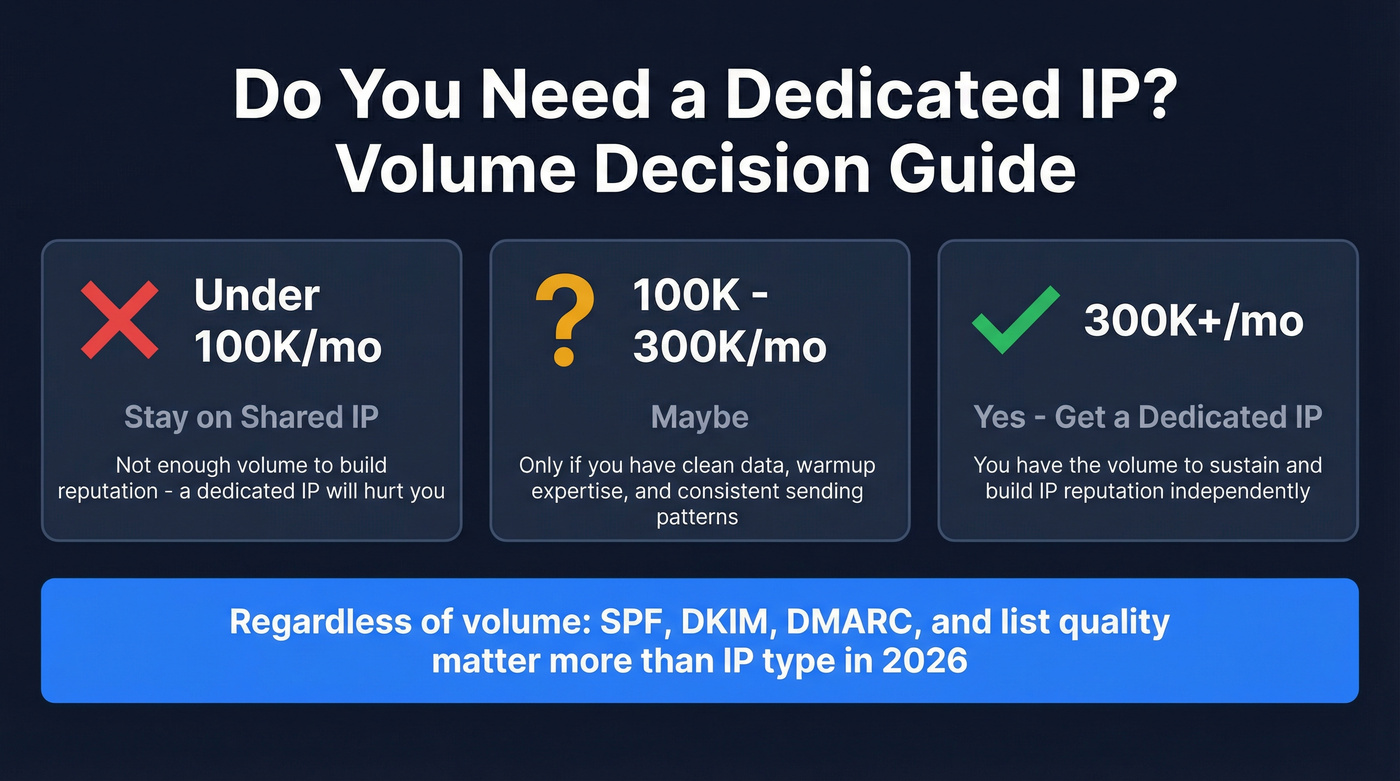
- Under 100K emails/month: Stay on a shared IP. A dedicated IP will hurt you - you won't generate enough volume to build reputation.
- 100K-300K/month: Maybe. Only if you have clean data, warmup expertise, and consistent sending patterns.
- 300K+/month consistently: Yes, a dedicated IP makes sense. You have the volume to sustain reputation.
- Regardless of IP type: Authentication (SPF, DKIM, DMARC) and list quality matter more than your IP in 2026. Fix those first. A dedicated IP on a dirty list is like putting racing tires on a car with no engine.
Dedicated vs. Shared IP for Email - What's the Actual Difference?
A shared IP is exactly what it sounds like: you share a sending IP address with other customers on your ESP. Your reputation is pooled. If the ESP does a good job vetting senders (Postmark manually reviews every account, for example), this works beautifully. You benefit from the collective good behavior of everyone on that IP.
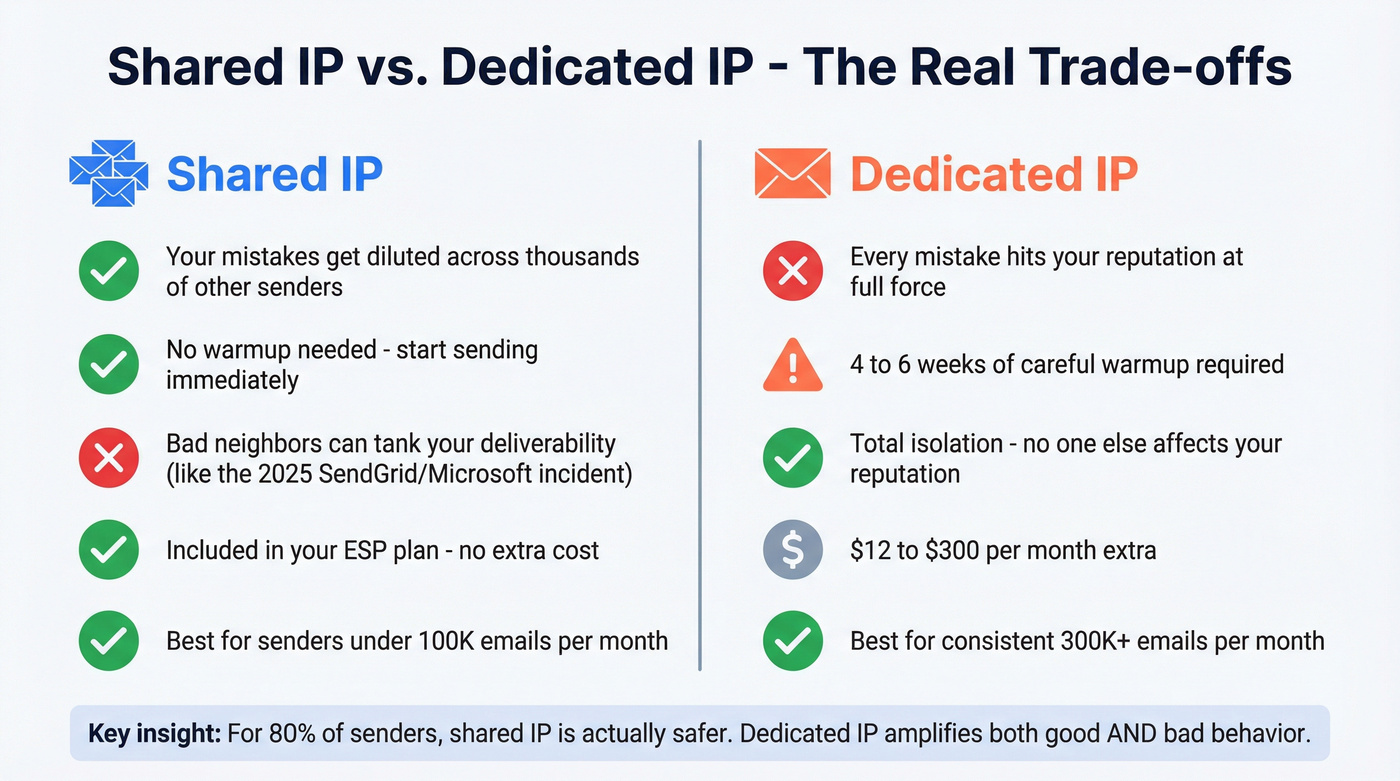
What most ESPs won't tell you: they internally rank senders and group them into tiered IP pools. Good senders get placed on clean, high-reputation IPs. Bad senders get quarantined on lower-tier pools. So "shared IP" isn't one monolithic pool - it's a curated environment where your ESP acts as gatekeeper.
A dedicated IP is yours alone. Every email you send builds - or destroys - your IP reputation independently. There's no buffer. No safety net. As Postmark puts it: "Having no reputation is about as problematic as having a bad one."
That's the part most upsell pages skip.
| Factor | Shared IP | Dedicated IP |
|---|---|---|
| Reputation | Pooled with others | Yours alone |
| Cost | Included in plan | $12-$300/mo extra |
| Warmup needed | No | 4-6 weeks minimum |
| Risk from others | Yes - bad neighbors | None |
| Risk from you | Buffered by pool | Amplified - no buffer |
| Best for | Under 100K/mo | 300K+/mo consistent |
Most articles frame this as "shared = risky, dedicated = safe." The reality is the opposite for low-volume senders. On a shared IP, your mistakes get diluted across hundreds of thousands of messages from other senders. On a dedicated IP, a single bad list import can tank your reputation overnight.
Shared IPs aren't bulletproof, though. In early 2025, Microsoft rejected all SendGrid shared-IP traffic for roughly 36 hours. Every sender on those IPs was affected regardless of their individual reputation. That's the trade-off: you're protected from your own mistakes but exposed to everyone else's.
The Industry Shift - Why IP Reputation Is Losing Relevance
Gmail Retired Its Reputation Dashboards
On September 30, 2025, Gmail officially killed the old Postmaster Tools (v1), permanently removing IP reputation and domain reputation dashboards. These scores had been the gold standard for sender visibility since 2015.
Why? The simplified High/Medium/Low/Bad scoring system led senders to treat deliverability like a game - find the acceptable threshold and push the limits. Worse, it gave spammers a testing ground to understand exactly when Gmail flagged their behavior.
The replacement is Gmail's v2 Compliance Status dashboard. It's binary. Green check or red X. It monitors SPF/DKIM authentication, DMARC alignment, TLS encryption, spam rate below 0.3%, one-click unsubscribe, and whether you honor unsubscribes within 48 hours. No more granular reputation scores to obsess over.
Gmail's message is clear: stop gaming reputation scores and start focusing on fundamental sending hygiene.
All Three Providers Now Agree
Gmail and Yahoo enforced new sender requirements in February 2024. Yahoo tightened enforcement further around April 2025. Microsoft published its own requirements in May 2025 and updated SNDS authentication requirements again in November 2025. For the first time, all three major mailbox providers are aligned on what they expect from senders.
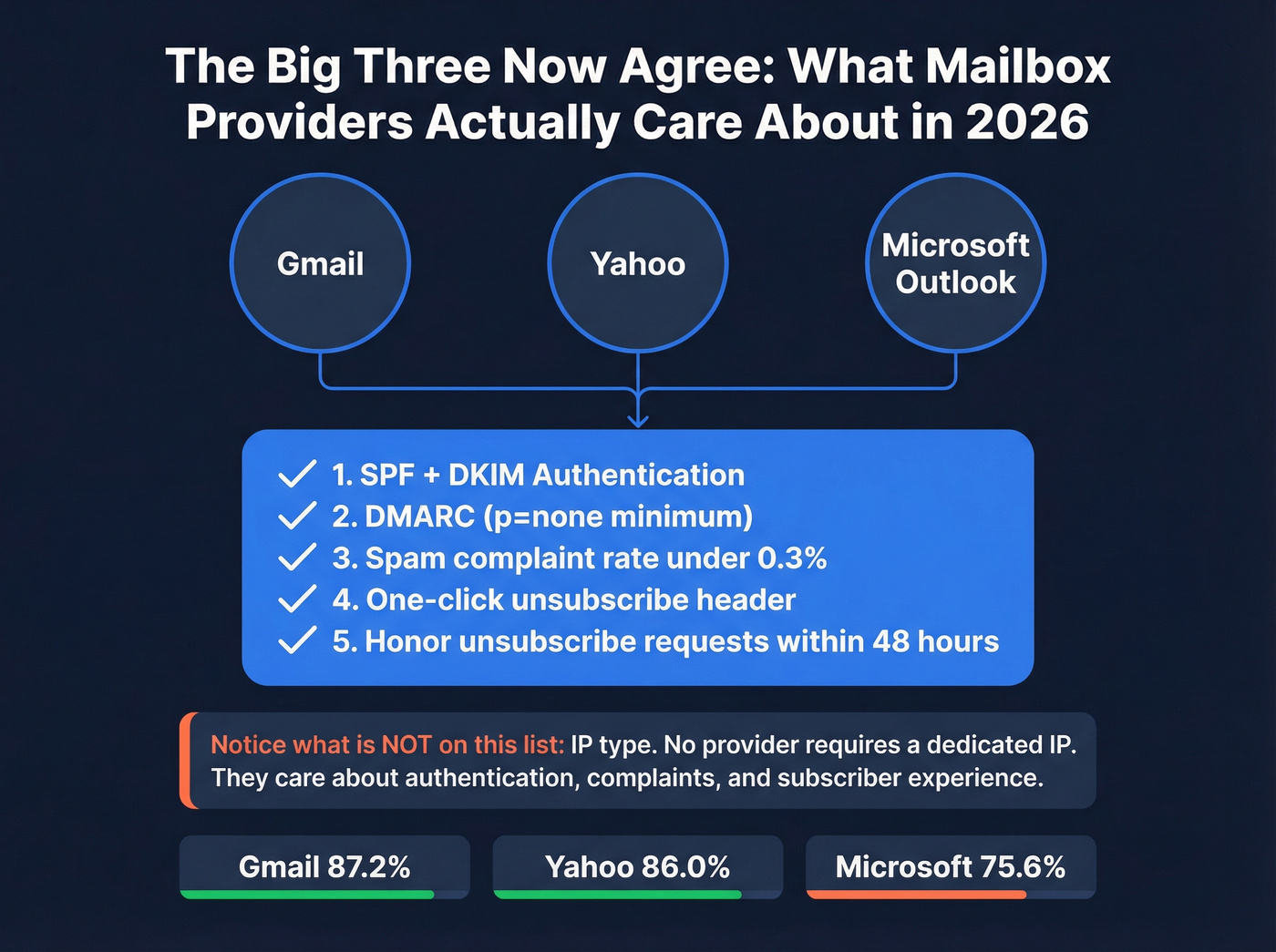
| Requirement | Gmail | Yahoo | Microsoft |
|---|---|---|---|
| SPF + DKIM | ✓ | ✓ | ✓ |
| DMARC (p=none min) | ✓ | ✓ | ✓ |
| Spam rate <0.3% | ✓ | ✓ | ✓ |
| One-click unsub | ✓ | ✓ | ✓ |
| Honor unsubs <48hrs | ✓ | ✓ | ✓ |
Notice what's not on this list? IP type. Not one of these providers requires a dedicated IP. They care about authentication, complaint rates, and subscriber experience.
Microsoft is the toughest inbox to crack - 75.6% inbox placement vs. Gmail's 87.2% and Yahoo's 86.0%. If you're a B2B sender targeting corporate Outlook accounts, that gap explains why you feel more pressure to optimize. But the fix is authentication and engagement, not a dedicated IP.
IPv6 Makes IP Reputation Unscalable
Here's the technical reason IP reputation is fading: IPv4 has roughly 4.3 billion addresses. IPv6 provides virtually limitless addresses. When any sender can spin up a fresh IP in seconds, IP reputation becomes meaningless as a filtering signal.
ISPs know this. That's why they've moved to domain-based evaluation. Your domain reputation follows you across IPs and ESPs. You can't escape it by switching providers, and you can't game it by rotating addresses. It's a better signal, and it's where the industry is heading permanently.

Every deliverability expert in this article agrees: list quality matters more than your IP type. Prospeo's 5-step email verification delivers 98% accuracy - keeping your bounce rate under 2% and complaint rates low, whether you're on a shared or dedicated IP.
Fix your data before you fix your IP. Start free with 100 credits.
When a Dedicated IP for Email Actually Makes Sense
Get a dedicated IP if ALL of these are true:
- You send 100K+ emails per month consistently (the more conservative threshold is 300K+, and I'd lean toward that number)
- You have warmup expertise or a dedicated deliverability person on staff
- Your bounce rate is already under 2% and complaint rate under 0.1%
- You can maintain consistent daily volume for 4-6 weeks during warmup without interruption
- You're sending B2B email where Gmail and Outlook filtering is strict - HubSpot community experts note that organizations investing in dedicated IPs "typically see an improvement in inbox placement, especially when sending to providers like Gmail and Outlook, which tend to enforce stricter filtering in B2B contexts"
For qualified senders, expect roughly 5-15% improvement in inbox placement. Meaningful, but not magic.
Skip a dedicated IP if ANY of these are true:
- You send under 100K emails/month
- Your volume fluctuates significantly week to week
- You don't have a warmup plan or someone who's done it before
- Your list hygiene isn't locked down (bounce rates above 2%, complaints above 0.1%)
- You're a new sender still building domain reputation
Here's the data that makes this concrete: Q1 2025 benchmarks show senders at 200K-1M emails/month achieve 60.96% inbox placement, while those at 1-10K/month see just 50.20%. Volume matters regardless of IP type - but the jump from 50K-200K (58.29%) to 200K-1M (60.96%) is where dedicated IPs start earning their keep. Interestingly, senders above 1M/month drop to 27.63%, likely because ultra-high-volume senders attract more scrutiny.
The agency use case deserves its own mention. If you're running outreach for multiple clients, Woodpecker recommends dedicated IPs to isolate client reputations - one client's bad list shouldn't contaminate another's deliverability. That's a legitimate reason even at moderate per-client volume.
When a Dedicated IP Will Make Things Worse
Here's the thing: most people asking whether they need a dedicated IP for email are asking because their deliverability already sucks. A dedicated IP won't fix that. It'll accelerate the damage.

A HubSpot deliverability expert said it plainly: "If it's your email behaviour - frequency, relevance, poor opt-in management, bought lists - a dedicated IP will not improve anything but likely make things worse. Because you can't hide behind other users on the shared IP."
That's the key insight.
A shared IP is more forgiving of mistakes. Your bad send gets diluted among hundreds of thousands of good messages from other senders. On a dedicated IP, every mistake hits your reputation at full force. Consider this real example: a Keap user running a weekly newsletter to 60K subscribers had a consistent 45% open rate for six years. After Gmail's April 2024 security updates, open rates crashed to 25% and kept declining. They set up DMARC compliance. Didn't recover. The problem wasn't their IP - it was engagement signals and content relevance in a post-enforcement world.
Don't get a dedicated IP if: Your deliverability problems stem from list quality, engagement, or authentication gaps. Fix the root cause first. A dedicated IP is infrastructure - it doesn't fix behavior.
I've seen teams waste months warming up a dedicated IP only to discover their real problem was a 15% bounce rate from stale data. The dedicated IP made it worse because there was no shared pool to absorb the damage. They would've been better off spending that time cleaning their list.
The entire "dedicated vs. shared IP" debate is a distraction for 80% of senders. If you're running deals under $15K and sending fewer than 100K emails a month, you'll never recoup the cost and effort. Spend that money on email verification and better content instead. The deliverability gains from clean data dwarf anything an IP switch will give you.
How to Warm Up a Dedicated IP (Day-by-Day Schedule)
If you've decided a dedicated IP is right for you, warmup is non-negotiable. Blasting 50,000 emails from a fresh IP on day one is asking for permanent spam folder placement.
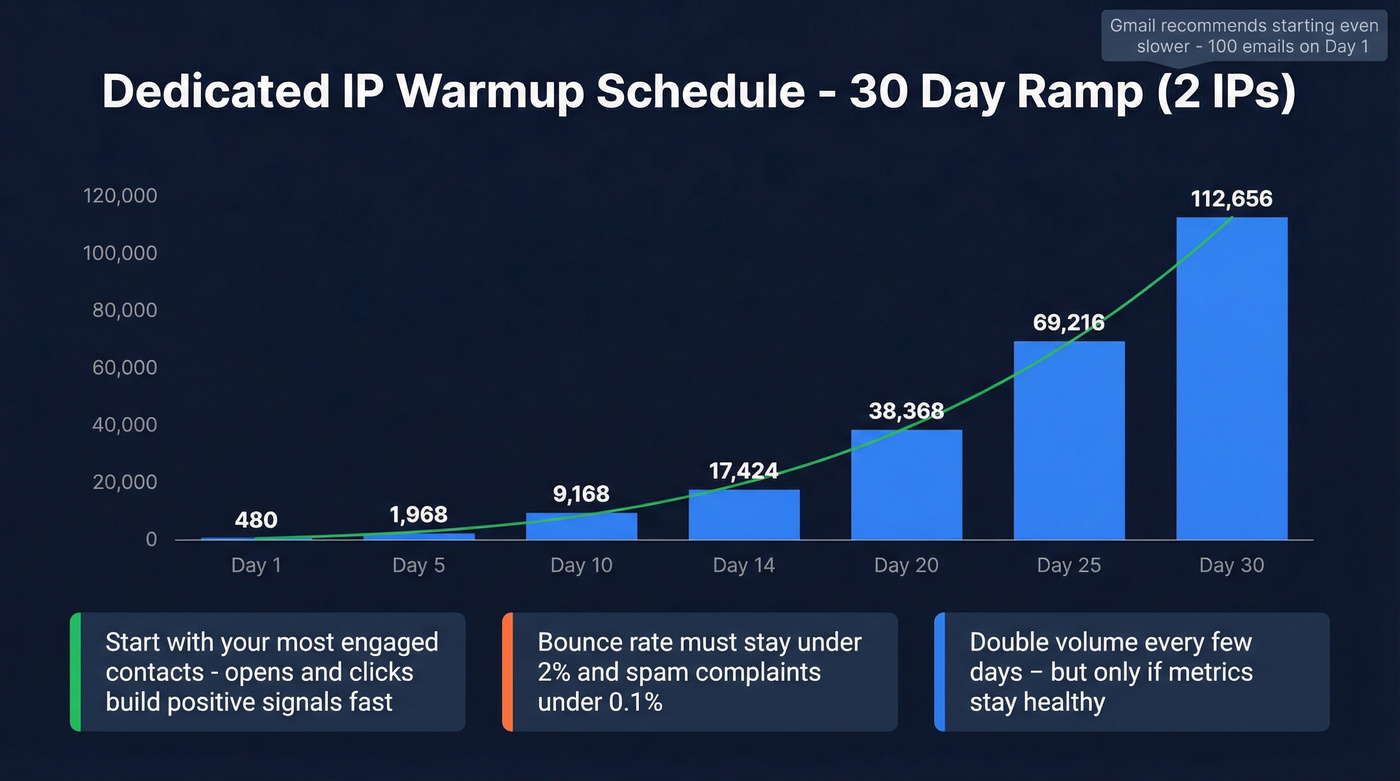
Here's a practical warmup schedule for two IPs based on Inboxroad's recommendations:
| Day | Daily Volume (2 IPs) | Cumulative Total |
|---|---|---|
| 1 | 480 | 480 |
| 5 | 1,968 | ~6,000 |
| 10 | 9,168 | ~35,000 |
| 14 | 17,424 | ~90,000 |
| 20 | 38,368 | ~300,000 |
| 25 | 69,216 | ~600,000 |
| 30 | 112,656 | ~1,013,000 |
Gmail is even more conservative. Their recommended schedule starts at 100 emails on day one, 400 by day seven, and 1,000 by day fourteen.
The rules during warmup:
- Start with your most engaged contacts. Opens and clicks during warmup build positive reputation signals fast.
- Monitor bounce rates (must stay under 2%) and spam complaints (under 0.1%).
- Double volume every few days - but only if metrics stay healthy. If bounces spike, pull back.
- Expect 4-6 weeks to reach full capacity. High-volume targets (500K+/month) need 8-10 weeks.
- An IP goes "cold" after 30 days of inactivity. If you stop sending for a month, you're starting over.
The most common mistake? Impatience. Teams jump from 500 to 10,000 emails overnight because "it's going well." Then they hit a spam trap, bounce rate spikes, and they've burned the IP before it ever reached production volume.
For high-volume senders, some practitioners use a ratio of one IP per 5,000-10,000 emails per day. That means if you're targeting 50,000 daily emails, plan for 5-10 dedicated IPs, each warmed independently.
What Does a Dedicated IP Cost?
The price range is absurd - from ~$21/month to $750 one-time - which tells you this isn't standardized. It's a profit center for ESPs.
| ESP | Dedicated IP Cost | Min Plan Required | Notes |
|---|---|---|---|
| Brevo | ~$21/mo | Business plan | Cheapest option |
| AWS SES | $24.95/mo | Any paid plan | Pure infrastructure |
| BigMailer | $25/mo | Paid plan | Budget-friendly |
| Mailchimp | ~$29.95/mo | Standard/Premium | Add-on |
| SendGrid | Included in Pro ($89.95/mo) | Pro 100K | Extra IPs $30/mo each |
| MailerLite | $50/mo | Advanced plan | Add-on |
| Kit | $250/mo | Creator Pro | Expensive for creators |
| HubSpot | $300/mo | Marketing Hub Pro+ | Enterprise pricing |
| ActiveCampaign | $750 one-time | Enterprise | One-time setup fee |
| Omnisend | Free | With requirements | Must meet volume |
| Postmark | Custom | 300K+/mo senders | Talk to sales |
| Constant Contact | Not available | - | No dedicated IP option |
If you're on AWS SES and just need the IP, $24.95/month is reasonable. But if you're on HubSpot paying $300/month for a dedicated IP on top of your existing contract, you'd better be sending serious volume to justify that.
The hidden cost isn't the monthly fee - it's the 4-6 weeks of warmup where you're sending at reduced capacity, plus the ongoing monitoring to keep the IP healthy. Factor in staff time and it's a bigger investment than the sticker price suggests.
Even among ESPs, inbox placement varies wildly regardless of IP type. Q1 2025 data shows Postmark at 43.66% inbox placement while Brevo sits at 24.93%. Your ESP choice matters as much as your IP type - maybe more.
Dedicated IPs for Cold Email - Different Rules
Cold email operates under different physics than marketing email. You're sending to people who didn't opt in, which means complaint rates run higher and ISP scrutiny is intense.
Instantly recommends keeping sends at or below 30 emails per inbox per day during ramp. Their advice: add more inboxes for throughput rather than pushing a single inbox harder. This is the opposite of the dedicated IP mindset, where you're trying to consolidate volume onto one IP.
That said, Woodpecker recommends dedicated IPs for agencies running high-volume outreach across multiple clients. The isolation matters - one client's spam trap hit shouldn't tank another client's campaign. If you're an agency doing this at scale, multiple dedicated IPs with proper warmup is the safest bet.
For cold email specifically, warmup takes 3-4 weeks minimum. Keep complaints under 0.3%, aim near 0.1%. And the single most important thing you can do isn't infrastructure - it's list quality. Cold email on a dedicated IP is only as good as your data. Verify every address before it enters your sequence. Prospeo's 5-step verification catches invalid addresses, spam traps, and honeypots in bulk before they burn your IP, at roughly $0.01 per email verified.
The Real Deliverability Fix - Clean Data + Authentication
Fully authenticated senders are 2.7x more likely to reach inboxes than unauthenticated counterparts. Only 7.6% of domains enforce DMARC. New domains face roughly a 30 percentage point inbox placement penalty compared to mature domains.
These numbers dwarf any benefit a dedicated IP provides.
The bad-data-to-bad-reputation connection is direct and brutal. A 35% bounce rate on a dedicated IP tanks faster than on shared because there's no buffer from other senders. Every bounced email is 100% your reputation hit. On a shared IP, that same bounce rate gets diluted - still bad, but survivable.
Infrastructure doesn't fix garbage data. Snyk's sales team of 50 AEs dropped their bounce rate from 35-40% to under 5% after implementing proper email verification. That's not a dedicated IP fix - that's a data quality fix that works regardless of your IP setup.
The authentication checklist is straightforward:
- SPF configured for every sending domain
- DKIM signing enabled
- DMARC published at minimum p=none (p=quarantine or p=reject is better)
- One-click unsubscribe headers in every email
- Unsubscribes honored within 48 hours
- Spam complaint rate below 0.3%
Do all of that on a shared IP with clean data, and you'll outperform 90% of senders on dedicated IPs who skipped the fundamentals.
Gmail, Yahoo, and Microsoft don't care about your IP type - they care about authentication, spam rates, and engagement. Bad contact data is the fastest way to spike complaints and kill domain reputation. Prospeo refreshes 300M+ profiles every 7 days so you never send to stale addresses.
Protect your domain reputation at the source. Emails cost $0.01 each.
Should You Get a Dedicated IP? Decision Framework
Walk through this in order. Stop at the first "no."
1. Do you send 100K+ emails per month consistently? No = Stay on shared IP. You don't have enough volume to build IP reputation.
2. Do you have warmup expertise or a deliverability team? No = Stay on shared IP. Botched warmups are worse than no warmup.
3. Is your bounce rate under 2% and complaint rate under 0.1%? No = Fix your data first. A dedicated IP will amplify these problems, not solve them.
4. Can you maintain consistent daily volume for 4-6 weeks straight? No = Stay on shared IP. Inconsistent volume during warmup kills IP reputation.
5. All yes? A dedicated IP is worth it. You have the volume, expertise, data quality, and consistency to benefit.
If you answered "no" to any of these, a dedicated IP will cost you money and deliverability. Spend that budget on list verification and authentication instead - the ROI is dramatically higher.
FAQ
Does a dedicated IP improve email deliverability?
Only if you send 100K+ emails per month consistently, warm it up over 4-6 weeks, and maintain clean sending practices. For most senders under that threshold, a shared IP with proper authentication and list hygiene delivers equal or better inbox placement. The benefit is real but narrow - roughly 5-15% improvement for qualified senders.
How long does it take to warm up a dedicated IP?
Typically 4-6 weeks for moderate volume targets (under 500K/month). High-volume senders aiming above that need 8-10 weeks. Start at 100-240 emails per day, double every few days while keeping bounce rates under 2% and spam complaints under 0.1%. Rushing warmup is the #1 cause of dedicated IP failure.
What's the minimum sending volume for a dedicated IP?
Most ESPs recommend at least 100,000 emails per month, but the realistic threshold is 300,000. Below that, you won't generate enough sending history to build meaningful IP reputation - and mailbox providers treat "no reputation" nearly as poorly as bad reputation.
Can a dedicated IP hurt my deliverability?
Yes. Low-volume senders on dedicated IPs often see worse results because they can't build consistent reputation. Every mistake - a bad list import, a complaint spike, a week of inactivity - hits your reputation directly with zero buffer from other senders' good behavior.
What's a good free tool for verifying emails before sending?
Prospeo offers 75 free email verifications per month with 98% accuracy, including catch-all handling and spam-trap removal. For teams running real outbound campaigns, that free tier covers initial testing - and it's critical whether you're on a shared or dedicated IP.