

Email Address Checker for Spam: What It Actually Means and What to Do About It
Someone on r/email asked for a spam checker plugin that sits inside their inbox and automatically tests whether their emails will land in spam. That question comes up constantly because "email address checker spam" means three completely different things depending on who's searching - and most articles only cover one of them.
Here's the uncomfortable truth: 80% of deliverability issues come from technical misconfigurations, not your email copy. So before you rewrite that subject line for the fifth time, figure out which problem you're actually solving.
What You Need (Quick Version)
Testing whether your emails land in spam - content scoring, authentication checks: Use Mail-Tester for a quick test or GlockApps for ongoing monitoring across ISPs.
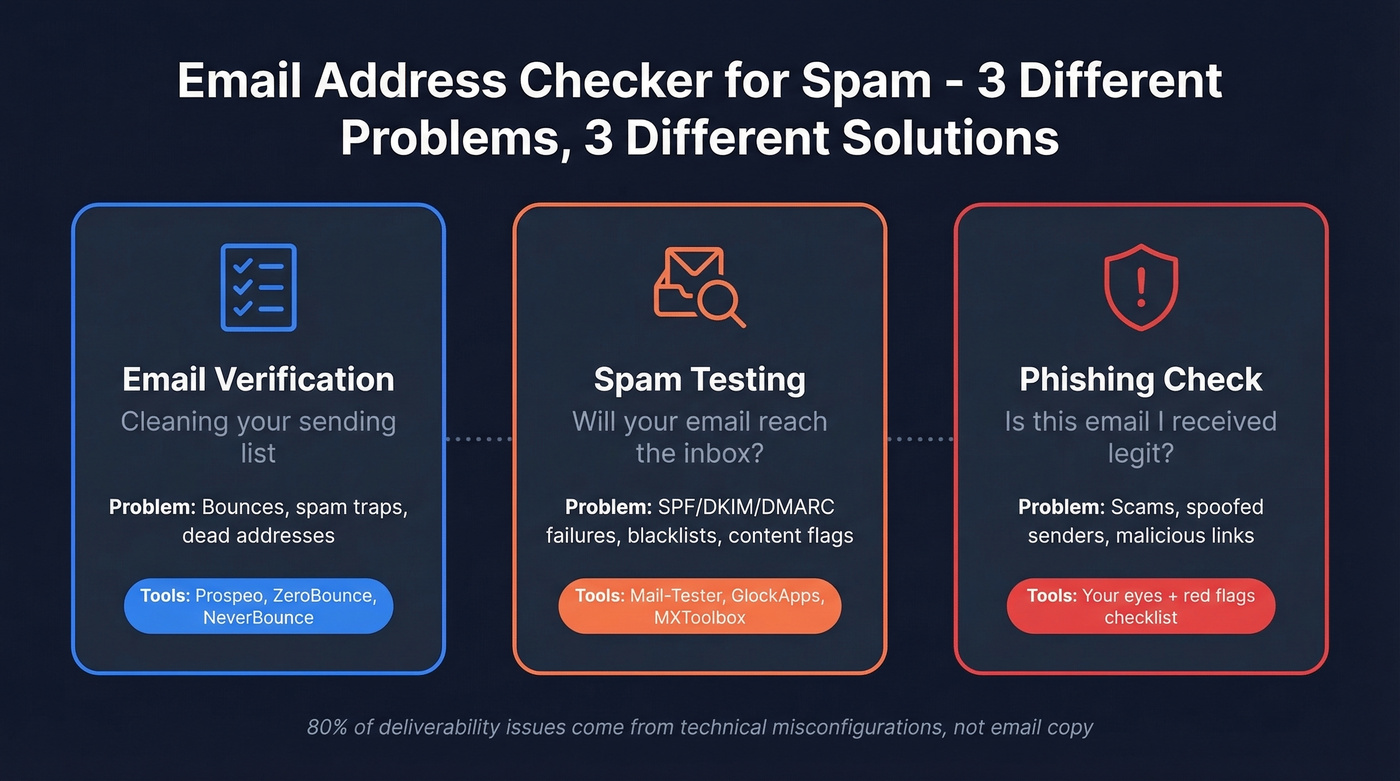
Checking a suspicious email you received: Skip to the phishing red flags checklist below. No tool required, just a trained eye and 30 seconds.
Email Verification: Cleaning Your List
Email lists decay by roughly 28% every year. People change jobs, abandon inboxes, and old addresses get recycled into spam traps. Send to a decayed list and your bounce rate spikes, your sender reputation tanks, and your emails start landing in spam - even the ones going to perfectly valid addresses.
The threshold that matters: keep total bounces below 2%, and hard bounces under 1%. Go above that and ESPs like Google and Microsoft start throttling or suspending your sending. We've seen teams lose months of domain warm-up progress from a single dirty list import.

Verification tools check addresses through a standard sequence: syntax validation confirms the format is correct, DNS and MX record lookup verifies the domain accepts email, SMTP-level mailbox checks confirm the specific inbox exists, and risk scoring flags known spam traps, role addresses, or disposable domains. The whole process takes milliseconds per address.
One universal limitation: catch-all domains. These are domains configured to accept mail to any address, so the verifier can't confirm whether a specific mailbox is active. Every tool handles this differently, and none guarantee accuracy on catch-alls (see catch-all domains and catch-all email verification).
Spam Traps That Wreck Sender Reputation
Three types will burn you.
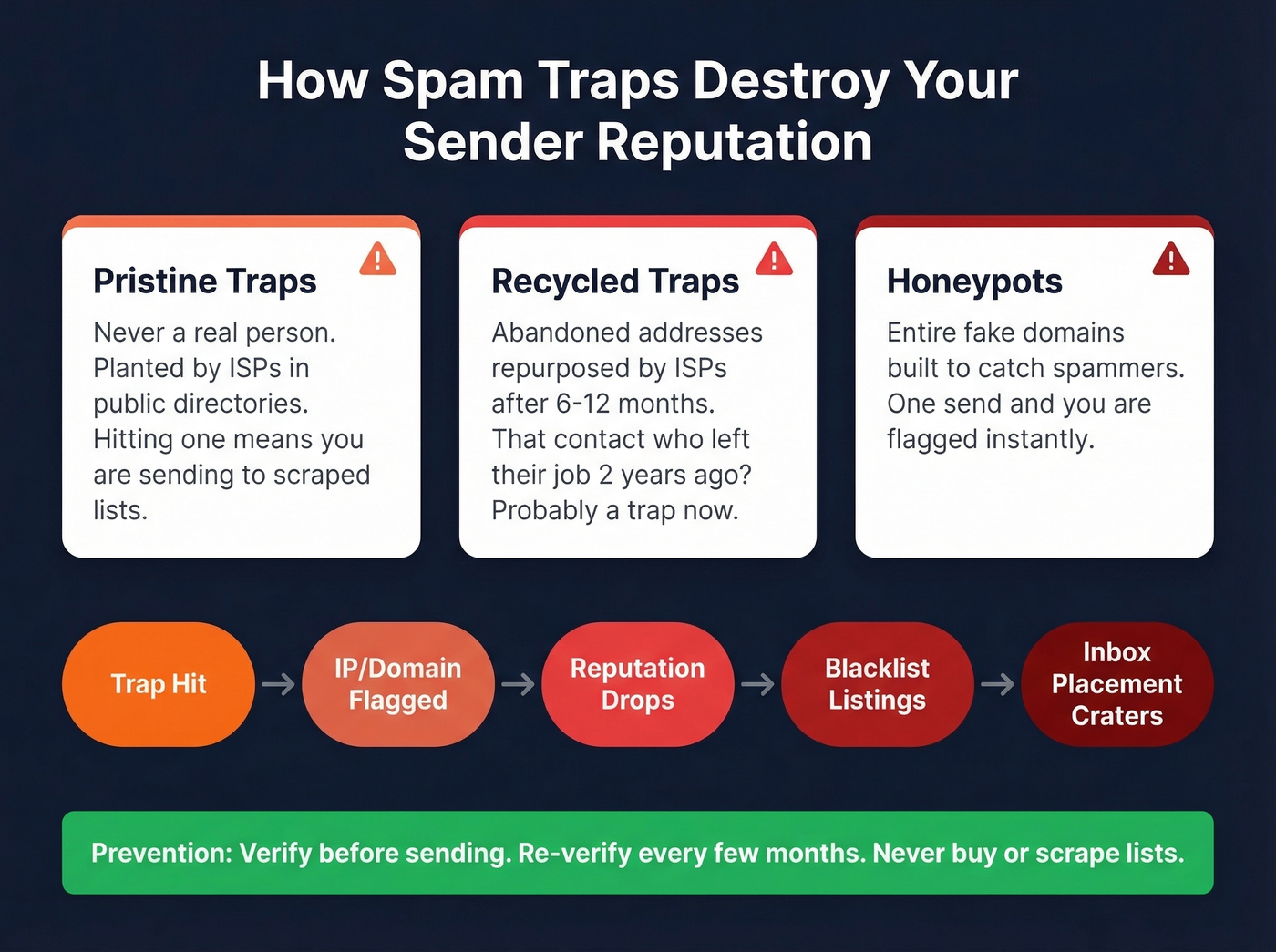
Pristine traps were never real addresses. ISPs and anti-spam organizations plant them in public directories and website HTML where scrapers harvest data. Hitting one signals you're sending to scraped lists.
Recycled traps are abandoned addresses that ISPs repurpose after 6-12 months of inactivity. If you're still mailing someone who left their company two years ago, that address is likely a trap now.
Honeypots are entire domains or mail systems built specifically to catch spammers and blacklist bad senders.
The chain reaction goes like this: trap hit, then IP/domain flagged, then reputation drops, then blacklist listings, then inbox placement craters. Prevention comes down to list hygiene - verify before sending, re-verify every few months, and never buy or scrape lists (more on spam trap hits and spam trap checkers).
Best Verification Tools
Let's be honest about accuracy claims. Hunter ran a benchmark testing 15 verifiers against 3,000 real business emails plus 300 invalid emails added to balance the sample. The top performers hit 68-70% accuracy - not the 99% you'll see on marketing pages. Hunter disclosed that their dataset classification may favor their own tool, but the methodology is one of the few with a defined sample size. That gap between real and claimed accuracy exists because of catch-all domains, enterprise mail server configurations, and how each tool handles "unknown" results.

Prospeo front-loads verification into data collection rather than treating it as a separate step. The database of 143M+ emails is pre-verified through a proprietary 5-step process that includes spam-trap removal, honeypot filtering, and catch-all handling. Every record refreshes on a 7-day cycle - the industry average is six weeks. The result is 98% email accuracy out of the box, which means you skip the separate verification step entirely. The free tier gives you 75 emails per month to test it, and paid plans run about $0.01 per email.
ZeroBounce is the most-discussed standalone verifier on Reddit and review sites. It's particularly strong on "risky" email classifications - addresses that other tools mark as valid but that carry elevated bounce risk. The consensus on r/DigitalMarketing is that accuracy is solid, but credits burn fast at scale. Pay-as-you-go starts at $15 for 2,000 verifications with 100 free credits, and it bundles an email scoring API and deliverability tooling.
NeverBounce is fast and affordable for small-to-medium lists at $8 per 1,000 emails with 1,000 free credits to start. Solid pick for teams running occasional list cleans. The tradeoff: users report inconsistencies with catch-all domains, and it doesn't offer the depth of risk scoring that ZeroBounce does.
Bouncer offers 1,000 free credits and $7 per 1,000 emails - one of the better free tiers in the space. Good budget option for startups that need basic verification without bells and whistles.
MillionVerifier is the cheapest per-verification option at roughly $3.70 per 1,000 with 500 free credits. If cost is the primary constraint and you're verifying large lists, it's worth testing. Don't expect deep risk scoring, but for raw volume, nothing beats the price.
Verification Pricing Comparison
Per-email cost varies nearly 7x across tools, and free tiers range from zero to 1,000 credits. Note that Prospeo's cost includes pre-verified data, while the others charge separately for sourcing and verification.
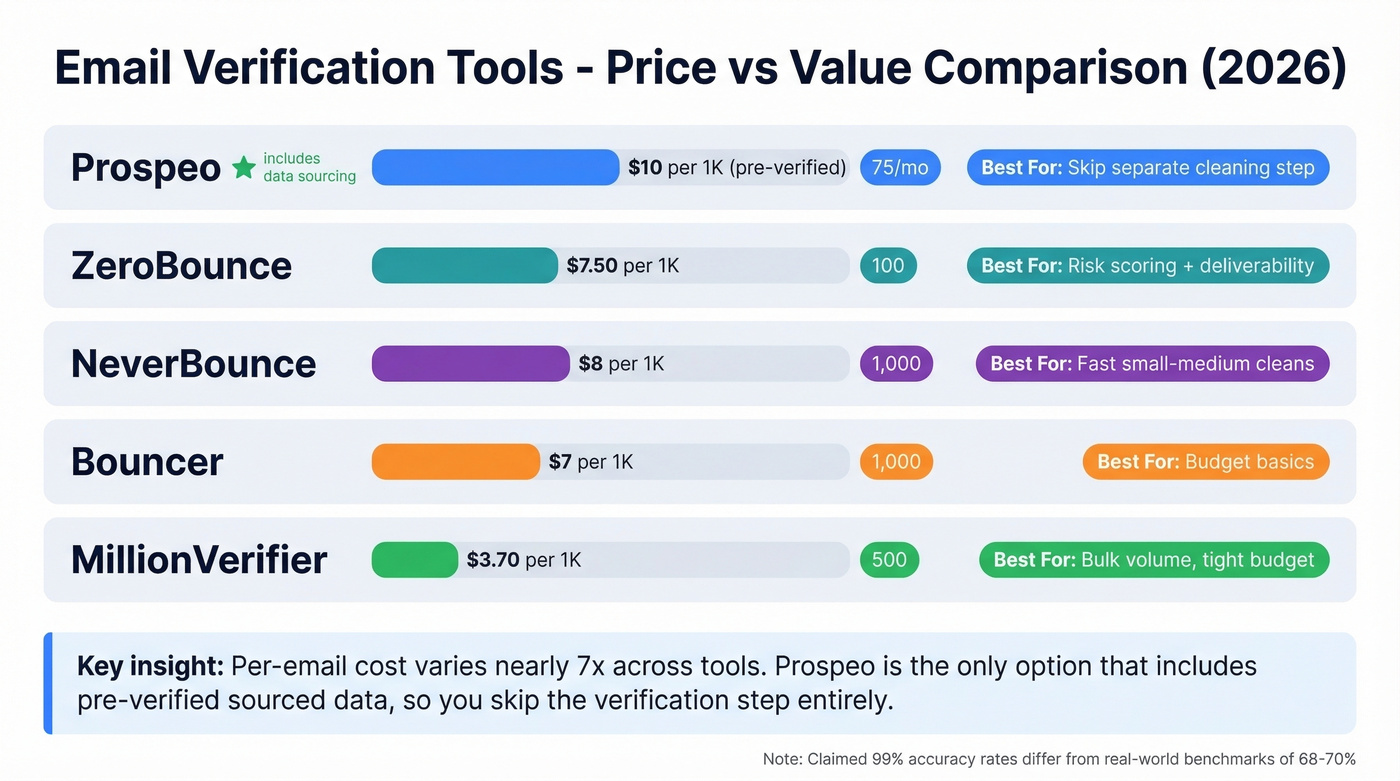
| Tool | Free Credits | Cost per 1K Verifications | Best For |
|---|---|---|---|
| Prospeo | 75/month | ~$10 (pre-verified) | Pre-verified data, skip separate cleaning |
| ZeroBounce | 100 | $7.50 per 1K (2K minimum) | Risk scoring + deliverability toolkit |
| NeverBounce | 1,000 | $8 | Fast small-to-medium list cleans |
| Bouncer | 1,000 | $7 | Budget teams needing basics |
| MillionVerifier | 500 | ~$3.70 | Bulk volume on a tight budget |
| Hunter | 50/month | ~$24.50 | Finder + verifier bundle |
| BriteVerify | Not public | $10 | Enterprise billing requirements |

Why verify emails after you source them when you can skip the step entirely? Prospeo's 143M+ emails are pre-verified through a 5-step process that removes spam traps, honeypots, and catch-all risks before you ever hit send. 98% accuracy. 7-day refresh cycle. About $0.01 per email.
Start with clean data instead of cleaning dirty data.
Spam Testing: Will Your Email Reach the Inbox?
Verification helps you avoid bad addresses. Spam testing answers a different question: will my email actually reach the inbox, or will it get flagged?
80% of deliverability issues stem from technical misconfigurations, not content. Your perfectly written cold email can land in spam because your SPF record is broken or your sending IP is on a blacklist. The global inbox placement rate sits around 83.5% - roughly one in six legitimate emails doesn't make it.
Here's the thing: if your deliverability is bad, rewriting your email copy is almost always the wrong first move. Fix your authentication, check your blacklist status, then worry about word choice (use a blacklist checker and follow a proper email deliverability checklist). I've watched teams spend weeks A/B testing subject lines when a broken DKIM record was the entire problem.
Authentication Basics
SPF tells receiving servers which IPs are authorized to send email on behalf of your domain. Without it, anyone can spoof your address (run an SPF checker if you're unsure).
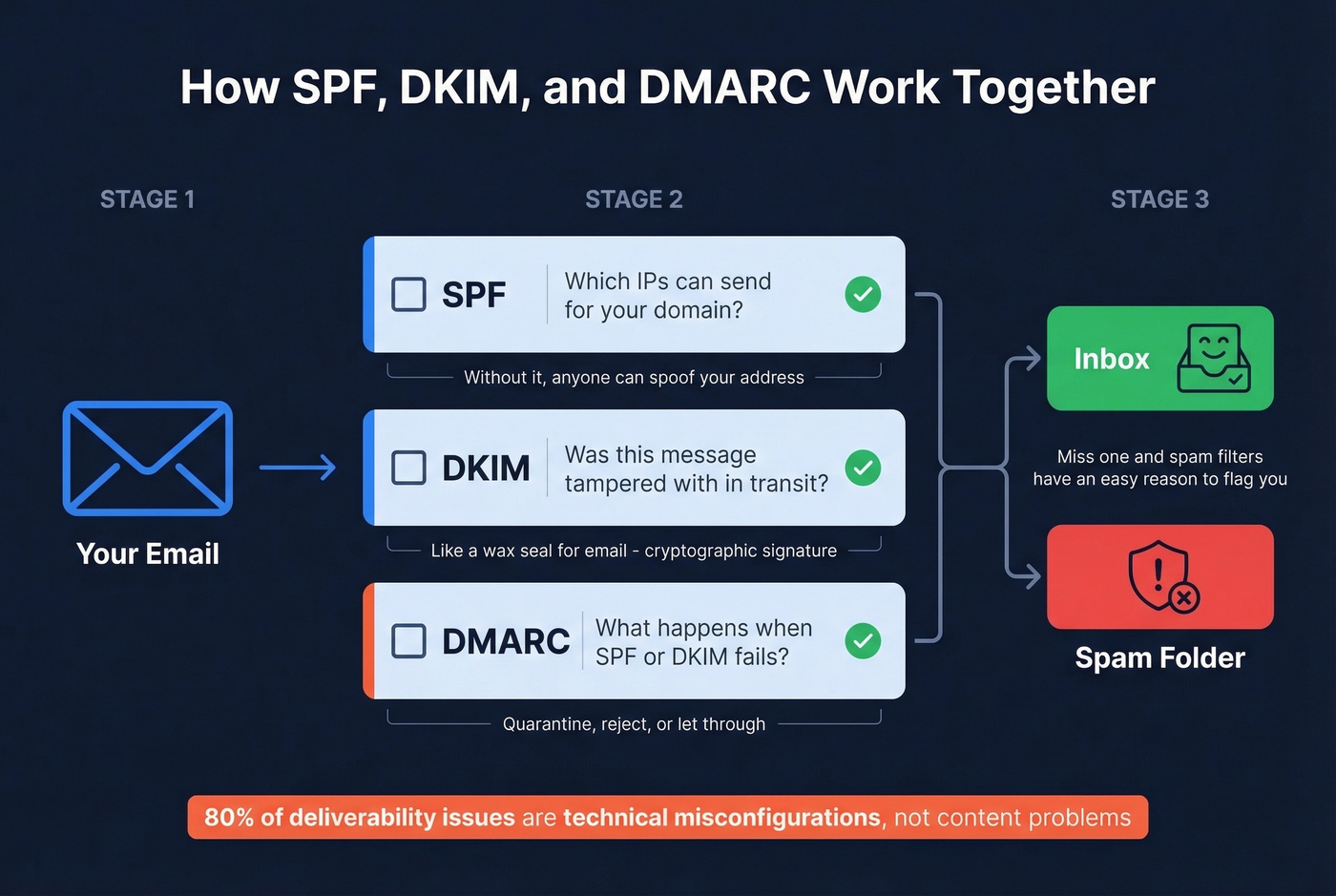
DKIM adds a cryptographic signature to your emails, proving the message wasn't tampered with in transit. Think of it as a wax seal for email (see DKIM and a practical DKIM checker).
DMARC ties SPF and DKIM together and tells receiving servers what to do when authentication fails - quarantine, reject, or let it through. All three need to be configured correctly. Miss one and you're giving spam filters an easy reason to flag you (use a DMARC checker or an email authentication checker).
Best Spam Testing Tools
Mail-Tester is the fastest option. Send an email to a generated address, and it returns a score based on SpamAssassin rules, authentication checks, and blacklist status. Keep your SpamAssassin score under 3, ideally close to 1. It won't show you ISP-by-ISP inbox placement, but for a quick content and config check, nothing's faster (if you need options, see a Mail-Tester alternative).
GlockApps goes deeper with seed-list testing across major providers - Gmail, Outlook, Yahoo - showing you inbox vs. spam placement by ISP. It validates SPF/DKIM/DMARC and checks against 50+ blacklists. The free plan includes 2 spam test credits and 10,000 DMARC checks per month. The Essential plan at $59/month gives you 360 test credits, enough for ongoing monitoring of multiple campaigns (related: inbox placement tools).
MXToolbox deserves a mention for quick DNS diagnostics. It checks SPF, DKIM, DMARC, and blacklist status in a single lookup. A good complement to Mail-Tester when you need to drill into authentication records specifically.
IPQS takes a different approach: paste your full email including headers and it scores based on content, sender ID, SPF, DNS settings, IP blacklisting, domain reputation, DKIM, and PTR records. Useful when you want a single-pass diagnostic without running multiple tools.
MultiRBL at multirbl.valli.org is a free blacklist checker. Enter your IP or domain and it runs checks against dozens of DNSBLs simultaneously. No signup, no credits - just a quick answer on whether you're listed somewhere you shouldn't be.
How to Check If a Received Email Is Spam
Not everyone searching for an email address checker for spam is a sender. Some people just got a weird email and want to know if it's legit. Business email compromise alone costs organizations over $2.7B annually, so this isn't paranoia - it's basic hygiene.
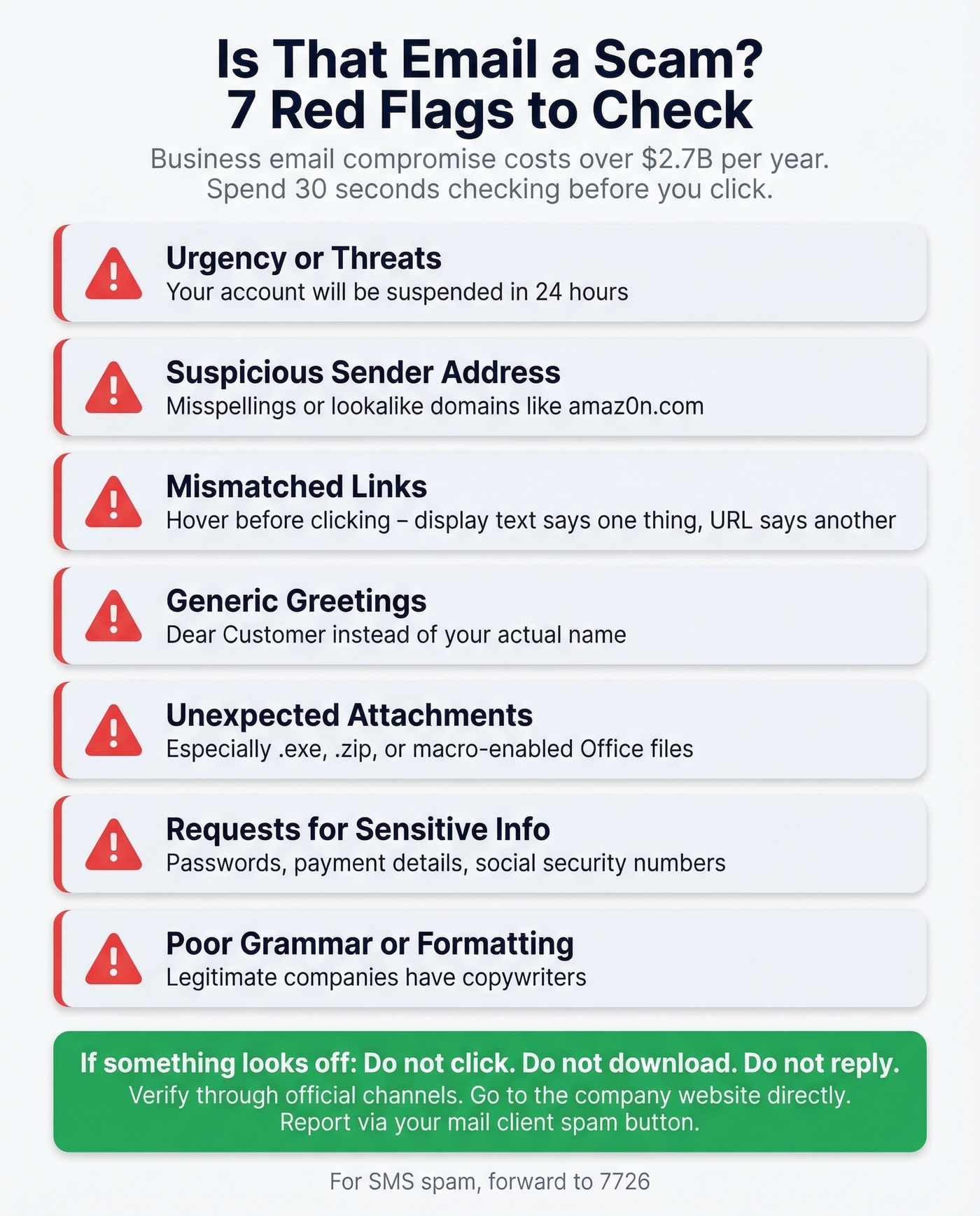
Red flags to watch for:
- Urgency or threats - "Your account will be suspended in 24 hours"
- Suspicious sender address - misspellings, lookalike domains (amaz0n.com)
- Mismatched links - hover before clicking; the display text says one thing, the URL says another
- Generic greetings - "Dear Customer" instead of your name
- Unexpected attachments - especially .exe, .zip, or macro-enabled Office files
- Requests for sensitive info - passwords, payment details, SSNs
- Poor grammar or formatting - legitimate companies have copywriters
If something looks off: don't click, don't download, don't reply. Verify through official channels by going to the company's website directly, not through the email link. Report via your mail client's spam/phishing button. For SMS spam, forward to 7726.
The 3-Step Email Hygiene Workflow
Most deliverability problems aren't mysterious. They follow a predictable pattern, and the fix is a simple three-step loop.
Step 1: Verify addresses before sending. Every address on your list should be validated before it enters a sequence. For existing lists, run them through a bulk verifier before your next campaign. For new lists, use a data source that pre-verifies contacts so you skip the separate cleaning step entirely (see email hygiene solutions).
Step 2: Test content before campaigns. Send a test email to Mail-Tester or run a GlockApps seed test before launching. Check your SpamAssassin score, confirm SPF/DKIM/DMARC are passing, and make sure you're not on any blacklists. This takes five minutes and can save weeks of reputation damage. In our experience, most teams skip this step entirely and only discover authentication issues after a campaign tanks.
Step 3: Monitor ongoing. Re-verify your list every 3-6 months to catch decayed addresses. When you're warming up a new domain or IP, start at 50 emails per day and double every 3-5 days - rushing this is the fastest way to get flagged (use a domain warm-up tool and follow a 14-day cold email ramp plan). Check blacklists monthly using MultiRBL. Deliverability isn't a one-time fix. It's maintenance.
The Cost of Skipping This
A 5% bounce rate on a 10,000-email campaign means roughly 500 wasted sends and a real risk of blacklisting. Getting delisted from public blacklists can happen within 24-48 hours, but some listings take much longer to clear. If you're warming up a new domain, that setback can cost you a month of progress. Thirty minutes of pre-send verification saves weeks of recovery - the math isn't complicated.
Every bounced email chips away at your sender reputation - and the tools above only catch problems after bad data is already in your CRM. Prospeo rebuilds the workflow: 300M+ profiles verified weekly, spam traps filtered out at the source, and bounce rates under 4% across 15,000+ teams.
Protect your domain reputation starting at 75 free verified emails per month.
FAQ
What does "email address checker spam" actually mean?
It covers three distinct needs: verifying that addresses on your list are real and not spam traps, testing whether your outgoing emails trigger spam filters, or checking whether an email you received is phishing. Different problems require different tools - verification services for list cleaning, seed-list testers for deliverability, and manual red-flag checks for suspicious messages.
How often should I re-verify my email list?
Every 3-6 months. Lists decay by roughly 28% annually due to job changes, abandoned accounts, and addresses recycled into spam traps. Waiting longer than six months means you're almost certainly sending to dead addresses that damage your sender reputation.
What bounce rate is too high?
Keep total bounces below 2% and hard bounces under 1%. Go above those thresholds and ESPs like Google and Microsoft will throttle or suspend your sending account - sometimes without warning.
Can any tool guarantee 100% verification accuracy?
No. Independent benchmarks show top tools hitting 68-70% accuracy on real-world business email datasets. Catch-all domains are the biggest wildcard - no verifier can definitively confirm whether a specific mailbox on a catch-all domain is active.
What's the fastest way to check if my sending domain is blacklisted?
Run your IP through multirbl.valli.org - it checks dozens of blacklists simultaneously, for free, with no signup. Also verify your SPF, DKIM, and DMARC configuration with MXToolbox. Both take under a minute and cover the two most common causes of spam folder placement.