

Event Follow-Up Emails: The Data-Backed Guide to Turning Badge Scans Into Pipeline
You came back from the conference with 300 badge scans, uploaded them to your sequencer, and hit send. Three days later: 12% bounce rate, two spam complaints, and three replies - one of which was "please remove me."
The list wasn't the problem. The list hygiene was. That's where most event follow-up email campaigns die before they start.
Only 5-15% of trade show contacts are actually sales-ready. The rest need nurture, not a pitch. And if your emails aren't reaching inboxes, none of it matters.
Before You Write a Single Follow-Up
Three things need to happen before you open a Google Doc:
- Clean your event list before sending. Most post-event email failures start with bad data. Run every address through verification - Prospeo catches invalid emails with 98% accuracy before they bounce. (If you need a broader stack view, compare data enrichment services too.)
- Segment by intent signal, not just "attended vs. didn't." A demo request and a badge scan aren't the same lead. Use a simple lead scoring model so your sequence matches readiness.
- Send the first email within hours, not days - keep it under 80 words. The average cold email reply rate is 3.43%. Follow-ups from events should 2-3x that because you've already had a touchpoint. But only if the email actually lands.
Why Most Follow-Ups After Events Fail
The failure usually isn't your copy. It's your infrastructure.
17% of cold emails never reach the inbox - they bounce or get spam-filtered before anyone sees them. The average cold email bounce rate runs 7-8%, and event lists often run higher because badge scans capture whatever email someone typed into a form at a crowded booth. Typos, personal addresses, defunct domains - it all gets swept into your CRM. (If you want the deeper breakdown, see email bounce rate.)
Then there's decay. Email lists degrade at roughly 22.5% per year. That conference contact from six months ago? There's a one-in-four chance the address is already dead. We've seen event lists where 20% of addresses were invalid - and the sender didn't discover it until their domain was flagged.
The other failure mode is treating badge scans like buying intent. Someone who stopped at your booth for a free t-shirt isn't the same as someone who asked about pricing. Most teams dump both into the same sequence and wonder why reply rates are terrible. (This is where intent based segmentation pays off fast.)

Clean Your Event List First
This is the step everyone skips. It's also the one that determines whether your campaign works.
Before you import a single contact into your sequencer, hit these thresholds:
- Hard bounces: 1% or less. Anything above this damages your sender reputation.
- Spam complaints: 0.3% or less. Gmail's threshold is even stricter at 0.1%.
- Don't exceed 30 emails per inbox per day. Spread volume across warmed inboxes. (More on safe sending limits in email velocity.)
- Inbox placement should be 80%+ on seed tests before you scale.
- Verify before import. Deduplicate. Fix obvious typos. (If you're troubleshooting deliverability end-to-end, use an email deliverability guide.)
Prospeo handles this in minutes. Upload your event CSV, and its 5-step verification process - catch-all handling, spam-trap removal, honeypot filtering - flags bad addresses before they ever hit your sequencer. Data refreshes on a 7-day cycle, so even contacts from a month-old event get checked against current records. For partial records where you only captured a name and company from a badge scan, the enrichment engine pulls verified emails with an 83% match rate. The free tier covers 75 emails per month, enough to clean a small event list without spending a dime.

58% of replies come from your first email - but only if it lands. Prospeo's 5-step verification cleans your event list in minutes: catch-all handling, spam-trap removal, honeypot filtering. 98% email accuracy, 7-day data refresh, and 83% match rate on partial badge scans where you only have a name and company.
Stop losing pipeline to bounced event follow-ups.
Benchmarks Worth Knowing
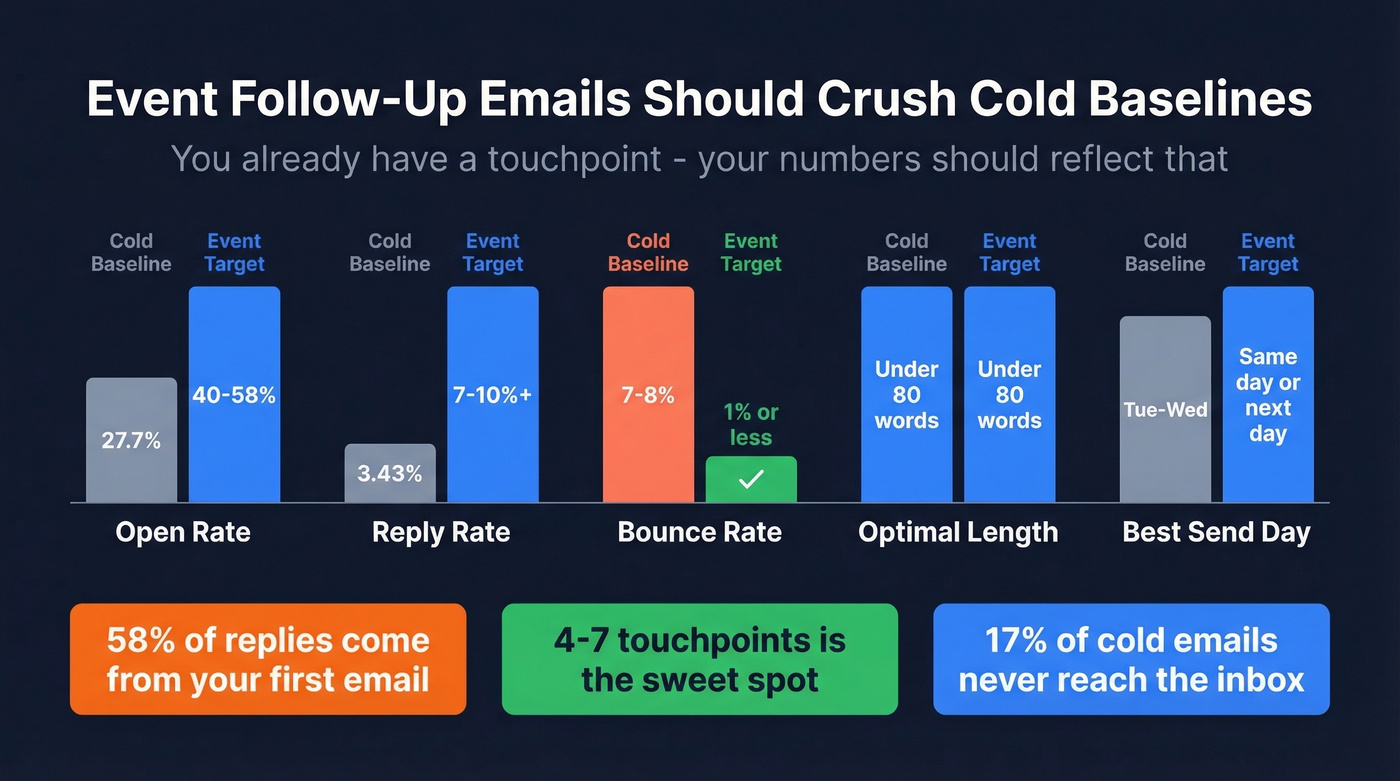
Cold email baselines give you the floor. A follow-up after an event should beat them because you've already had a touchpoint. The sweet spot is 4-7 touchpoints total across your sequence - enough persistence to catch someone who's busy, not enough to feel like harassment. (If you want more options, see sales follow-up templates.)
| Metric | Cold Baseline | Event Follow-Up Target |
|---|---|---|
| Open rate | 27.7% | 40-58% |
| Reply rate | 3.43% | 7-10%+ |
| Bounce rate | 7-8% | ≤1% (verified) |
| Optimal length | <80 words | <80 words |
| Best timing | Tue-Wed | Same-day or next-day |
The 27.7% open rate is the cold email average. Webinar follow-up emails can reach open rates as high as 58% because the recipient already opted in.
Here's the number that matters most: 58% of replies come from the first email in a sequence. Your first touch carries the most weight. But multi-step sequences still pull nearly half your total replies, so don't send one email and call it done. (For a full sequence build, use a B2B cold email sequence framework.)
Badge scans give you names and companies. Prospeo gives you verified emails. Upload your event CSV and enrich partial records with 50+ data points per contact - job title, direct dial, buyer intent signals. At $0.01 per email, cleaning a 300-contact event list costs less than the coffee you drank at the booth.
Turn badge scans into verified, segmented contacts in minutes.
Timing Framework by Intent Signal
Think of follow-up timing as an SLA, not a suggestion. The window is measured in hours, not days.
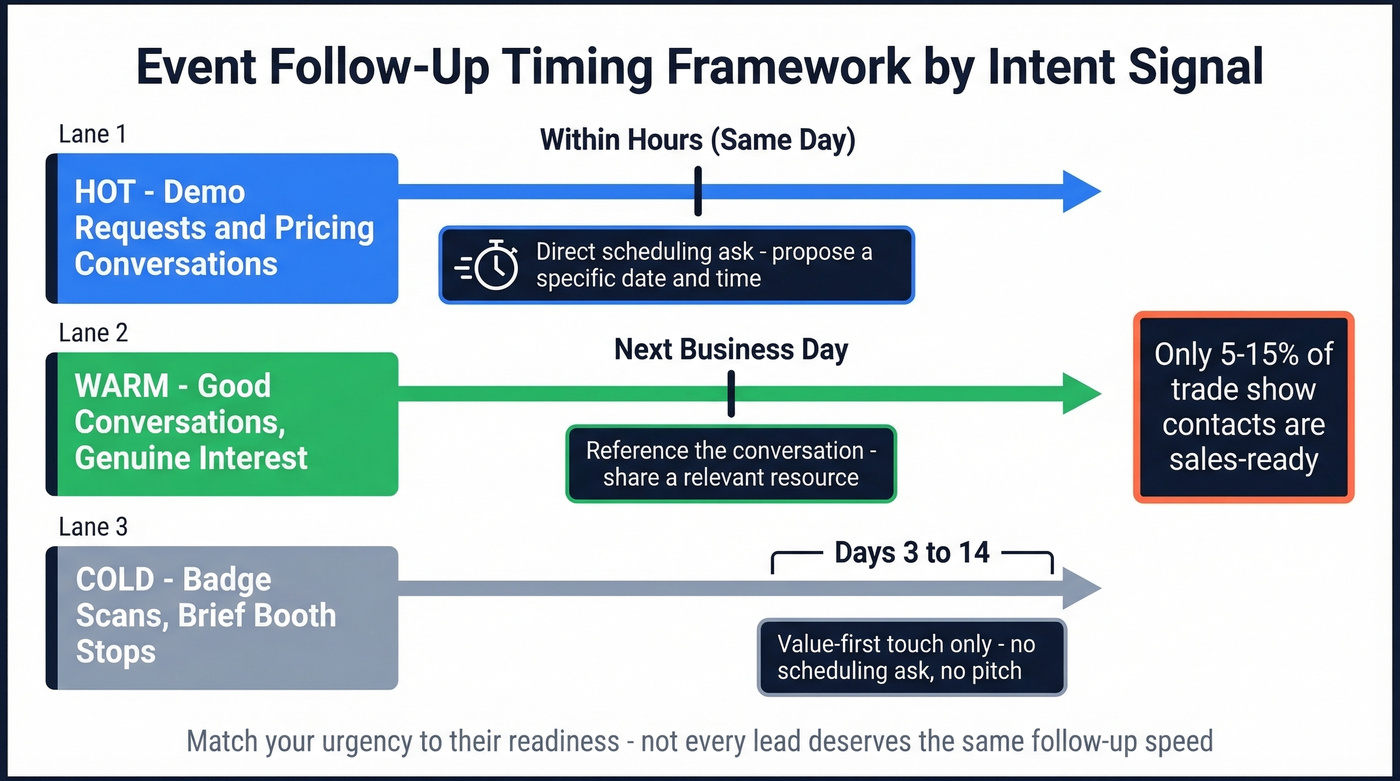
Same-day (within hours): Demo requests, pricing conversations, strong booth interactions where someone explicitly asked for next steps. These leads are hot. Waiting 48 hours is leaving pipeline on the table.
Next business day: Warm interactions - good conversations, genuine interest, but no explicit ask. They remember you. Don't let that fade.
Days 3-14 (light nurture): Cold badge scans, brief booth stops, anyone who didn't show clear buying signals. These need value-first touches, not scheduling asks.
Only 5-15% of trade show contacts are ready for a sales conversation. Pushing a hard CTA on a day-14 nurture lead feels desperate. Sending a gentle resource share to someone who asked for a demo feels lazy. Match your urgency to their readiness. (If you need help operationalizing this, map it to lead status.)
Segment Before You Write
Not all event contacts deserve the same email. Let's break your list into buckets before you draft anything:
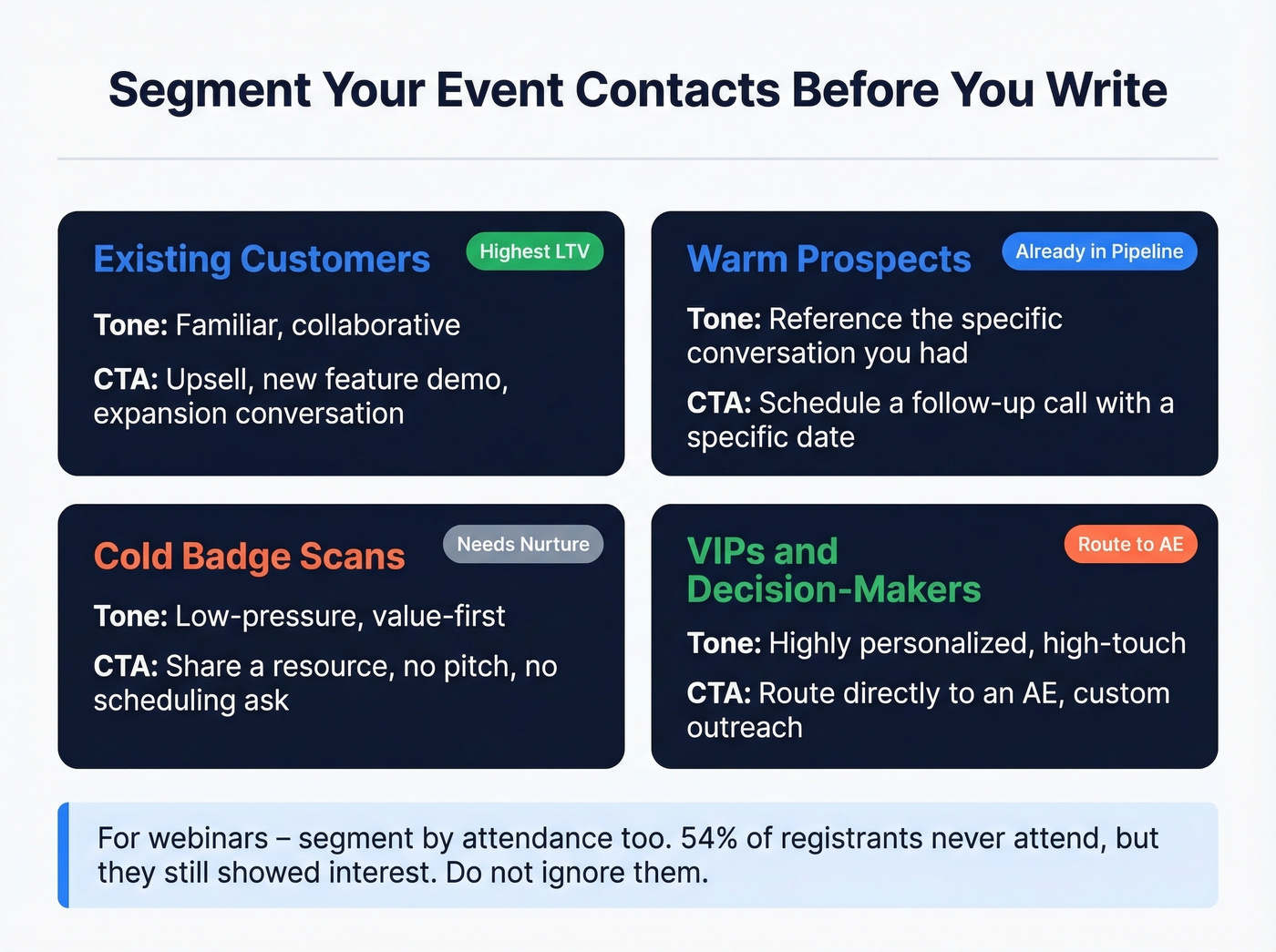
- Existing customers - different tone, different CTA (upsell, not intro)
- Warm prospects - already in your pipeline, reference the conversation
- Cold badge scans - need education, not a pitch
- VIPs and decision-makers - personalized, high-touch, routed to an AE
For webinars, you get behavioral data that in-person events can't match. Segment by attendance: full-session attendees are your highest intent. 54% of webinar registrants never attend - that's more than half your list, and they still registered because they were interested. Don't ignore them.
For trade shows, you won't have watch-time data. You'll rely on conversation notes and lead scoring from booth interactions. Webinars hand you engagement signals automatically; trade shows require your team to actually log them. (A quick way to standardize this is an ideal customer profile + scoring rubric.)
Templates and Examples
Personalized emails deliver 6x higher transaction rates - which is why every template below includes a specific conversation reference. One personalized detail, one resource, one CTA. That's the formula. (If you want more angles, see emails that get responses.)
High-Intent Booth Conversation
Subject: Following up from [Event] - [specific topic you discussed]
Hey [Name], great talking at [Event] about [specific challenge they mentioned]. I pulled together [resource/case study] that's directly relevant to what you're working on.
I'm finalizing my calendar for next week - does [date] work for a quick call to dig into this?
[Your name]
Why this works: The direct scheduling ask is a staple on r/sales for a reason - it forces a yes/no instead of a vague "let's connect sometime." One practitioner put it well: "Give them a specific date. Vague CTAs die in the inbox."
Warm Session Attendee
Subject: [Session title] - one thing I'd add
[Name], I saw you at [session title] - [speaker]'s point about [specific insight] stuck with me too. We just published [resource] that builds on that idea.
Curious: what's the biggest challenge you're tackling in [relevant area] right now?
Cold Badge Scan
Subject: Good to meet you at [Event]
[Name], we crossed paths at [Event] - hope you got as much out of it as we did. I thought you might find [resource/insight] useful given your role at [Company].
No pitch, just sharing something relevant. Happy to chat if anything resonates.
This one works because it leads with value and sets zero expectations - exactly the right tone for someone who didn't express buying intent.
Webinar Attendee vs. No-Show
These two scenarios need opposite energy. The attendee already invested 30-60 minutes - reward that with a sharp takeaway. The no-show needs zero guilt and maximum convenience.
Attendee subject: [Webinar title] replay + the one takeaway that matters
[Name], thanks for joining [webinar title]. If you only remember one thing, make it [key takeaway - one sentence]. Here's the replay: [link]. What's the biggest challenge you're facing with [topic] right now?
No-show subject: We missed you - here's the recording
[Name], no worries about missing [webinar title]. Here's the recording: [link]. The TL;DR: [one-sentence summary of the key insight]. Worth 15 minutes if you've got them.
The Anti-Template: What NOT to Send
Hi [Name], it was great meeting you at [Event]! I wanted to reach out and introduce myself and our company. We help businesses like yours achieve better results through our innovative platform. I'd love to schedule a call to discuss how we can help. Also, check out our blog and follow us on LinkedIn!
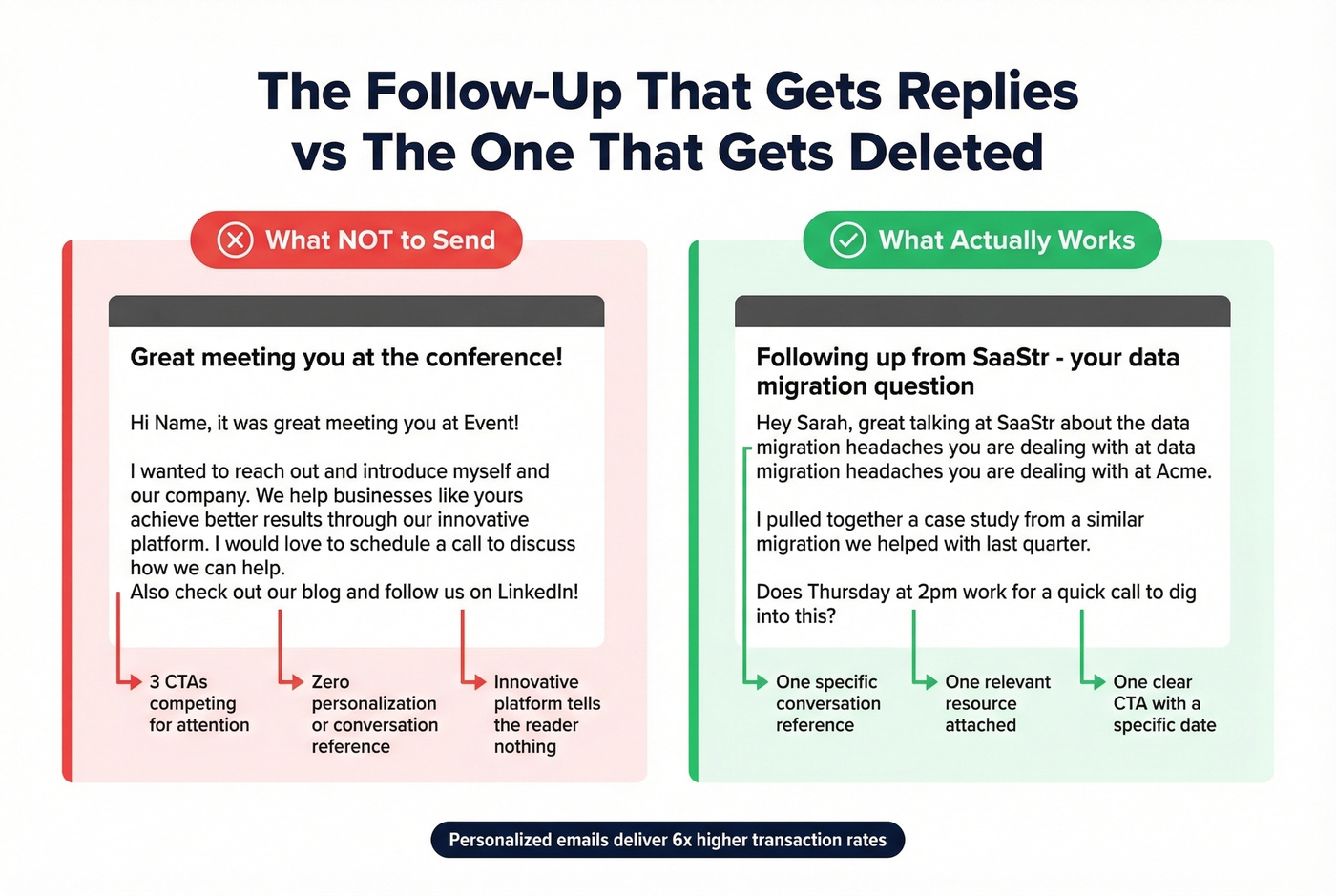
Three CTAs, zero personalization, and "innovative platform" tells the reader nothing. This is the email that gets 300 badge scans and 3 replies. Skip this approach entirely.
Breakup / Final Touch
Subject: Closing the loop
[Name], I've sent a few notes since [Event] and haven't heard back - totally understand if the timing's off. I'm going to close this thread out. If [topic] becomes a priority down the road, I'm easy to find. Wishing you a strong [quarter].
Day-by-Day Follow-Up Cadence
A one-email-and-done approach leaves 42% of potential replies on the table. Here's a multi-channel cadence adapted from the 3-7-3 model - three value propositions, seven touches, three channels over roughly three weeks:
- Day 1 - Email: Personalized follow-up referencing your conversation. This is your highest-leverage touch.
- Day 2 - Social connect: Connection request referencing the event.
- Day 4 - Phone call: Reference your email. Keep it to 60 seconds.
- Day 8 - Value email: Share a case study relevant to their challenge. No ask.
- Day 10 - Social engagement: Comment on their content or share something relevant.
- Day 15 - Tactical email: New angle, new value prop. Direct CTA.
- Day 17 - Breakup email: Short, respectful, door open.
Hot tip: Frame your follow-up as a reply to your first email - literally hit "reply" to your original thread. Instantly's benchmark data shows reply-style follow-ups outperform formal follow-ups by roughly 30%. It feels like a conversation continuation, not a new sales touch.
A/B test your subject lines weekly. Even small changes - adding the event name vs. leaving it out - can shift open rates meaningfully. (If you need a swipe file, use these email subject lines examples.)
Mistakes That Kill Your Results
Sending to unverified lists. This is mistake number one and it's not close. We've watched teams torch their domain reputation with a single unverified event send. A 12% bounce rate can take weeks to recover from. Verification is how you get bounce rates down to 1% or less. (If you're already in trouble, start with how to improve sender reputation.)
Multiple CTAs per email. One email, one ask. "Book a call, download our ebook, and follow us on social" is three asks and zero conversions. (Tighten your asks with an email call to action checklist.)
Waiting more than 48 hours. For high-intent leads, 48 hours is already too late. Same-day is the standard.
Treating all leads the same. A demo requester and a badge scan need completely different sequences. Segment or waste your effort.
Ignoring no-shows. 54% of webinar registrants don't attend. They registered because they were interested - send the recording and a soft CTA. Threads on r/digital_marketing consistently confirm that no-show rates hover around 40-50%, and the best-performing teams treat no-shows as warm leads, not dead ones.
FAQ
How soon should I send an event follow-up email?
Same-day for high-intent leads - demo requests, pricing conversations, strong booth interactions. Next business day for warm contacts. Within 3-5 days for cold badge scans. 58% of replies come from the first email, so speed matters more than perfection.
How long should a post-event follow-up be?
Under 80 words. A large 2026 cold email benchmark study found short emails consistently outperform long ones. Include one personalized reference, one resource, and one CTA - nothing more.
How do I follow up with webinar no-shows?
Send the recording within 24 hours with a one-sentence summary of the key takeaway. Over half of registrants are no-shows, so don't guilt them. Include a soft CTA to book a conversation, not a hard sell.
How many follow-up touches should I send after a conference?
Plan 4-7 total touchpoints across email, phone, and social. 58% of replies come from email one, but the remaining 42% come from subsequent touches - stopping after a single send leaves nearly half your potential pipeline untouched.
What's a free tool to verify event email lists before sending?
Prospeo's free tier includes 75 email verifications per month with 98% accuracy and 5-step verification - enough to clean a small event list. For partial records with only a name and company, the enrichment engine returns verified contact data at an 83% match rate.