How to Automate Follow-Up Emails Without Killing Your Domain
An SDR launches a 500-contact sequence on Monday morning. By lunch, 47 emails have bounced, the domain's sender score is tanking, and the sequencing tool is throttling sends. The automation worked perfectly - the data underneath it didn't.
Learning how to automate follow-up emails starts with getting the data right, not picking a tool. That's backwards from what most guides tell you, and it's why most sequences underperform before they even get a chance.
Why Most Follow-Up Sequences Fail
Responding to a lead within five minutes makes you 21x more likely to qualify them compared to waiting 30 minutes. That's the promise of automated follow-up sequences. The reality is messier.
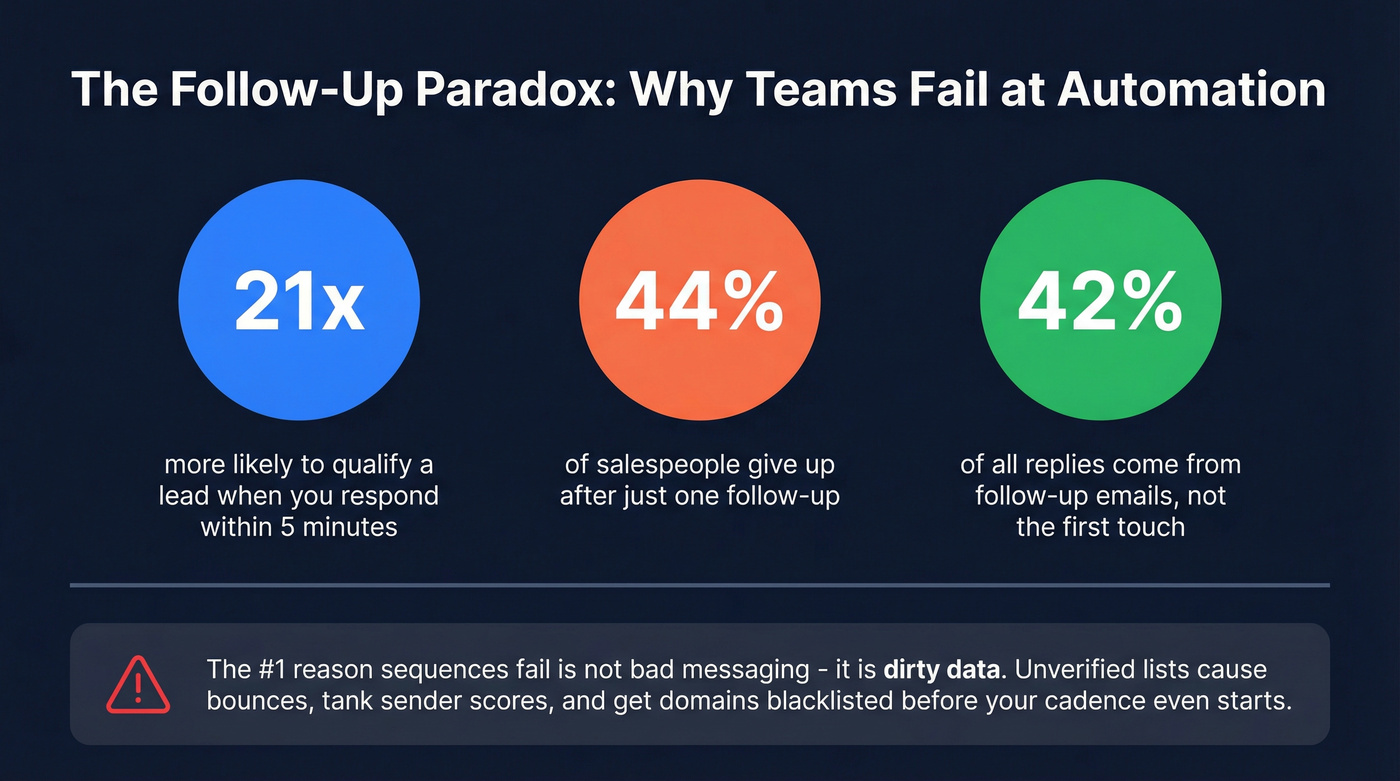
44% of salespeople give up after a single follow-up, even though follow-ups generate 42% of all replies. Nearly half your pipeline lives in messages two through four. But teams that do automate often make things worse - blasting unverified lists, stacking too many touches, and torching domain reputation in the process. You don't need AI agents dynamically rewriting your emails. You need clean data and a disciplined 4-touch cadence.
What You Need Before You Automate Email Follow-Ups
- A verified email list. Bad addresses kill sequences before they start. (If you're comparing options, start with an email validator shortlist.)
- A sequencing tool matched to your stack. Gmail-native, standalone, or CRM-built - as long as it supports stop-on-reply and throttling. (See more cold email marketing tools.)
- A 3-4 email cadence, not a 10-email drip. More on why below. (Examples: sales cadence example.)
Step 0 - Verify Your List First
Skip this and nothing else matters.
A healthy cold email campaign stays under a 2% bounce rate. Anything above 5% risks domain damage and vendor blocks. B2B contact data decays at roughly 30% per year as people change jobs, companies restructure, and roles shift - so even a list that was clean six months ago is probably dirty now. (More on benchmarks in B2B contact data decay.)
We've seen teams burn through three domains in a month because they skipped verification. Prospeo's 5-step verification catches invalid addresses, spam traps, and catch-all domains at 98% accuracy before they hit your sequencer. The free tier gives you 75 emails per month to test the workflow, and it integrates with Salesforce, HubSpot, Smartlead, Instantly, Lemlist, Clay, Zapier, and Make so verified contacts flow straight into your sequences. (If you want the mechanics, see email verification for outreach.)


Every bounced email in your follow-up sequence chips away at your domain reputation. Prospeo's 5-step verification catches invalid addresses, spam traps, and catch-all domains at 98% accuracy - before they reach your sequencer. At ~$0.01 per email, cleaning your list costs less than a single burned domain.
Stop automating on dirty data. Verify your list first.
Step 1 - Pick Your Sequencing Tool
Here's the thing: a $150/mo platform with 40% adoption loses to a $25/mo tool with 90% adoption every time. The best sequencing tool is the one your reps will actually use. (If you're building the stack end-to-end, use a B2B sales stack blueprint.)
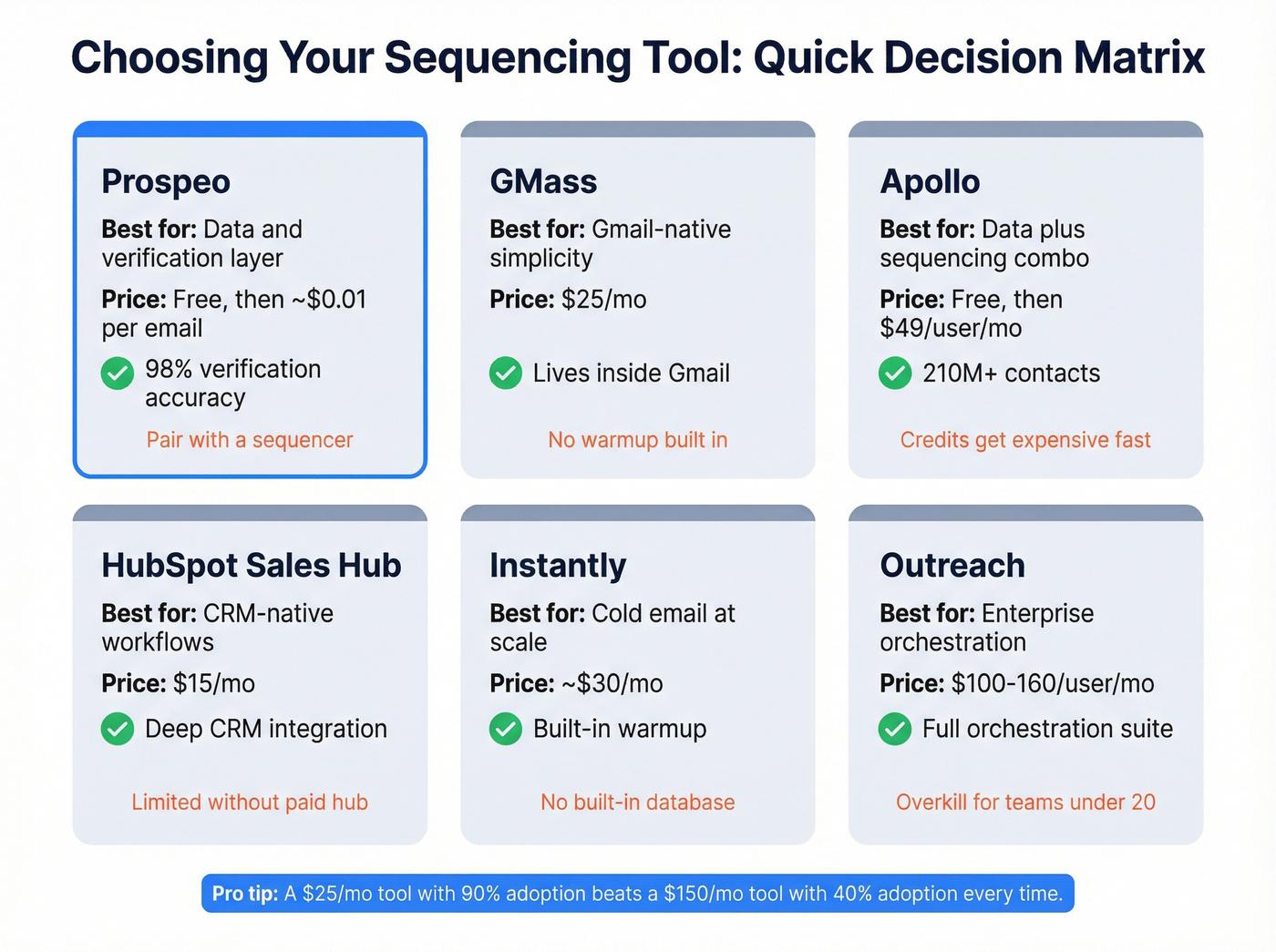
| Tool | Best For | Starting Price | Key Limitation |
|---|---|---|---|
| Prospeo | Data & verification layer | Free; ~$0.01/email | Pair with a sequencer |
| GMass | Gmail-native simplicity | $25/mo | No warmup built in |
| Apollo | Data + sequencing combo | Free; $49/user/mo | UI overwhelm |
| HubSpot Sales Hub | CRM-native workflows | $15/mo | Limited without paid hub |
| Instantly | Cold email at scale | ~$30/mo | No built-in database |
| Outreach | Enterprise orchestration | ~$100-160/user/mo | Overkill for small teams |
GMass is the lightest option - it lives inside Gmail and threads follow-ups into the same conversation. The tradeoff: no warmup, and it requires extensive Google Drive permissions. Apollo bundles 210M+ contacts with sequencing on paid plans, but the credit system gets expensive fast once you're pulling verified emails at volume. Outreach runs $100-160/user/month plus implementation fees, which is enterprise pricing for enterprise complexity. Skip it if you're a team under 20 reps.
For teams that just need reliable data flowing into an existing sequencer, Prospeo at roughly a penny per verified email is hard to beat on cost.
Step 2 - Design Your Cadence
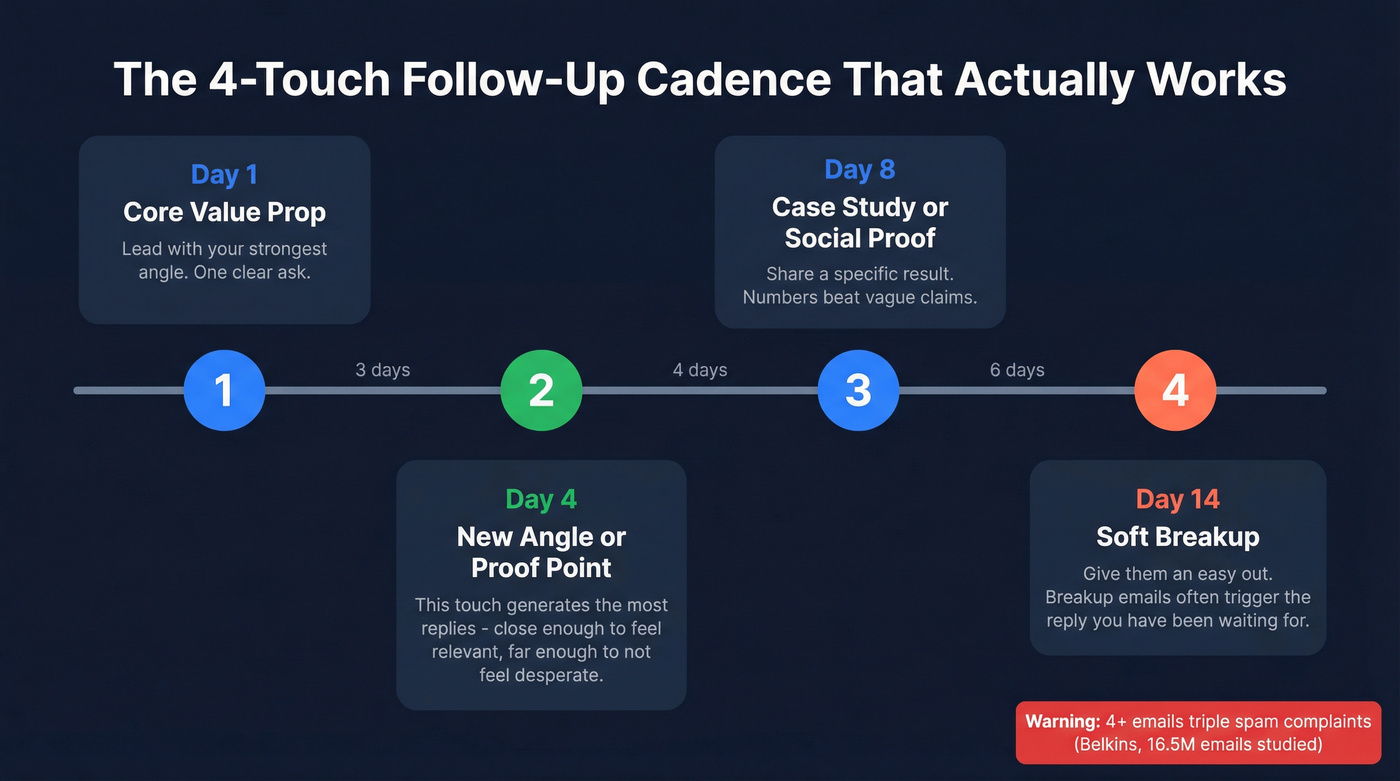
Less is more. A Belkins study of 16.5 million cold emails found the highest reply rate (8.4%) came from a single email. Sending 4+ emails in a sequence more than triples your unsubscribe and spam complaint rates. Some vendors claim longer sequences boost reply rates, but the spam complaint data tells a different story. (For proven patterns, see best sales sequences.)
That doesn't mean send only one email. It means every additional touch needs to earn its spot.
| Touch | Timing | Purpose |
|---|---|---|
| Email 1 | Day 1 | Core value prop |
| Email 2 | Day 4 | New angle or proof point |
| Email 3 | Day 8 | Case study or social proof |
| Email 4 | Day 14 | Soft breakup |
In our experience, the Day 4 follow-up generates the most replies - it's close enough to feel relevant but far enough to not feel desperate. Post-demo follow-ups should land within 24 hours. Cold outreach first follow-ups work best at 3-5 days. And one pattern we see repeatedly: SMBs tolerate more follow-ups, while enterprises with 1,000+ employees are basically allergic to persistence. (If you need timing rules, see when should I follow up on an email.)
Step 3 - Write Emails Worth Reading
Every follow-up needs to add something new - a stat, a case study, a relevant insight. If you don't have something new to say, don't send the email. (If you're stuck, borrow frameworks from sales email structure.)
Personalized subject lines increase response rates by 30.5%, and keeping them between 36-50 characters pushes that another 24.6% higher. Stay between 50-125 words. Brevity wins.
"Just following up" and "circling back" are zero-value signals that tell the prospect you have nothing new to offer. Don't repeat your first email's pitch - if they didn't respond once, they won't respond to the same thing again. And never put "follow-up" in the subject line. It's the fastest way to get archived. (More examples in subject lines for follow-up emails.)
Step 4 - Set Deliverability Guardrails
Automation without guardrails is a domain reputation time bomb. Ask any SDR community what kills their sequences and the answer is always the same: bad data and too many touches. The r/sales consensus lines up - threads about burned domains almost always trace back to unverified lists or sequences that ran too hot too fast.
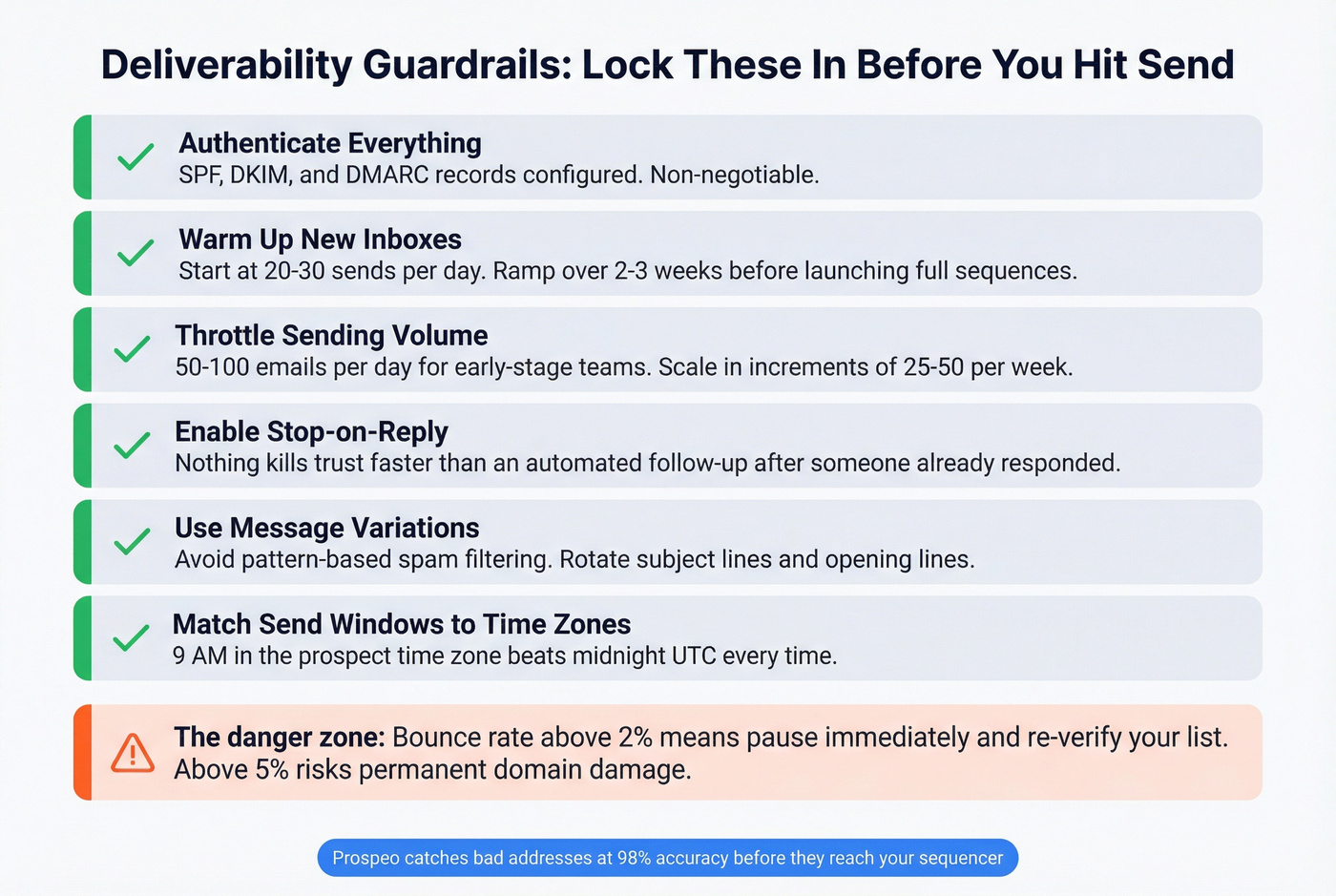
Let's break down what to lock in before you hit send:
Authenticate everything. SPF, DKIM, and DMARC records configured before a single automated email goes out. Non-negotiable. (Use this SPF, DKIM, DMARC guide.)
Warm up new inboxes. Don't launch a 500-email sequence from a fresh domain. Ramp over 2-3 weeks, starting at 20-30 sends per day and scaling gradually. (Details: automated email warmup.)
Throttle sending. 50-100 emails per day for early-stage teams. Scale only after deliverability metrics stabilize - and even then, increase in increments of 25-50 per week, not overnight jumps.
Enable stop-on-reply. Nothing kills trust faster than an automated follow-up landing after someone already responded. Every sequencer worth using has this feature. Turn it on.
Use message variations to avoid pattern-based spam filtering, and match send windows to the prospect's time zone. A 9 AM email typically outperforms a 3 AM one - obvious, but I've audited sequences where every email fired at midnight UTC regardless of where the prospect sat. (If you're troubleshooting, start with an email deliverability checklist.)
Your 4-touch cadence is dialed in. Your copy is tight. None of it matters if 30% of your list has decayed since you built it. Prospeo refreshes data every 7 days - not the 6-week industry average - and pipes verified contacts directly into Instantly, Smartlead, Lemlist, HubSpot, and Salesforce.
Feed your sequencer verified emails, not bounces.
FAQ
How many follow-up emails should I send?
Three to four max. Belkins data across 16.5 million emails shows 4+ emails triple spam complaints. Each touch should add new value - a fresh case study, a relevant stat - not just a reminder you exist.
What's the best way to handle follow-up automation at scale?
Start with verified data, add a sequencing tool with throttling, and cap your cadence at four touches. Most teams fail at scale because their lists are dirty, not because their messaging is weak. Clean your data first, then monitor bounce rates after every batch. If bounces creep above 2%, pause and re-verify before sending another email.
What's the best time to send follow-up emails?
Tuesday through Thursday, 9-11 AM in the prospect's time zone consistently outperforms other windows. Wait at least 72 hours before your first follow-up - anything faster often signals desperation rather than persistence.
Do I need a dedicated tool or can I use Gmail?
Gmail works fine for low volume - under 50 contacts. Once you're managing larger lists, a sequencing tool saves hours and prevents mistakes like double-sending. Either way, verify your list first to keep bounces under 2%. The platform matters less than the process behind it.