


Scheduling Sales Meetings During Holidays (Without Getting Ghosted)
$15k in pipeline can disappear in December without a single "no." It just drifts into calendar limbo, then reappears in January with different priorities and a different internal champion.
Holiday meeting-setting isn't broken. Your expectations are.
If you're staring at a half-empty calendar, you're not crazy - December is structurally different.
Numbers to memorize (print this for your SDR pod)
- OOO baseline: ~2.7%
- Christmas week OOO spike: 6.8%
- Best availability: week two of January at 1.1% OOO
- Baseline no-shows: 6.5% (and worse in holiday weeks)
What you need (quick version)
Use this checklist as your holiday meeting-setting system:
Pick your "real booking week" upfront. ZoomInfo published an out-of-office (OOO) proxy based on millions of emails sent globally by ZoomInfo employees in 2023: median OOO sits around ~2.7%, and Christmas week spikes to 6.8%.
Default to the best availability window. Week two of January is the cleanest week to stack first meetings, with 1.1% OOO. If you're unsure, push there and protect your calendar.
Assume churn, then design against it. RevenueHero's benchmark puts baseline no-shows at 6.5% (419 no-shows out of 6,428 meetings). In the last two weeks of December, plan for ~1.3-2.0x the normal reschedule/no-show churn and build redundancy, because holiday no-shows are predictable, not "bad luck."
Use a "two slots + link + 15 minutes" ask. Two options kill back-and-forth. Fifteen minutes lowers commitment. A link catches self-serve schedulers.
Treat OOO replies as leads, not failures. Capture the return date, then follow up 1-2 days after they're back. That's where "December dead" pipeline gets revived.
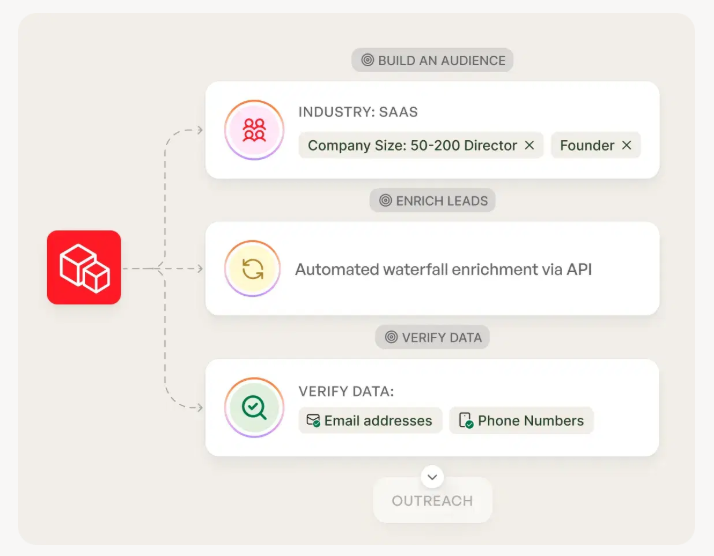
Prep list quality before you send. Holiday windows punish bad data. In our experience, teams that wait until January to clean lists waste the best week of the quarter on bounces and wrong contacts. Tools like Prospeo, "The B2B data platform built for accuracy," make the pre-flight check painless: 98% email accuracy and a 7-day refresh lets you verify and refresh right before your January push, so your best week isn't spent emailing ghosts. If you need a comparison set, start with email lookup tools and an email verifier website shortlist.
Why holiday meeting-setting feels broken (and it's not you)
December creates a specific kind of sales anxiety: you're doing the work, activity looks fine, but outcomes stall. Prospects don't say "no." They say nothing. Or they say "after the holidays" and vanish, then you get the classic "booked it, lost it" pattern when the meeting finally hits the calendar.
I've seen teams blame copy, sequences, even the SDR... when the real issue was the calendar.
What reps say in December (sentiment, not proof)
- "Every deal... has now slipped into Jan."
- One rep mentioned $25-30k "lost" to timing.
That's one rep's story, not a benchmark. The pattern (slip to January) still shows up across teams because the constraints are real: availability, attention, and internal approvals.
Here's the thing: holiday scheduling isn't about persuasion. It's about logistics. Win logistics and your normal sales skills start working again.
Holiday scheduling map: best weeks, worst weeks, and why
ZoomInfo published a useful proxy metric: OOO reply rate based on millions of emails sent globally by ZoomInfo employees in 2023. It's not a "meetings booked" metric, but it's a strong availability signal. You can read the full post here: ZoomInfo's best and worst times to send email.
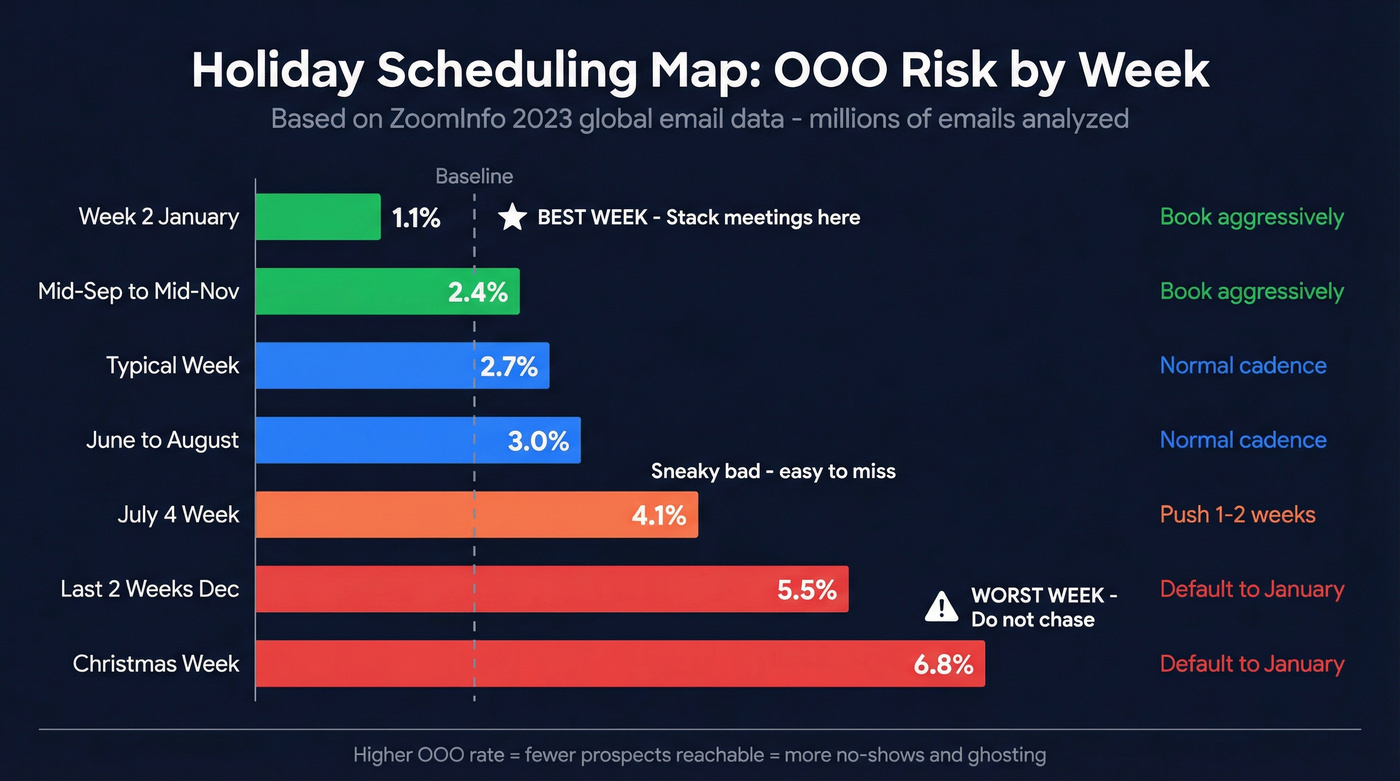
The key numbers you should actually operationalize:
- Median OOO rate: ~2.7% (baseline "normal")
- Christmas week: 6.8% (worst)
- Week two of January: 1.1% (best)
- July 4 week: 4.1% (sneaky bad)
- Mid-Sep to mid-Nov: 2.4% (quietly great)
Holiday scheduling map (OOO risk -> what to do)
| Window | OOO risk | What it means | Recommended action |
|---|---|---|---|
| Mid-Sep-Mid-Nov | ~2.4% | High focus | Book same-week |
| Typical week | ~2.7% | Normal | Normal cadence |
| June-Aug | ~3.0% | Summer drift | Short ask + reminders |
| July 4 week | 4.1% | PTO cluster | Push 1-2 weeks |
| Last 2 weeks Dec | High | Chaos weeks | Offer Jan first |
| Christmas week | 6.8% | Worst | Don't chase |
| Week 2 Jan | 1.1% | Best | Stack meetings |
What's happening under the hood:
- OOO clustering: people don't take random PTO in December. Teams coordinate it. Whole committees go offline.
- Internal change freezes: security, procurement, finance, and legal run skeleton crews.
- Attention fragmentation: planning + reviews + travel + family logistics. Your meeting isn't competing with vendors - it's competing with life, and life wins.
Hot take: most December outbound doesn't fail because the message is bad. It fails because you're trying to schedule into weeks that don't exist. If you want to systematize those touches, use a simple cold email cadence instead of improvising.
Default holiday operating calendar (US/EU) - steal this
This is the part most "holiday selling tips" skip. Don't wing it; run a calendar.
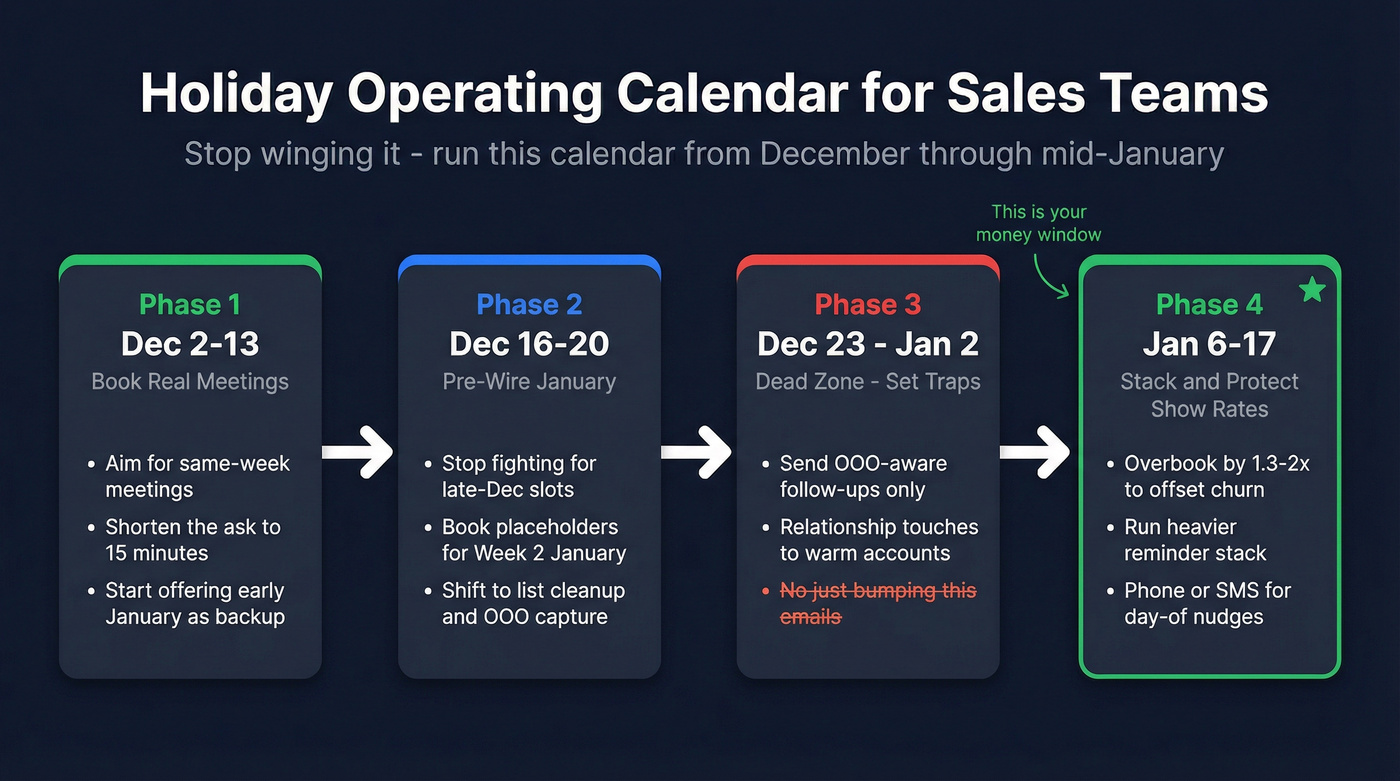
Phase 1: Early December (Dec 2-13) - Book real meetings
- Aim for same-week meetings where possible.
- Run your normal sequence, but shorten the ask (15 minutes).
- Start offering "first full workweek after New Year" as a secondary option.
Phase 2: Mid-December (Dec 16-20) - Pre-wire January
- Stop fighting for late-December slots.
- Book placeholders for week two of January (or the first full workweek after New Year for your region).
- Shift effort to list cleanup, multi-threading, and OOO capture.
Phase 3: Dead zone (Dec 23-Jan 2) - Don't chase; set traps
- Send only two types of touches:
- OOO-aware follow-ups ("I'll follow up when you're back"), and
- relationship touches to warm accounts (see below).
- Avoid "just bumping this" emails. They train prospects to ignore you.
Phase 4: Re-entry (Jan 6-17) - Stack + protect show rates
- Overbook slightly to offset holiday churn (that ~1.3-2.0x reality).
- Run a heavier reminder stack and confirm attendance explicitly.
- Use phone/SMS for day-of nudges if you've got mobile numbers (see B2B phone number workflows).
Opinion: if your deal size is on the smaller side and you're still trying to "close December," you're usually better off stacking high-quality first meetings in early January than begging for end-of-year miracles.

Holiday no-shows hurt. But emailing ghosts in January is worse. Prospeo's 7-day data refresh means your lists are verified right before the Week 2 January push - 98% email accuracy, so your best scheduling window isn't burned on bounces and wrong contacts.
Stack January meetings on data that actually connects you to real buyers.
Scheduling sales meetings during holidays: book this week or push to January?
Christmas week is a scheduling trap. If you "try anyway," you'll burn touches, rack up no-shows, and convince yourself outbound's broken.
Decision tree
Start: Are you inside the last two weeks of December?
- Yes -> Default to January. Offer week two of January first.
- No -> Keep going.
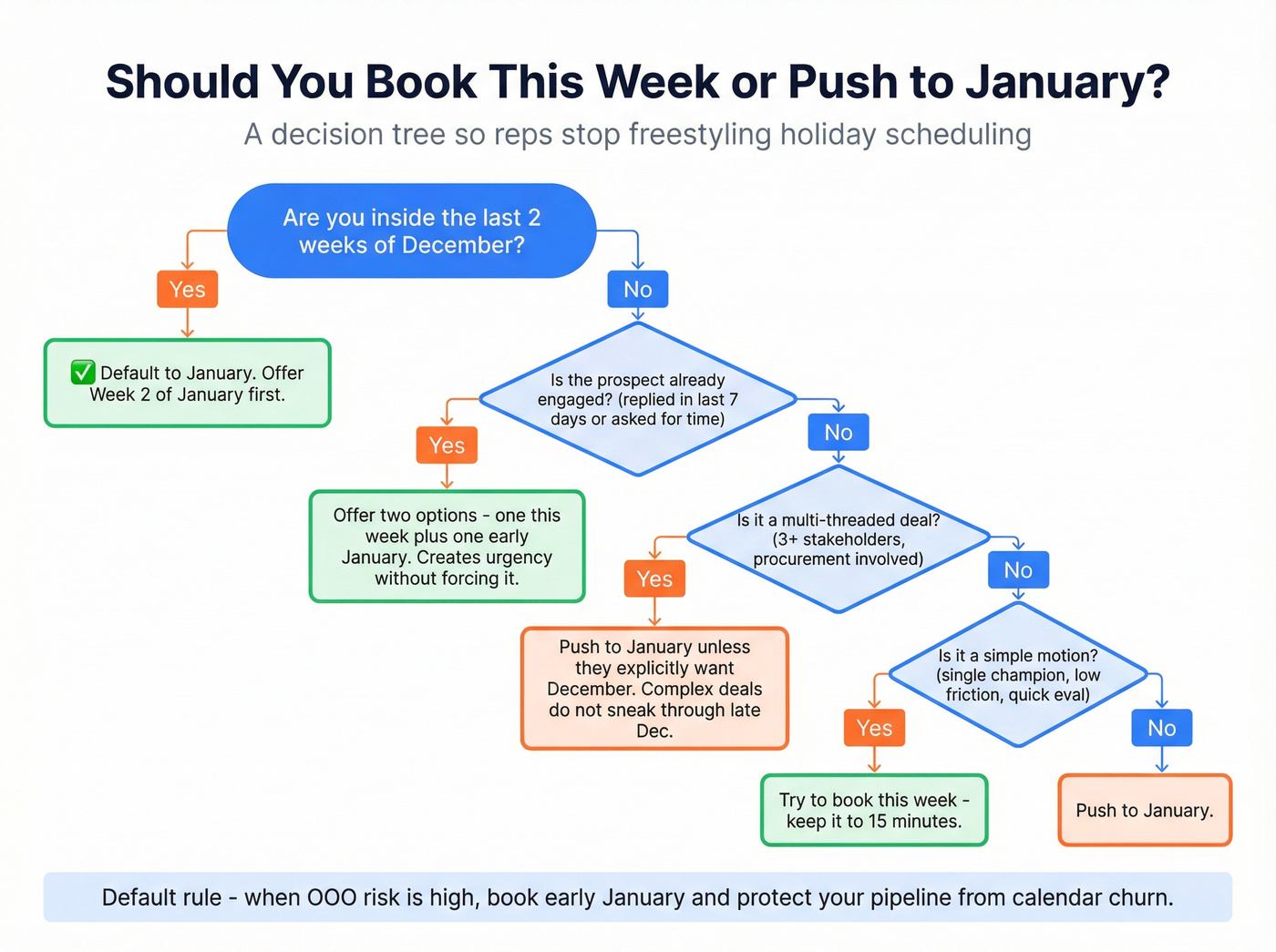
Is the prospect already engaged (replied in last 7 days or asked for time)?
- Yes -> Offer two options: one this week + one early January. You create urgency without forcing it.
- No -> Keep going.
Is your deal motion multi-threaded (3+ stakeholders, security/procurement involved)?
Yes -> Push to January unless they explicitly want December. Complex deals don't "sneak through" late December. If you're building a committee map, use this ABM multi-threading playbook.
No -> Keep going.
Is it a simple motion (single champion, low friction, quick eval)?
- Yes -> Try to book this week, but keep it 15 minutes.
- No -> Push to January.
Use/skip rules (so reps don't freestyle)
- Use December slots when: inbound intent's hot, the buyer asked for time, or it's a renewal/expansion with a clear path.
- Skip December slots when: it's net-new outbound, committee deals, or OOO replies are stacking up.
- Default rule: when OOO risk's high, book early January and protect your pipeline from calendar churn. If you want a tighter system around this, borrow a few rules from SDR cadence best practices.
The holiday meeting ask that works: "two slots + calendar link + 15 minutes"
Belkins analyzed 16.5M cold emails across 93 domains (Jan-Dec 2024). Average reply rate was 5.8%, but 6-8 sentences hit 6.9% reply rate. Thursday performed best at 6.87%. Here's the benchmark post: Belkins cold email response rate benchmarks.
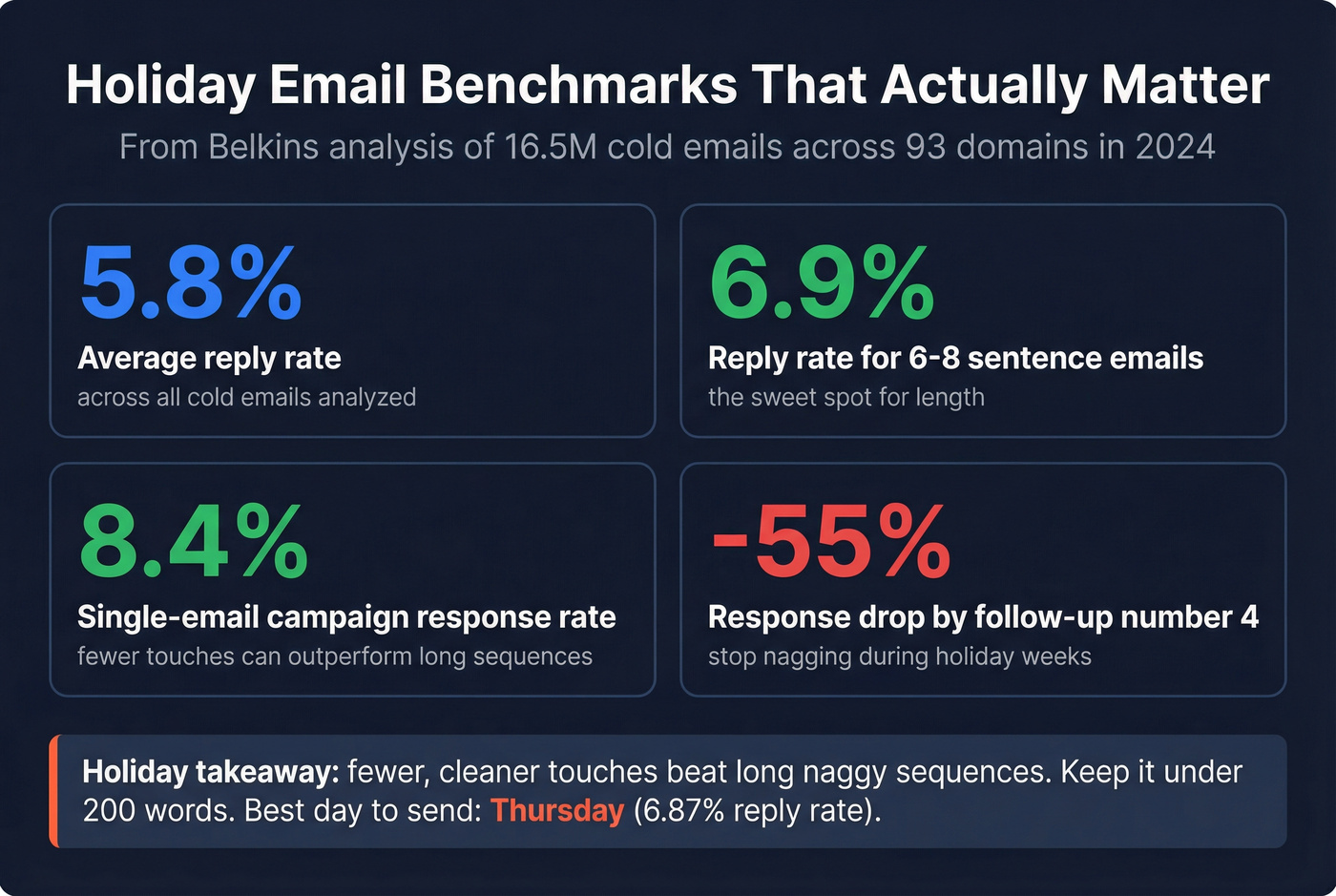
One more stat worth using: Belkins found single-email campaigns can hit 8.4% response rate, while later follow-ups fall hard (by follow-up #4, response rate's down ~55%). Translation: in holiday weeks, fewer, cleaner touches beat long, naggy sequences.
Holiday takeaway: keep the ask simple, short, and easy to say yes to. Under 200 words is the guardrail. If you want more patterns like this, keep a swipe file of schedule meeting email examples.
Template (copy/paste)
Subject: Quick question, then I'll get out of your way
Hi {{FirstName}} - are you the right person for {{problem area}} at {{Company}}?
We're helping {{peer group}} teams {{outcome}} without {{common headache}}. If it's relevant, I'd love to ask 2-3 questions and share what's working.
Could we do 15 minutes on either:
- {{Day}} {{TimeOption1}}, or
- {{Day}} {{TimeOption2}}?
If easier, here's my calendar link: {{CalendarLink}}.
If your calendar's a mess until January, I can also hold {{EarlyJanOption}}.
Thanks, {{Name}}
Holiday language to avoid (sounds needy) vs language that works (sounds competent)
Avoid
- "I know you're busy..." (everyone is; it reads like you're bracing for rejection)
- "Just bumping this to the top of your inbox" (translation: I've got nothing new)
- "Any chance you can squeeze me in?" (you're asking for a favor, not a business conversation)
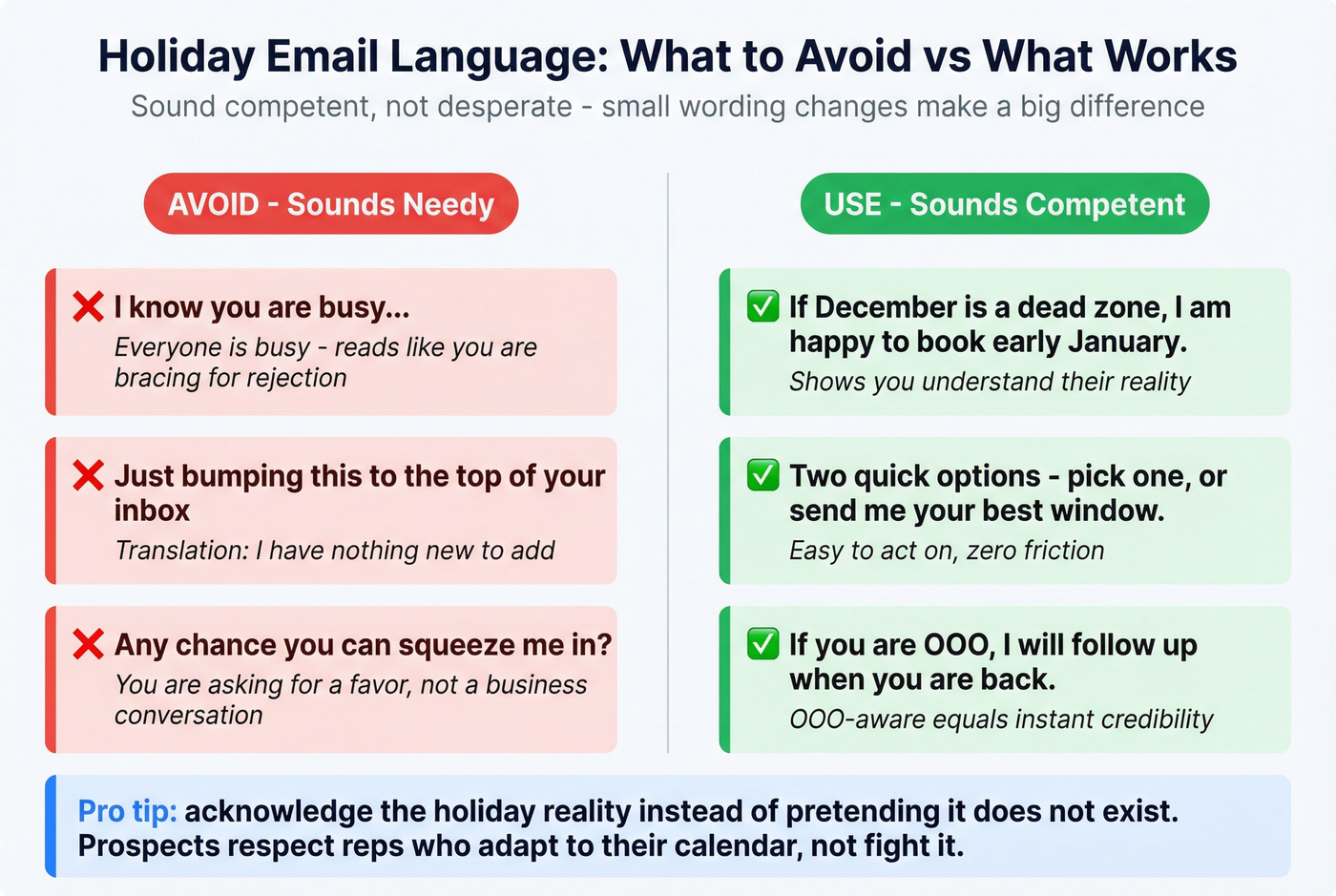
Use
- "If December's a dead zone, I'm happy to book early January."
- "Two quick options - pick one, or send me your best window."
- "If you're OOO, I'll follow up when you're back." (OOO-aware = instant credibility)
Relationship-first holiday touch (for warm accounts)
Subject: Quick check-in before year-end
Hey {{FirstName}} - quick one before the year wraps.
If it's helpful, I can send a 3-bullet recap of what we discussed + a suggested next step for January. If priorities changed, just tell me and I'll close the loop on my side.
Either way - hope you get a real break over the holidays.
-- {{Name}}
This message does two things: it gives them an easy "yes" (send recap) and an easy "no" (priorities changed) without forcing a meeting into chaos weeks.
OOO workflow (turn OOO into booked meetings)
OOO replies are a gift: they tell you the buyer's reality and give you a date to work with. Most reps ignore them, then "follow up in January" with no structure.
Don't.
OOO workflow checklist
Step 1: Parse the OOO for a return date. If it says "back Jan 3," that's your trigger.
Step 2: Tag the lead as "OOO - return date known." When OOO spikes (like Christmas week), your job's to stop wasting touches and start scheduling around return dates.
Step 3: Send a one-line courtesy reply (optional). "Thanks - I'll follow up on {{return+1 day}}."
Step 4: Create a CRM task with an SLA: return+1 business day. Example task title: "OOO follow-up (return+1): {{Contact}}" Due date: {{ReturnDate + 1 business day at 10:00am prospect TZ}} Notes: paste the OOO text + your last email.
Step 5: Follow-up message = context + two slots. "Welcome back - want to do 15 minutes this week or next?" Keep it easy.
Step 6: If no reply, call/text (if you've got mobile) within 48 hours. Holiday inboxes are chaos. A quick nudge beats another email. If you need a timing rulebook, use when should i send a follow up email as the default.
The "OOO return-date queue" (simple ops upgrade that works)
If you manage a team, build one saved view in your CRM:
- Filter: Status = OOO - return date known
- Sort: Return date ascending
- SLA column: Days past due
Then run it like a support queue every morning for 10 minutes. This one habit rescues more January meetings than any "new year, new you" blast.
No-show prevention protocol for holiday weeks (design for a 6.5% baseline)
RevenueHero published a no-show benchmark every SDR manager should memorize: 6.5% no-show (419/6,428 meetings). Here's the report: RevenueHero no-show benchmark.
RevenueHero also estimated 209.5 hours of selling time lost to no-shows in their sample. Holiday weeks amplify that waste, because you're not just losing a meeting - you're losing the only viable slot that week, and virtual meetings are the easiest thing on the calendar to "forget" when everything else gets messy.
No-show benchmark examples
| Industry | No-show rate |
|---|---|
| Education | 18.1% |
| Real estate | 15.1% |
| Marketing software | 4.59% |
| Data & Analytics | 2.8% |
| IT & Security | 1.8% |
| Developer tools | 1.2% |
The pro/con reality of "book it anyway"
Pros of booking holiday-week meetings
- You'll catch the minority who are working and want to get ahead.
- You can pre-wire January pipeline while competitors go quiet.
Cons
- Higher reschedule/no-show risk.
- Longer gaps between booking and meeting (Dec -> Jan) increase drop-off.
- You'll waste prime selling hours on empty calendar slots.
Real talk: the goal isn't "more meetings booked." It's "more meetings held."
Holiday no-show prevention checklist (ops-ready)
1) Offer safer time slots FullFunnel's show-rate playbook recommends avoiding Friday, lunch, and end-of-day slots because they collide with real life and increase flake risk. Use it here: FullFunnel show rate playbook.
My default: Tue-Thu mornings in the prospect's time zone.
2) Shorten the meeting
- Default to 15 minutes for first touch during holiday weeks.
- If you need 30, earn it: "15 now, and we'll book 30 with the right folks."
3) Confirm attendance explicitly Send this right after booking (email or text):
- "Quick confirm: are you still good for {{time}}?"
- "Is there any reason you might not be able to attend?"
That second line works because it gives people permission to reschedule early instead of ghosting.
4) Use multi-reminders (not just one) Minimum reminder stack for holiday weeks:
- T-3 days: value + agenda (1-2 bullets)
- T-24 hours: confirm + link
- T-1 hour: "still good?" + link
If you've got a phone number, add a quick SMS at T-1 hour. Email gets buried. If you need subject lines for those reminders, use subject lines for reminder email.
5) Make joining frictionless
- Put the meeting link in every reminder.
- Include dial-in as backup.
- Add a one-line agenda so it doesn't feel like a trap.
6) Build a reschedule path that saves face
Include: "If something came up, grab a new time here: {{link}}."
People no-show when rescheduling feels socially expensive. Remove that.
Gong also has a solid breakdown of holiday "dead zones" if you want more context: avoid holiday selling dead zones.
Objection handling: "Let's do this in Q1" (without sounding desperate)
You're going to hear "Let's reconnect in Q1." Sometimes it's real. Sometimes it's a polite brush-off. Your job's to separate the two without begging.
Scenario 1: They're interested, just overloaded (SMB/mid-market)
"Totally fair. To make Q1 easy, want to lock 15 minutes in early January now? If it's not relevant then, we'll cancel."
Why it works: you're not fighting their reality, you're preventing the January black hole.
Scenario 2: They're stalling (you need a gentle truth test)
"No worries. Before we punt it - what would need to be true for this to be a priority in Q1? Budget, timing, or internal ownership?"
If they can't answer, it's not a timing issue. It's a fit issue.
Scenario 3: End-of-year close (use sparingly, human tone)
A rep on Reddit used a very direct line about wanting to show progress before Jan 1. It can work with real rapport, but it can also backfire if you haven't earned it.
Cleaner enterprise-safe version: "Understood - enterprise calendars get weird in December. Let's pencil a placeholder for early January, and I'll send a short pre-read so we can use the time well."
That keeps you professional and gives them a reason to show up.
Holiday-aware scheduling for global buyers (stop proposing dead days)
Global scheduling fails in dumb ways: you propose a "normal Tuesday" that's a public holiday in their country, then you interpret silence as disinterest.
Fix it once, operationally.
How to operationalize holiday-aware scheduling
Use country holiday calendars that cover 2026. Thunderbird provides downloadable/subscribable holiday calendars by country with coverage labeled 2026-2028. Use it as your baseline source: Thunderbird holiday calendars by country.
Import holidays into your actual calendar (3 steps)
Google Calendar
- Google Calendar -> Settings
- Add calendar -> From URL
- Paste the holiday calendar URL (ICS) -> Add calendar
Outlook
- Outlook Calendar -> Add calendar
- Subscribe from web
- Paste the ICS URL -> Import
Do this once for your top 3 regions and you'll stop proposing "dead days" forever.
Create "blackout dates" in your scheduling tool. Block:
- Public holidays for your top regions
- The day before/after major holidays (often de facto PTO)
- Your own internal change-freeze days
Use time-zone etiquette that reduces friction.
- Always propose times in their time zone.
- Offer one early option and one late option if you're crossing oceans.
- If you're booking APAC from the US, don't make them take your 6pm. (More on timing mechanics: cold email time zones.)
Add one line to your ask for international prospects. "If any of these land on a local holiday for you, tell me your next best window and I'll adapt."
Region gotchas (quick examples)
- UK: Boxing Day is a real shutdown for many teams. Don't propose "normal" late-December days without checking.
- EU: August holiday drift is brutal; treat it like a second December for scheduling.
- APAC: Lunar New Year varies year to year; plan for multi-day closures and travel.
Execution prep: clean your list so your best weeks aren't wasted
Holiday inboxes are crowded. During Cyber Week, Mailjet delivered 20.4B emails, and open rates hovered around ~13% excluding bots - Mailjet reported this for Cyber Week 2025. Here's the post: BFCM email volume benchmarks. The takeaway's simple: attention's scarce, and deliverability mistakes get punished.
So if you're going to push hard in early January, don't waste it on bounces and wrong numbers. If you need a clean SOP, use an email verification list workflow and a step-by-step guide on how to verify an email address.
One more thing, and I'm going to be blunt because this drives me nuts: if your team keeps "saving" list cleanup for later, you're not doing sales, you're doing calendar theater.
Dec 15 -> Jan 15 execution schedule (steal this)
Dec 15-20: "Make January inevitable" week
- Verify and dedupe your target list.
- Add mobile numbers for your top 20-50 accounts.
- Book placeholders for early January with engaged prospects.
- Build your OOO return-date queue (CRM view + SLA tasks).
Dec 23-Jan 2: "Low volume, high intent" week
- Pause broad net-new sequences.
- Run only:
- OOO-aware follow-ups, and
- relationship touches to warm accounts
- Prep your first-week-of-January call blocks and reminder automations.
Jan 6-10: "Stack meetings" week
- Prioritize accounts with:
- recent engagement,
- known return dates,
- committee involvement (because you need runway)
- Overbook slightly to offset holiday churn.
Jan 13-15: "Protect show rate" week
- Tighten confirmation + reminders.
- Recycle no-shows within 24 hours with a reschedule link and two fresh slots.
- Route "not now" replies into a clean Q1 nurture instead of endless bumps.
Micro-checklist (do this before you hit send)
- Verify emails before you launch (especially catch-all domains)
- Remove role accounts and stale contacts
- Add mobile numbers for "back from PTO" follow-ups
- Deduplicate so you don't double-tap the same person in chaos weeks
Your December OOO replies are gold - but only if you follow up with verified contact data. Prospeo gives you 98% accurate emails and 125M+ direct dials so when prospects return in January, you reach them first, not their voicemail.
Turn every OOO reply into a booked January meeting at $0.01 per email.
Quick recap: your holiday operating system
- Book the right week: treat late December as pre-wire time; stack first meetings in early January when availability rebounds.
- Use the right ask: two slots + calendar link + 15 minutes beats "when works?" every time.
- Run an OOO SLA: follow up return+1 business day with context + two fresh options.
- Protect show rates: assume baseline 6.5% no-shows (worse in late December) and run a 3-touch reminder stack.
If you're serious about scheduling sales meetings during holidays, stop trying to "win December" on willpower. Win it with a calendar, an OOO queue, and a show-rate protocol that assumes reality.
FAQ
Is it worth trying to book meetings the last two weeks of December?
Yes - only for already-engaged prospects or low-friction motions. For net-new outbound and committee deals, late December's a churn factory, so use it to pre-wire January: book placeholders, capture OOO return dates, and clean your list so week two of January isn't wasted.
What's the best week in January to schedule sales meetings?
Week two of January is the best week to schedule because availability's highest - ZoomInfo's OOO proxy shows 1.1% OOO that week (lowest of the year). Stack your top accounts there and use mid-December to secure placeholders before calendars fill up.
How many reminders should I send to reduce holiday no-shows?
Use at least 3 reminders in holiday weeks to counter a 6.5% baseline no-show rate: T-3 days (agenda/value), T-24 hours (confirm + link), and T-1 hour ("still good?" + link). If you've got a mobile number, add a short SMS at T-1 hour for a real lift in attendance.
What do I do when I get an out-of-office reply?
Treat OOO as a scheduling signal, not a rejection: capture the return date, create a task for return+1 business day, and follow up with context plus two time slots and a calendar link. If there's no reply within 48 hours, a quick call/text beats another email in a crowded inbox.
How do I verify emails and add mobile numbers before a holiday sequence?
Verify your list before sending so you don't waste prime booking windows on bounces and stale contacts. Prospeo includes 98% email accuracy, a 7-day refresh, and 125M+ verified mobile numbers, plus a free tier with 75 emails + 100 Chrome extension credits/month - enough to clean a small January push fast.