

Pre Call Research for SDRs (2026): A Time-Boxed System That Actually Scales
If you're hunting "one more detail," you're not doing research - you're hiding from the dialer.
Pre call research for sdrs isn't about knowing everything. You win outbound by knowing one thing that makes your opener land and your next step feel obvious.
Most prospects deserve Tier 3.
What you need (quick version)
Non-negotiables (5-bullet checklist)
- Time-box research by tier (no improvising per prospect).
- Capture only what changes your opener (or your next step).
- Default to Tier 3 for cold lists; earn Tier 2/1 with real signals.
- Write a one-line hypothesis before you write a question.
- If you can't write the opener after 90 seconds, stop and dial.
The "math doesn't math" reality
I've watched new SDRs spend 5-10 minutes "getting ready" for a call, then wonder why they never hit activity targets. At 80-100 dials/day, that's 6.7-16.7 hours of research - before emails, follow-ups, meetings, and admin.
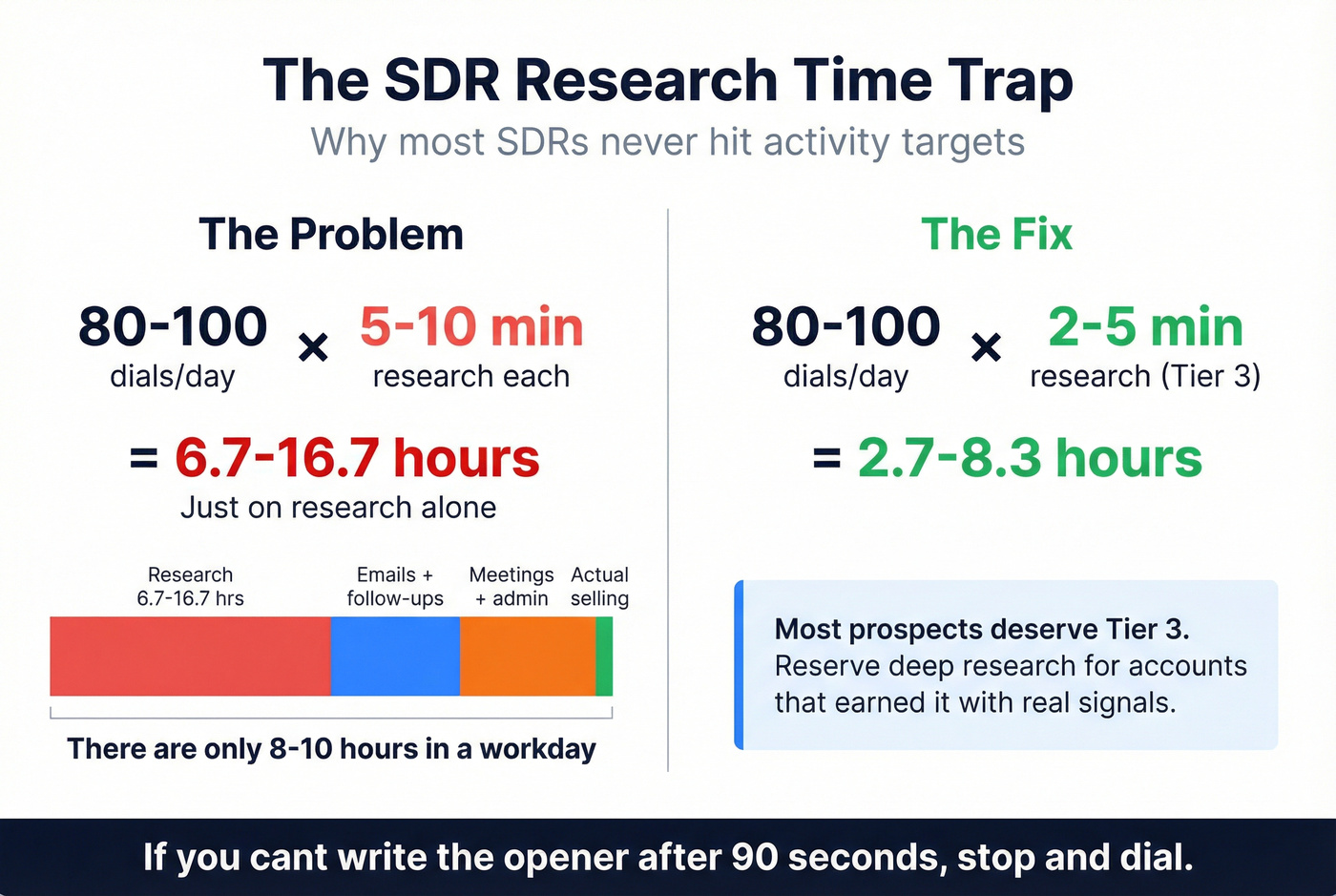
So your system has to assume: most prospects get 2-5 minutes.
Mini-framework (3 steps)
- Pick the tier (2-5 / 10-15 / 20-25 minutes).
- Pull commodity intel fast (firmographics, role, verified contact).
- Turn one trigger into an opener -> ask for a micro-commitment.

Why pre-call research feels impossible (and what to optimize for)
Cold calling punishes wasted motion. You can do "good research" and still lose if it doesn't change what the prospect hears in the first 10 seconds.
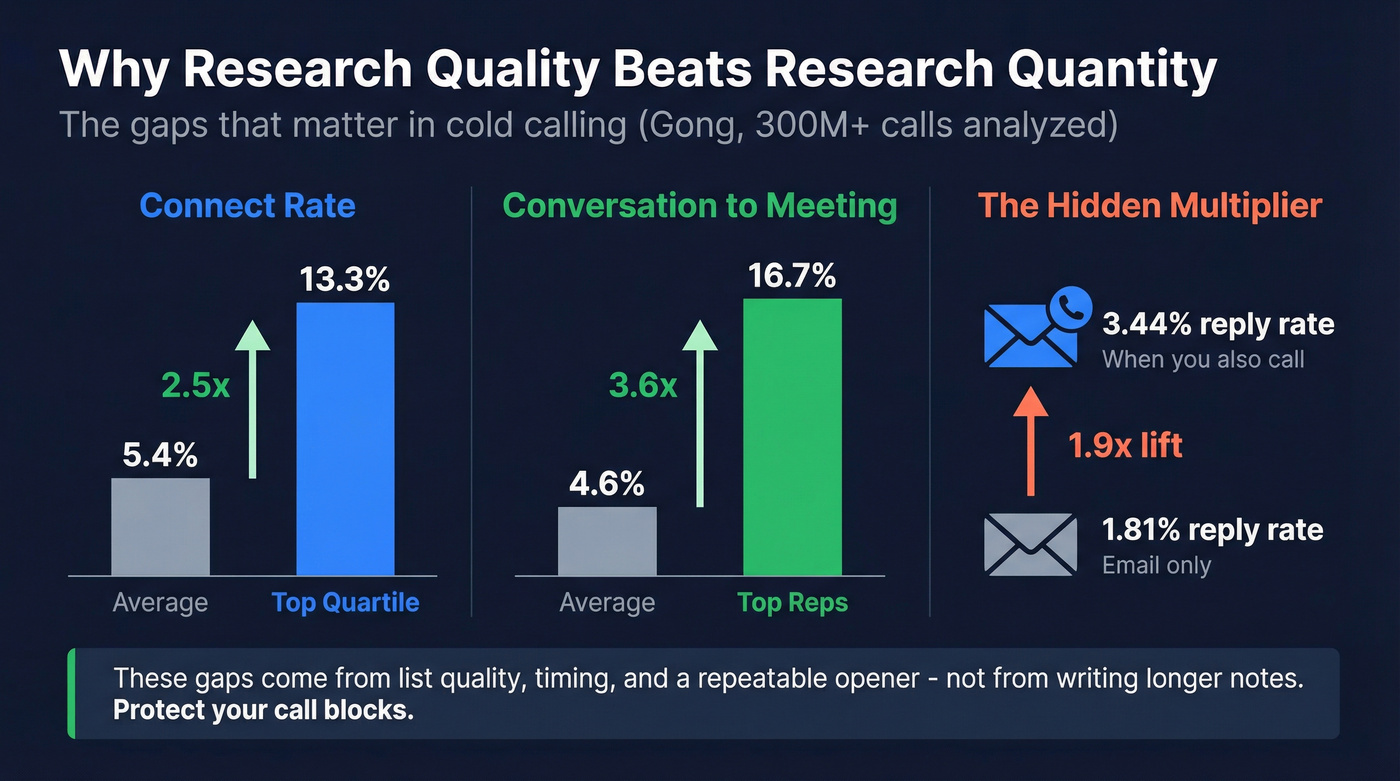
Gong's analysis of 300M+ cold calls puts average connect rate at 5.4%, while the top quartile hits 13.3%. After you connect, average reps convert conversations to meetings at 4.6%, while top reps hit 16.7% (Gong: https://www.gong.io/blog/cold-calling/). Those gaps come from list quality, timing, and a repeatable opener - not from writing longer notes.
And here's the part people forget: even when you don't connect, calling still lifts email replies (3.44% vs 1.81%). Calls create familiarity and urgency even when they go to voicemail, which is why protecting call blocks matters more than perfecting your "research doc."
So optimize research for two outcomes:
- Better conversations when you connect (you earn 30-60 more seconds instead of getting brushed off).
- More next steps per conversation (meeting, referral, or a clean disqualify).
Look, on smaller deal sizes, "deep personalization" is usually a cope. Clean data, tight triggers, and a calm permission opener beat a beautifully written paragraph that never gets read.
Tiered research system for SDR call blocks (Tier 1 / Tier 2 / Tier 3 + Signal accounts)
HockeyStack's time budgets are a clean way to stop the rabbit hole:

- Tier 1: 20-25 minutes
- Tier 2: 10-15 minutes
- Tier 3: 2-5 minutes
- Signal accounts: 10-15 minutes (earned by intent/engagement)
In our experience, teams that adopt tiers stop arguing about "how much research is enough" and start arguing about the only thing that matters: which accounts earned more time.
Tier table (time budget -> capture -> output)
| Tier | Time | When to use | Capture (3-5 items) | Skip (2-3 items) | Output sentence |
|---|---|---|---|---|---|
| Tier 3 | 2-5 min | Cold lists, dial blocks, SMB/MM volume, no clear trigger | Role + scope; company one-liner; 1 trigger; 1-line hypothesis; next-step target | Org charts; deep product research; long notes | "Calling because X is happening - quick question about Y?" |
| Tier 2 | 10-15 min | Tight ICP + engagement, clear trigger, post-reply follow-up | Trigger details; KPI tie-in; 1 peer pattern; likely objection; 2 extra contacts | Perfecting the story; reading everything they've published | "Saw X, teams usually see Y--are you dealing with that?" |
| Tier 1 | 20-25 min | Named/strategic accounts, SDR->AE motion, higher ACV | Initiative + timeline; current vs desired state; incumbent; committee map; clean handoff note | Building a narrative before you earn the call; trivia | "Based on X, I think you're trying to achieve Y this quarter." |
| Signal account | 10-15 min | Intent/engagement says "why now," you need to move fast | Signal source; why-now sentence; hypothesis; best contact + 2 backups; next step | Generic personalization; "nice-to-know" facts | "You're looking at X right now - can I ask one question?" |
Use/skip rules (so you don't overthink it)
Use Tier 3 by default if:
- It's a cold list with no engagement
- You're in a dialing block
- You're working SMB/mid-market at volume
- You don't have a clear trigger event
Use Tier 2 if:
- They opened/clicked multiple times
- They fit ICP tightly (ideal customer segment + right role)
- There's a clear trigger (funding, hiring spike, new leader, tool change)
- You're following up after an email reply (even a soft one)
Use Tier 1 if:
- It's a named account / strategic target
- You're coordinating SDR -> AE motion
- There's a live initiative you can anchor to (reorg, expansion, new product line)
- The deal size justifies mapping a committee
Use Signal accounts if:
- They're showing intent/engagement and you need to move fast
- You're prioritizing a small subset inside a big territory
One rule that keeps teams honest: if you can't write the opener after 90 seconds, stop researching and dial. The call will teach you more than the 12th browser tab.
Tier 1 add-on: the exec-brief checklist (when a VP joins)
If an exec is joining the call, your Tier 1 brief needs six extra fields:
- Account overview: what they sell + who to + why it matters
- Incumbent / status quo: what they likely use today
- Who we've met / touched: names + outcomes (1 line each)
- Key people to know: EB, champion, validator, blocker
- Growth initiatives: what they're pushing this quarter (and why)
- What you want the exec to do: align on POV, ask one question, secure next step
That last bullet's the whole point. Execs don't join to "listen." They join to move the deal.
Automate the "commodity intel" (so humans do only high-signal work)
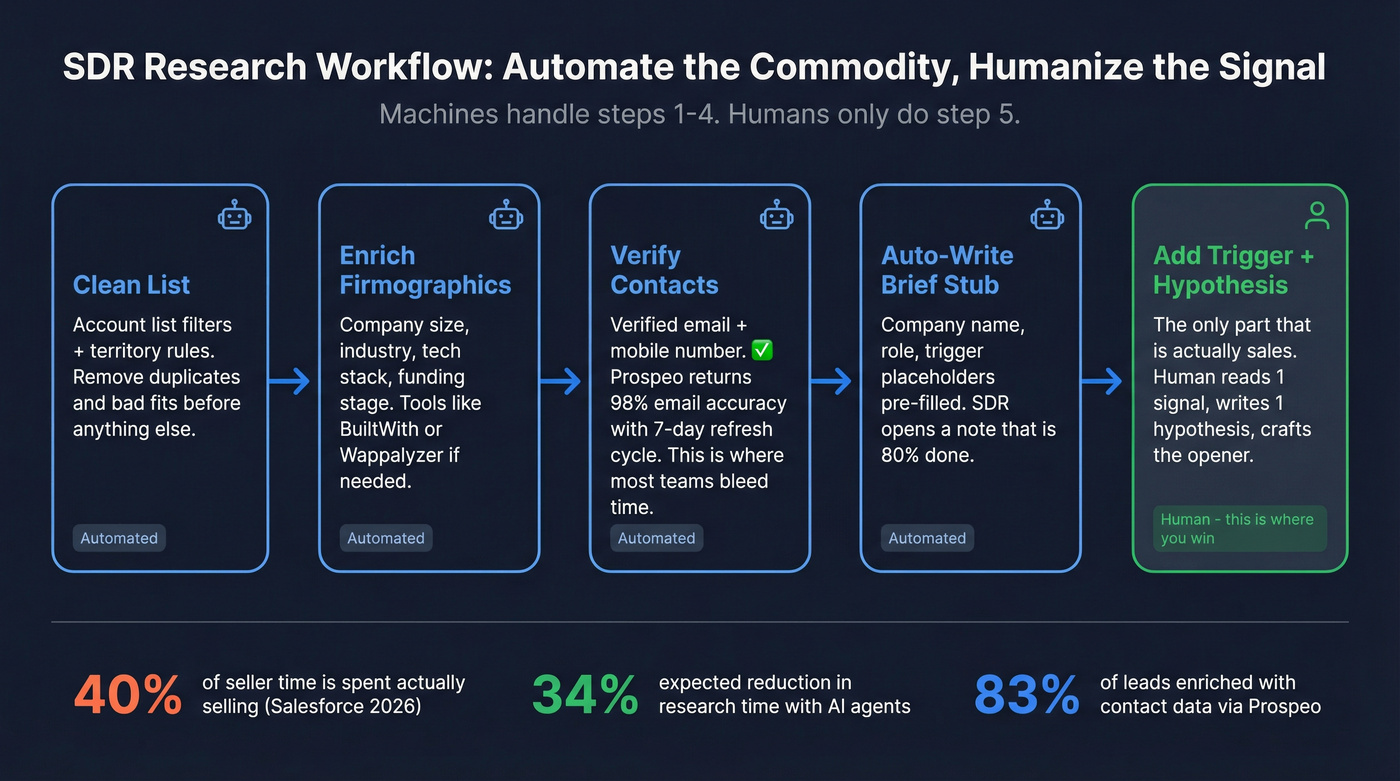
Salesforce's State of Sales for 2026 nails the underlying problem: sellers spend 40% of their time actually selling, and sellers expect AI agents to cut prospect research time by 34% once fully implemented (survey of 4,050 sales pros).
Here's a workflow that scales without turning SDRs into note-taking machines:
A practical automation workflow (light tooling)
- Start with a clean list (account list filters + territory rules).
- Enrich firmographics + technographics (optional):
- BuiltWith starts around $199/mo if you need tech stack at scale.
- Wappalyzer starts around $250/mo for similar use cases.
- Verify contacts before you research (this is where most teams bleed time) (verify-this-email).
- Auto-write a 1-line brief stub (company, role, trigger placeholders).
- Human adds the trigger + hypothesis (the only part that's actually "sales").
When to use waterfall enrichment (and when not to)
Waterfall enrichment means you run multiple providers in order (cheap -> expensive) until you get a hit.
Use it when:
- You need higher fill rate across messy segments (international, niche titles).
- You want cost control (don't pay premium credits when a cheaper source hits).
- You're building a RevOps-grade pipeline where coverage matters more than "one tool."
Skip it when:
- You're a small team and speed matters more than optimization.
- Your ICP is clean and one provider already hits consistently.
My opinion: most SDR teams don't need a waterfall on day one. They need one reliable verification/enrichment step and a ruthless Tier 3 habit.
The B2B data platform I'd pick for accuracy + freshness
If your priority is verified contact data without enterprise friction, Prospeo ("The B2B data platform built for accuracy") is the one I'd put in the top tier: 300M+ profiles, 143M+ verified emails, 125M+ verified mobile numbers, 98% email accuracy, and a 7-day refresh cycle (industry average is about 6 weeks). It's self-serve with credit-based pricing plus a free tier, and it includes 15,000 intent topics powered by Bombora; enrichment returns contact data on 83% of leads.
That combo matters because it fixes the most frustrating SDR problem: you can do perfect research and still lose the day if half your list bounces, routes to a generic inbox, or has no mobile number when your connect rates are already single digits.
What it looks like in the tool (so you can move fast)
If you're using Prospeo's Chrome extension, you typically:
- open a prospect page in your workflow
- pull verified email + mobile
- export to CSV or push enrichment into your system

Hunter starts around $49/mo for basic email finding. If you're dialing seriously, prioritize verification depth, freshness, and mobiles - those three things decide whether your call block is productive or miserable.

Your Tier 3 research shouldn't include verifying contacts. Prospeo's 98% email accuracy and 125M+ verified mobiles mean step 3 of your workflow - "verify contacts before you research" - takes seconds, not minutes. At $0.01/email with 7-day data refresh, your SDRs spend time on triggers and hypotheses, not hunting for valid contact info.
Reclaim your call blocks. Let clean data do the commodity work.
The 1-page pre-call brief (copy/paste template + examples)
Most SDR "research" fails because it doesn't produce an output anyone can reuse.
CloudTalk's pre-call planning guidance is worth copying because it forces you to define an objective, pull relevant prospect/company background, check recent developments, and use internal history so you don't repeat questions.
Copy/paste template (one page)
Use this as a single note in Salesforce/HubSpot, or a pinned snippet in Outreach/Salesloft. Keep it tight.
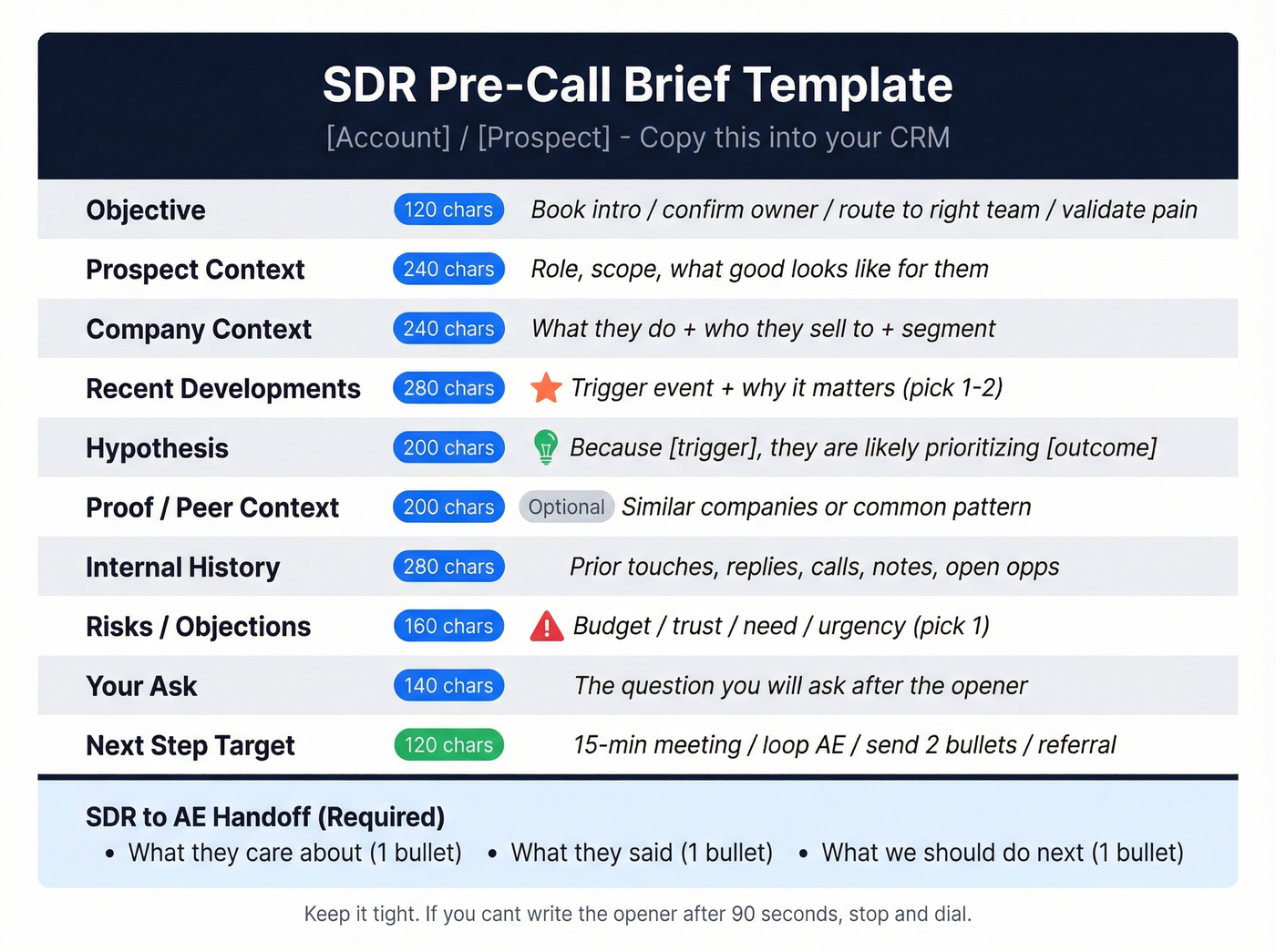
PRE-CALL BRIEF (SDR) - [Account] / [Prospect]
- Objective (1 line, <=120 chars): Book intro / confirm owner / route to right team / validate pain
- Prospect context (<=240 chars): Role, scope, what "good" looks like for them
- Company context (<=240 chars): What they do + who they sell to + segment
- Recent developments (pick 1-2, <=280 chars): Trigger event + why it matters
- Hypothesis (1 sentence, <=200 chars): Because [trigger], they're likely prioritizing [outcome]
- Proof/peer context (optional, <=200 chars): Similar companies / common pattern
- Internal history (<=280 chars): Prior touches, replies, calls, notes, open opps
- Risks / likely objections (pick 1, <=160 chars): Budget / trust / need / urgency
- Ask (1 line, <=140 chars): The question you'll ask after the opener
- Next step target (<=120 chars): 15-min meeting / loop AE / send 2 bullets / referral
SDR -> AE output (required):
- What they care about (1 bullet):
- What they said (1 bullet):
- What we should do next (1 bullet):
Example brief (Tier 3 vs Tier 1)
Tier 3 example (2-5 min)
- Objective: Book 15-min discovery with Ops leader
- Prospect context: Owns rev process + tooling; measured on speed + accuracy
- Recent developments: Hiring 3 SDRs + new territory expansion
- Hypothesis: Scaling outbound -> data quality + routing gaps show up fast
- Ask: "How're you handling list quality + routing as you add reps?"
- Next step target: 15-min meeting or intro to RevOps
Tier 1 example (20-25 min)
- Objective: Secure AE-led meeting with VP + RevOps
- Prospect context: VP Sales owns pipeline coverage + rep productivity
- Company context: Mid-market SaaS selling to IT; sales cycle 60-90 days
- Recent developments: New VP started 60 days ago; job posts for RevOps + enablement
- Hypothesis: New leader + enablement hires -> standardizing process + tightening outbound efficiency
- Internal history: Clicked sequence twice; no reply; attended webinar last quarter
- Risks: Trust ("already have a provider")
- Ask: "What's the one outbound metric you're under pressure to move this quarter?"
- Next step target: AE meeting with VP + RevOps, share 2-bullet POV
CRM note format your AE will actually read
If your AE has to scroll, you lost.
Use this 3-bullet format:
- Trigger + why now: [1 sentence]
- Hypothesis + who cares: [1 sentence]
- Next step + who to include: [1 sentence]
A worked example: list -> research -> opener -> next step (plus a day-before variant)
Scenario: You're calling a RevOps leader at a 300-person SaaS company.
- Tier selection: They clicked your email twice and visited your integrations page -> Signal account (10-15 min).
- Trigger find (3 minutes): Job posts show "Sales Ops Analyst" + "CRM Admin," and their CEO just announced a new product line.
- Brief (60 seconds):
- Trigger: new product line + RevOps hiring
- Hypothesis: pipeline process + routing + data hygiene will break under new volume
- Ask: "What's the one part of your outbound motion that gets messy when volume spikes?"
- Opener (10 seconds): "Hey [Name]--I saw you're hiring in RevOps and rolling out a new product line. I know I'm calling out of the blue - can I ask a quick question about how you're keeping routing and data clean as volume ramps?"
- Next step ask (15 seconds): "If it's worth it, I'll bring a 2-slide POV and we can decide in 15 minutes whether it's relevant - should we loop in whoever owns CRM workflows too?"
Day-before variant (scheduled call): At 5 PM the day before, refresh the brief: check any new job posts, a fresh press mention, and CRM touch history. Then rewrite the hypothesis in one sentence so you don't walk into the call with yesterday's story.
This is the bar: one trigger, one hypothesis, one question, one next step.
Turn research into your first 10 seconds (data-backed openers)
Gong's opener data is the cheat code most SDRs ignore.
On 300M+ calls, "Did I catch you at a bad time?" converts at 2.15%. It's the worst mainstream opener because it hands them an easy exit.
Permission-based openers convert at 11.18%, and "Heard the name tossed around?" lands at 11.24%. Both work because they reduce threat and earn a question.
Tailored permission opener (recommended)
Formula (say it like a human):
- Context from research (trigger/peer)
- Own the cold call
- Ask permission for one question
Script: "Hey [Name]--I'm calling because I saw [trigger/context]. I know I'm calling you out of the blue. Can I ask a quick question about how you're handling [problem area]?"
Plug-in examples (copy/paste):
- "...because you're hiring in [team] and teams usually hit [pain] when they scale."
- "...because I noticed [initiative] and that tends to create [tradeoff] for [role]."
- "...because a few [peer companies] have been changing [process] and I'm curious if it's on your radar."
Do:
- Make the context one line
- Ask one question
- Sound calm, not caffeinated
Don't:
- Read their resume
- Mention five facts to prove you researched
- Ask for 30 minutes in the first breath
Peer-context opener ("heard the name...")
Script: "Hey [Name]--calling because we've been working with a few [peer group] teams on [outcome]. I'm [You] from [Company]. Have you heard our name tossed around over there?"
Use it only when your peer set is real and you can name names if challenged.
3 research-based questions to earn the next step
- Trigger question: "When [trigger] happens, what usually breaks first for your team?"
- Current-state question: "What're you using today for [process], and what's the part you wish worked better?"
- Priority question: "What's the metric you're under pressure to move this quarter?"
If your question's Googleable in five seconds, don't ask it on a cold call. It makes you sound lazy.
Trigger-event library (including enterprise 10-K/8-K in 3 minutes)
Triggers are the only research that consistently pays off because they answer "why now?"
Fast triggers (personal/company/industry)
Personal triggers
- Promotion / new role (especially first 90 days)
- Post/comment about a pain (process, hiring, tooling)
- Speaking at an event (signals initiative + priorities)
Company triggers
- Funding / acquisition / expansion
- Leadership change (new VP Sales, RevOps, CIO)
- Hiring spike in a department you impact
- New product launch or new market
Industry triggers
- Regulatory change
- New competitor or pricing pressure
- Platform shift (AI adoption, security requirements)
Where to look fast: Google News, company newsroom, job postings, earnings call highlights, your CRM activity history, call recordings if you've called them before.
Contradiction check (30 seconds): don't get fooled by the headline
Before you anchor your opener to a trigger, cross-check for conflicting signals:
- Press release growth vs hiring freeze: "We're expanding!" but job posts are flat and sales roles are disappearing -> your "growth" opener will sound out of touch.
- New product launch vs layoffs/reorg: product news is loud, but they're cutting teams -> the real priority might be efficiency, consolidation, or risk reduction.
This one habit prevents the most common "personalized but wrong" opener.
Enterprise triggers from SEC filings (10-K/8-K)
If you sell enterprise, SEC filings are a goldmine because they're structured and current.
8-K (fastest): most 8-K events are filed within four business days. Scan for:
- Material agreements/terminations
- Acquisitions/dispositions
- Restructuring/exit costs
- New debt obligations
- Earnings results
- Impairments, delisting notices
10-K (3-minute scan): the sections worth scanning are:
- Business (what they sell, how they operate)
- Risk Factors (what could go wrong; often reveals priorities)
- MD&A (management's narrative - what they're focused on)
Official references: https://www.sec.gov/resources-for-investors/investor-alerts-bulletins/investorpubsreada10kpdf and https://www.sec.gov/resources-for-investors/investor-alerts-bulletins/how-read-an8-k.
"Trigger -> hypothesis -> ask" mapping
- New VP Sales -> "They're rebuilding pipeline motion" -> "What're you changing first: messaging, lists, or activity?"
- Hiring SDRs -> "Volume's going up, data quality becomes visible" -> "How're you keeping bounce/connect rates healthy as you scale?"
- Acquisition -> "Systems + teams are messy" -> "Who owns consolidation for process and tooling right now?"
- Regulatory change -> "Risk + compliance projects get funded" -> "Is this a 'this quarter' priority or a 'sometime' priority internally?"
Research that maps the buying committee (multi-threading checklist)
Gong's deal data makes this non-negotiable: across 1.8M opportunities, 77% of deals involve multiple contacts. Strategic enterprise deals average 17 contacts.
And when deals are over $50K, multi-threading boosts win rates by 130%.
So your research shouldn't just find "the person." It should find the next two people.
Multi-threading checklist (SDR-friendly)
- Identify primary owner (day-to-day pain)
- Identify economic buyer (budget + priority)
- Identify technical/ops validator (security, IT, RevOps, finance ops)
- Identify adjacent stakeholder (downstream team impacted)
- Capture 2 alternates in case your first contact is a dead end
Micro-scenarios (what to do with it)
- If the prospect says "not my area": "Got it - who owns it? I can send a 2-line summary and you can sanity check me."
- If they say "we already have something": "Makes sense - who evaluates changes there? Usually there's an ops owner and an exec sponsor."
- If they're interested but busy: "Who else should be in the loop so we don't waste cycles later?"
Optional but practical: pull your 2nd/3rd contact before the dial block so you're not searching mid-flight.
Pre-call objection prep (SDR version) + next-step language
Avoma's objection taxonomy is simple and it holds up in real calls:
| Bucket | What it sounds like | Your question |
|---|---|---|
| Budget | "No money" | "If it worked, who funds it?" |
| Trust | "Never heard of you" | "What'd you need to see to trust it?" |
| Need | "We're fine" | "What's the cost of staying the same?" |
| Urgency | "Not now" | "What would make it a priority?" |
The SDR move isn't to "overcome" objections. It's to classify them fast, then earn the next step (objection handling script).
Next-step language that doesn't feel pushy
- Meeting ask: "If I can show you how teams handle [outcome] in 15 minutes, is it worth looping in [role]?"
- Referral ask: "Who's the best person to sanity check this with?"
- Permission to follow up: "If I send two bullets on what I'm seeing in your space, will you tell me if I'm off?"
Metrics that prove your research is working (and stop the rabbit hole)
OutboundSalesPro nails the north-star metric because it punishes busywork: Held Meetings per Rep Hour.
If research is working, it shows up in held meetings per hour - not in how pretty your notes look.
Scorecard (what to track weekly)
- Held Meetings per Rep Hour (north star)
- Bounce rate: <2% (b2b-contact-data-decay)
- Spam placement: <5% (email-deliverability-2024)
- Meeting held rate: 70-85%
- Calls connect -> meeting: 10-25%
- Positive reply rate (email): 2-5%+ (contextual, but useful)
If bounce is above 2%, fix data before you rewrite scripts. Bad data turns "personalization" into a deliverability problem.
Cadence note (the operational piece most teams skip)
Run a 28-32 day, 12-step outbound sequence with parallel dial bursts:
- early touches are call-heavy (to create familiarity fast)
- mid-sequence mixes value email + call
- late touches are breakup + referral asks
This cadence makes your Tier 3 research pay twice: it improves the call opener and it gives you a clean follow-up email when they don't pick up (SDR cadence best practices).
Daily rhythm (simple, repeatable)
- 10 min: inbox + deliverability check (bounces, spam flags)
- 60-90 min: call block (Tier 3 only)
- 20 min: Tier 2 research sprint for signal accounts
- 60-90 min: second call block
- 15 min: update CRM notes + handoffs
- 30 min: follow-ups + booking logistics
Research belongs in sprints. If it leaks into the whole day, it'll eat the whole day.
Compliance sidebar (CCPA/CPRA 2026 + ADMT guardrails for AI summaries)
You can do solid research and still create risk if you're sloppy with personal data or AI summaries.
CCPA/CPRA do/don't checklist (practical)
Do:
- Treat contact + household-linked data as personal information.
- Be ready to support core rights: know, delete, opt-out of sale/sharing, correct, limit sensitive PI, and non-discrimination.
- Keep a clean suppression process (opt-outs honored everywhere).
- Document what data you store in CRM notes (and why).
Don't:
- Paste sensitive personal information into call notes.
- Store personal details that don't serve a legitimate business purpose.
- Use AI summaries as a black box for decisions that affect people without oversight.
What changed in 2026 (the part teams miss)
New California regs effective Jan 1, 2026 add teeth around:
- ADMT (automated decision-making technology) guardrails
- Risk assessments for certain processing
- Cybersecurity audits requirements in scope scenarios
If you're using AI to summarize profiles, prioritize leads, or route outreach, treat it like a governed system: minimize inputs, log outputs, and keep a human in the loop.
You just read that sellers spend only 40% of their time selling. Prospeo's enrichment API returns 50+ data points per contact at a 92% match rate - auto-filling firmographics, technographics, and role data so your SDRs skip straight to writing the hypothesis. No waterfall complexity needed when one provider hits consistently.
Kill the 12th browser tab. Enrich your list in one step.
Summary: make pre call research for sdrs earn its keep
Pre call research for sdrs is only "good" if it makes you faster, calmer, and more effective in the first 10 seconds. Time-box it by tier, automate commodity intel (especially verification), and force every minute to produce one trigger, one hypothesis, one question, and one next step.
Skip Tier 1 unless the deal size earns it.
FAQ: Pre-call research for SDRs
How long should pre-call research take for cold outbound?
For cold outbound, pre-call research should take 2-5 minutes for most prospects, with 10-15 minutes reserved for signal accounts and 20-25 minutes only for high-value targets. If you can't write a one-line opener after 90 seconds, stop researching and dial.
What are the 3 most important things to find in 3 minutes (3x3)?
In 3 minutes, find (1) role + scope (what they own), (2) one trigger (hiring, launch, leadership change, compliance pressure), and (3) a hypothesis tying that trigger to a measurable outcome. That's enough to deliver a tailored permission opener and ask one relevant question.
How do I turn research into a cold call opener without sounding creepy?
Use research as context, not as proof you stalked them: one sentence on the trigger, then ask permission for one question. Avoid personal details, avoid listing facts, and don't quote posts back to them. Your goal's to sound relevant and low-threat, not omniscient.
What's a good free tool for verified emails and mobiles for outbound?
Prospeo has a free tier (75 emails + 100 Chrome extension credits/month) that works well for verifying contacts and pulling direct dials, then you layer in your trigger research. If you outgrow that, move to credit-based plans so you're paying for verified data instead of wasting call blocks on dead records.