Email Deliverability Glossary: Every Term You Need, Explained
One in six emails never reaches the inbox. Not bounced. Not rejected. Just gone - routed to spam, filtered into a tab nobody checks, or dropped somewhere between servers. The global inbox placement average sits around 84%, which means if you sent 10,000 emails this week, roughly 1,600 of them accomplished nothing.
This glossary exists for one reason: the fix starts with vocabulary.
Why Most Deliverability Glossaries Fall Short
Most glossaries in this space read like someone copied definitions into an alphabetical list and called it a day. You get 30-50 terms, each explained in a sterile sentence that tells you what something is but never why it matters when your campaigns start sliding into spam.
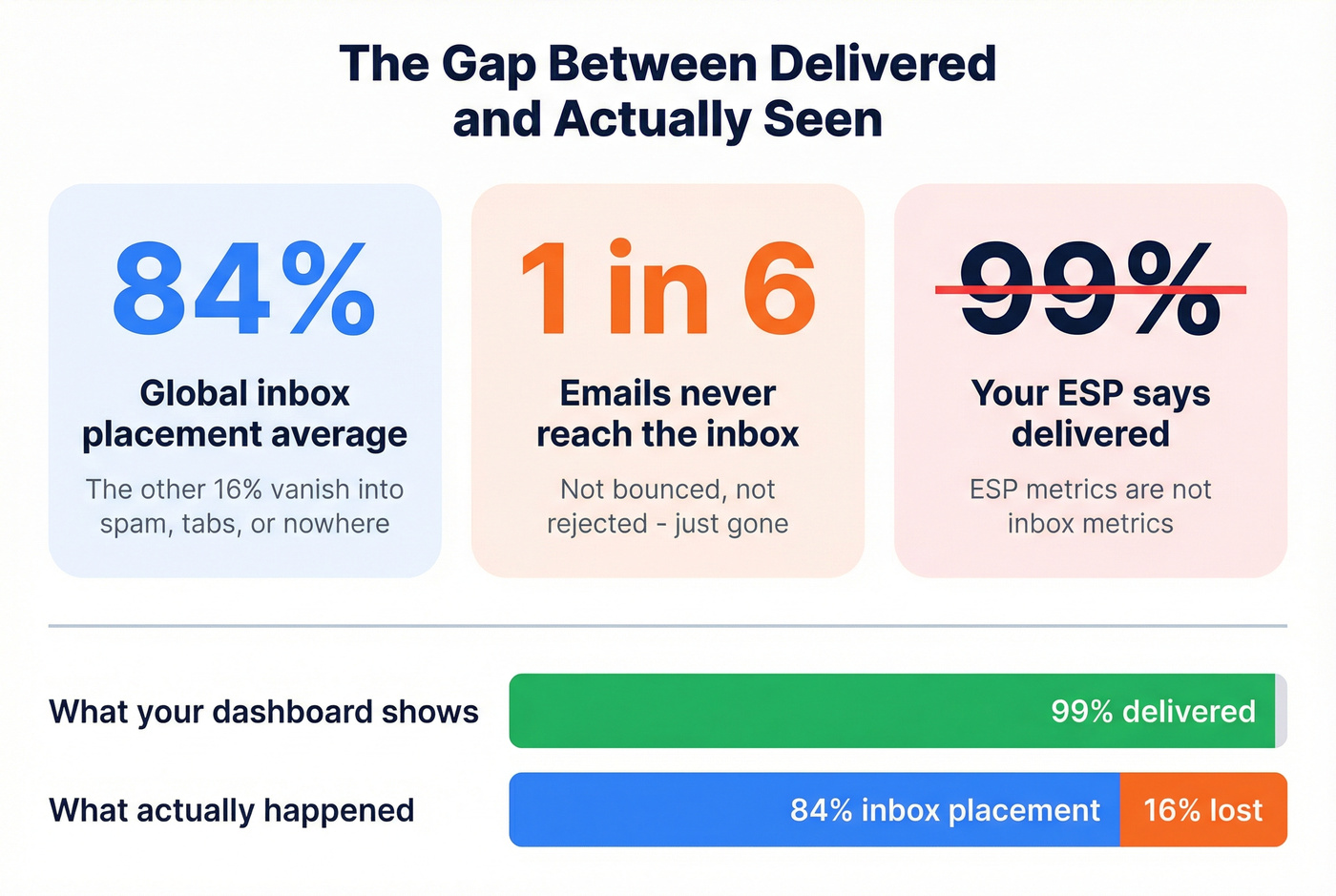
Here's the thing: deliverability isn't academic. It's operational. It's DNS records that break quietly, reputation signals that decay faster than you'd expect, and "helpful" security tools that click every link in your email before a human ever sees it. If you've ever stared at a dashboard showing "99% delivered" while your pipeline dries up, you've already learned the hard lesson - ESP metrics aren't inbox metrics.
The single most important distinction - delivery vs. deliverability - still trips up experienced teams. Delivery means the receiving server accepted your message. Deliverability means it actually landed where a human will see it: the inbox (not spam, not promotions, not "missing"). An email can get a clean 250 OK response and still be effectively dead on arrival.
We built this glossary to be useful under pressure. The terms here get benchmarks, failure modes, and blunt advice where they matter most, and the rest stay tight and scannable. It's genuinely 150+ terms - because when something breaks, you shouldn't have to leave the page to decode the jargon.
The 15 Terms That Decide Your Inbox Fate
If you only learn 15 deliverability terms deeply, make it these.
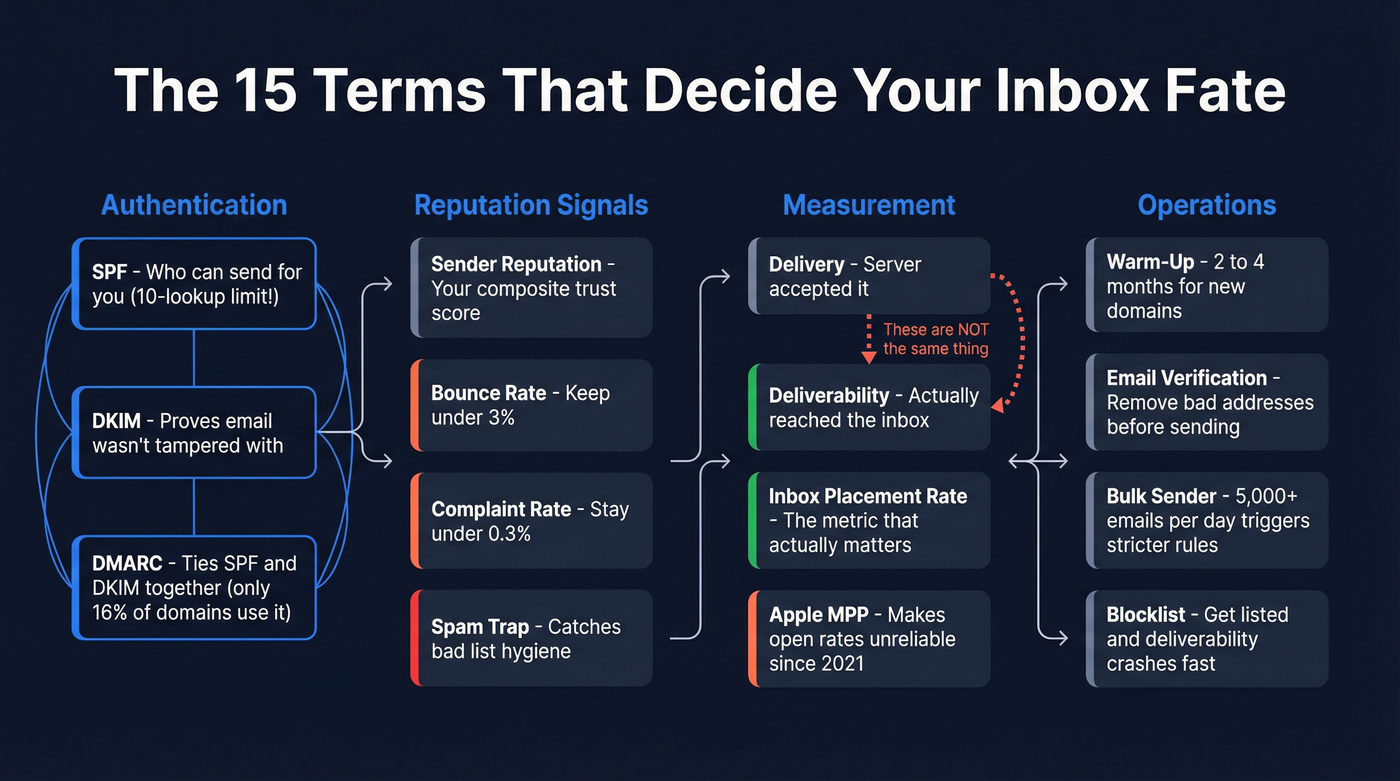
- Deliverability - Whether your email reaches the inbox, not just the server.
- Delivery - Whether the mailbox provider accepted the message at all.
- SPF - DNS record listing which servers can send on your behalf. Has a 10-lookup limit that breaks silently.
- DKIM - Cryptographic signature proving the email wasn't tampered with in transit.
- DMARC - Policy layer tying SPF and DKIM together. Only 16% of domains have implemented it.
- Sender Reputation - The composite trust score mailbox providers assign your domain and IP.
- Inbox Placement Rate - The percentage of sent emails that land in the actual inbox.
- Bounce Rate - Hard bounces (invalid addresses) kill reputation fast. Keep it under 3%.
- Complaint Rate - Spam complaints. Stay under 0.3% or face filtering.
- Warm-Up - Gradually increasing send volume on a new domain or IP. Expect 2-4 months.
- Spam Trap - Addresses designed to catch senders with bad list hygiene.
- Email Verification - Pre-send validation that removes invalid addresses, traps, and honeypots.
- Apple MPP - Apple Mail Privacy Protection. Pre-fetches content, making open rates unreliable since 2021.
- Bulk Sender - Anyone sending 5,000+ emails/day to a major provider domain.
- Blocklist - Third-party databases of IPs/domains flagged for spam.
Two truths that save careers: SPF alone doesn't protect you, and open rate is a vanity metric in 2026. If your SPF record exceeds 10 DNS lookups, it can fail without obvious warnings. And if you're still optimizing around opens, you're optimizing around bots.

You just read that bounce rates above 3% destroy sender reputation. Prospeo's 5-step verification - with catch-all handling, spam-trap removal, and honeypot filtering - keeps bounce rates under 4% across 15,000+ companies.
Fix deliverability at the source: start with emails that are actually real.
A-Z Deliverability Terminology
Jump to: A · B · C · D · E · F · G · H · I · J · K · L · M · N · O · P · Q · R · S · T · U · V · W · X · Y · Z
A
A/B Testing - Sending two variants (subject line, sender name, content) to measure which drives better engagement. In deliverability work, test one variable at a time or you'll learn nothing.
Abuse Desk - The contact point (often an email like abuse@domain.com) that receives spam and abuse reports. Having a monitored abuse desk is a trust signal for some providers and blocklist operators.
Abuse Rate - Another name for complaint rate: the percentage of recipients who mark your email as spam.
Allowlist (Whitelist) - A list of approved senders that bypass some filtering. It helps in tightly controlled corporate environments, but it won't save you from Gmail or Outlook spam filtering.
AMP for Email - A framework that allows interactive elements inside emails. Powerful, but it increases complexity and can trigger stricter scrutiny if your implementation is sloppy.
API (Email Sending API) - A programmatic way to send email from an application. Great for transactional email; dangerous for marketing if you don't enforce rate limits and suppression.
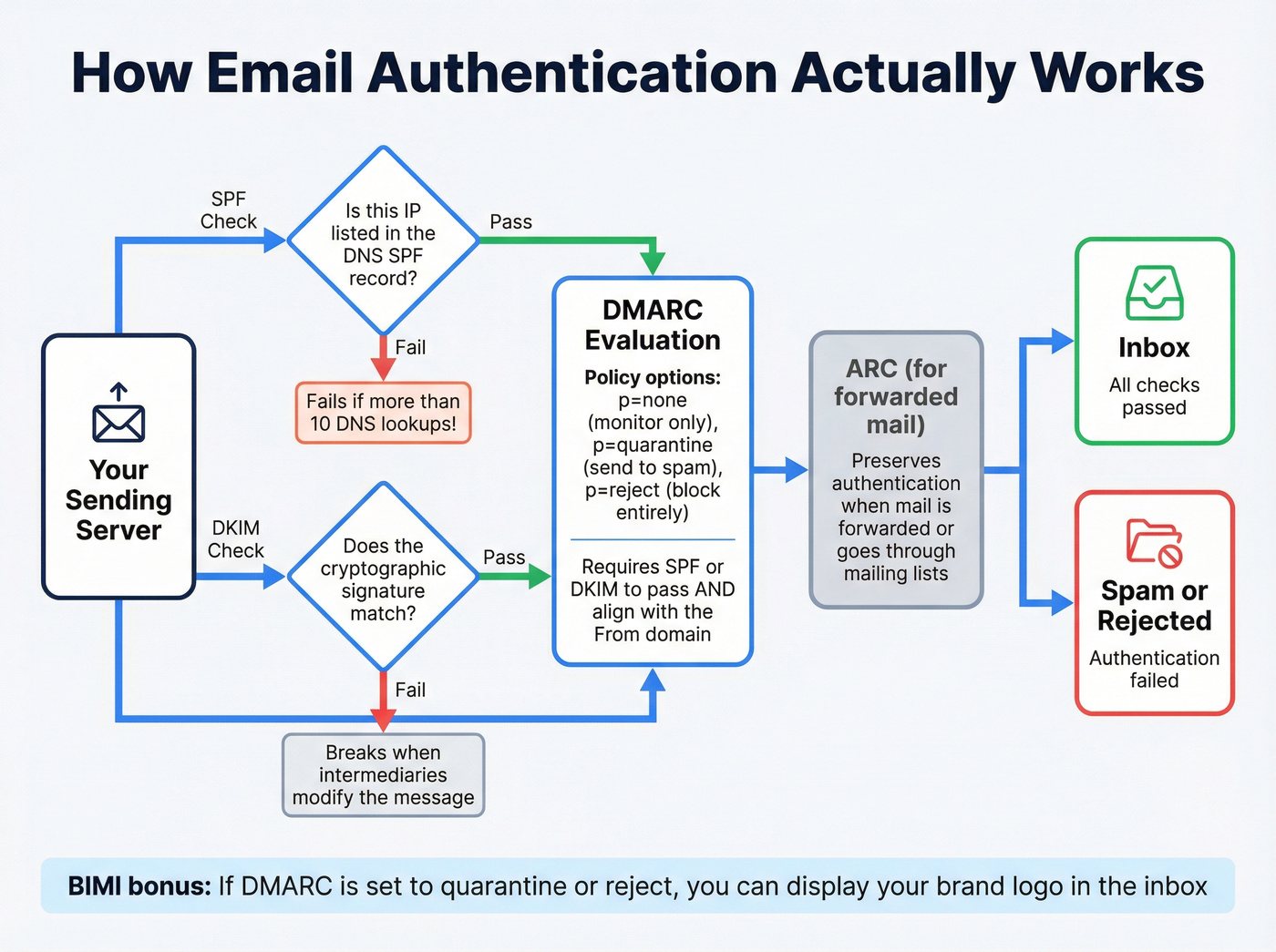
ARC (Authenticated Received Chain) - A protocol that preserves authentication results when emails pass through intermediaries like mailing lists or forwarding services. Without ARC, forwarded mail often fails DKIM/SPF even when the original sender did everything right.
Apple MPP (Mail Privacy Protection) - Apple's privacy feature that pre-fetches email content via proxy servers, inflating opens and masking user behavior. See Metrics After Apple MPP.
Authentication - The umbrella term for SPF, DKIM, and DMARC working together to prove you're a legitimate sender. No authentication, no trust. (If you need the full setup flow, start with SPF, DKIM, and DMARC.)
Autoresponder - An automatic reply (like "We received your message"). Misconfigured autoresponders can create loops and backscatter.
B
Backscatter - Bounce messages sent to forged sender addresses. Backscatter is a sign of broken mail systems and can get domains/IPs flagged.
Bayesian Filtering - A statistical spam-filtering method that learns from patterns in spam vs. non-spam. Modern filters use far more than Bayesian signals, but the concept still shows up in tooling and discussions.
BIMI (Brand Indicators for Message Identification) - A DNS standard that displays your brand logo next to authenticated emails in supporting inboxes. Requires DMARC enforcement (p=quarantine or p=reject) and typically a Verified Mark Certificate.
Blocklist (Blacklist) - A real-time database of IPs/domains flagged for spam. Getting listed can crush deliverability within hours. Spamhaus is the most influential; check their resources at spamhaus.org. If you need a triage playbook, see Blacklist Alert.
Bounce (Hard) - A permanent delivery failure. Hard bounce rates above ~2-3% are a reputation problem, not a rounding error. (Deep dive: Hard Bounce.)
Bounce (Soft) - A temporary failure (mailbox full, server down, message too large). Repeated soft bounces should be suppressed.
Brand Spoofing - When attackers send email that looks like it's from your brand. DMARC enforcement is the practical defense.
Bulk Email - High-volume marketing or outreach email. Bulk email is judged by different rules than transactional email.
Bulk Sender - A sender hitting a provider's bulk threshold (commonly 5,000+ emails/day to that provider). Bulk senders face stricter authentication and unsubscribe requirements.
Bulk Sender Rules
Google and Yahoo began enforcing stricter requirements for bulk senders in February 2024. Microsoft followed in May 2025. The threshold is 5,000+ emails per day to their domains.
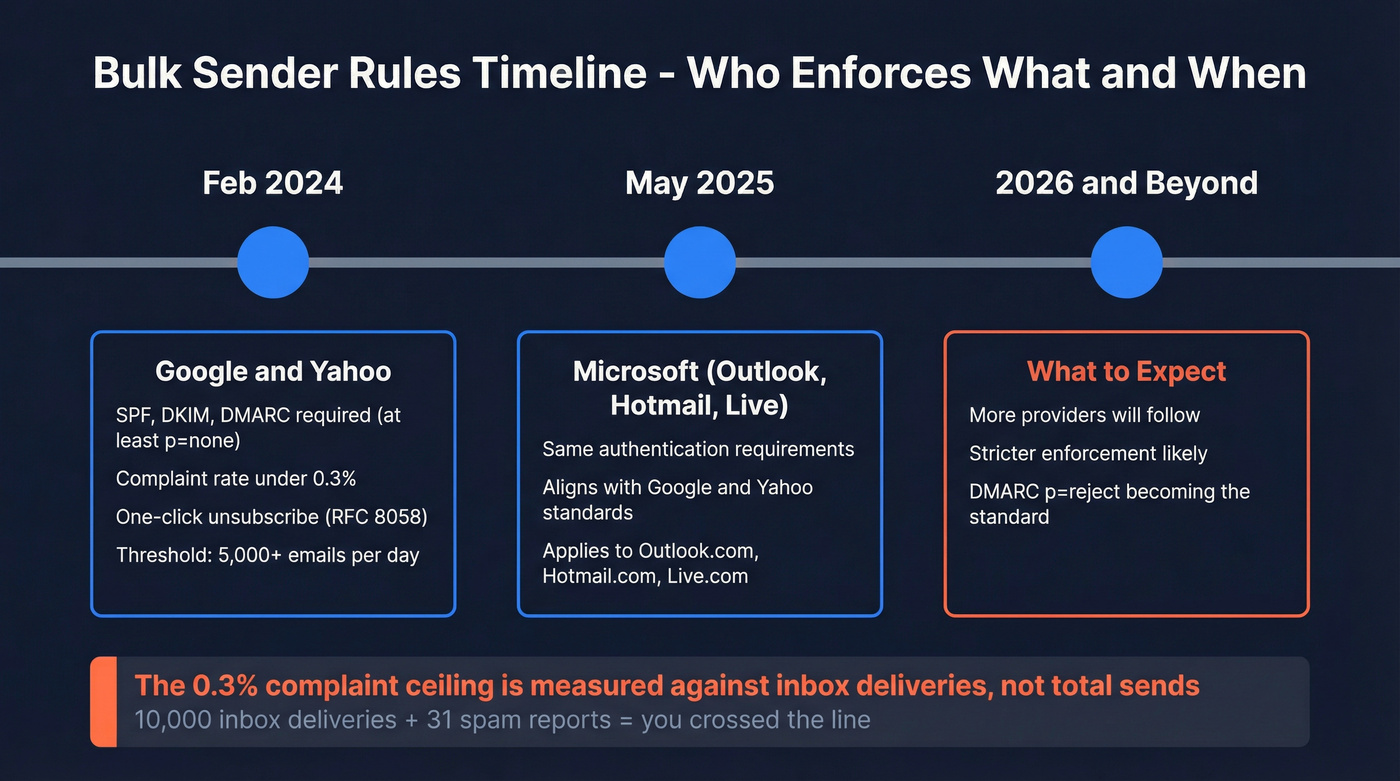
Requirements include SPF, DKIM, and DMARC authentication (at minimum p=none), spam complaint rates under 0.3%, and one-click unsubscribe via the List-Unsubscribe-Post header (RFC 8058). Google's guidance is worth bookmarking because it's blunt and implementation-focused: https://support.google.com/a/answer/81126
The 0.3% complaint ceiling is measured against messages delivered to the inbox, not total sends. If 10,000 emails land in the inbox and 31 people hit "Report spam," you crossed the line.
Let's be honest: if your average deal size is modest and you're blasting cold lists, you don't have a "deliverability problem." You have a relevance problem - and the filters are doing their job. (If you're doing outbound, pair this glossary with cold email tactics.)
C
Callback Verification - A verification method that checks whether a mailbox exists by talking to the receiving mail server. Useful, but catch-all domains and anti-abuse defenses can make results ambiguous.
CAN-SPAM - The US law governing commercial email. Requires a physical mailing address, a clear unsubscribe mechanism, and honest subject lines. Penalties can reach tens of thousands of dollars per email. (More detail: CAN-SPAM Physical Address Requirement.)
CASL (Canadian Anti-Spam Legislation) - Canada's anti-spam law. Requires consent (express or implied) before sending commercial electronic messages, with serious penalties for violations. (If you're doing outbound to Canada, see CASL cold email.)
CCPA (California Consumer Privacy Act) - A privacy law that affects how you collect, store, and delete subscriber data. It doesn't set deliverability rules, but it changes what you're allowed to do with email lists.
Catch-All Domain - A domain configured to accept email sent to any address, whether or not a specific mailbox exists. This makes verification harder and increases bounce risk if you treat "accepted" as "real."
CIDR (IP Range) - A notation for IP blocks (e.g., 192.0.2.0/24). Useful when managing SPF or diagnosing reputation issues across ranges.
Click-Through Rate (CTR) - The percentage of delivered emails where a recipient clicked at least one link. In 2026, CTR beats open rate as a signal you can trust.
Click-to-Open Rate (CTOR) - Clicks divided by opens. With Apple MPP inflating opens, CTOR is often misleading.
Click Tracking Domain - The domain used to wrap links for tracking. Using a custom tracking domain aligned to your brand usually reduces suspicion versus generic shared tracking domains.
Clipping (Gmail) - Gmail truncates emails larger than ~102KB. Keep emails under that threshold or you risk hiding critical content and breaking tracking pixels placed at the bottom.
Cold Email - Unsolicited outreach email. It lives or dies on list quality, targeting, and reply rate - not fancy templates. (Templates: outreach email template.)
Complaint Rate - The percentage of recipients who mark your email as spam. Stay under 0.3% if you want consistent inbox placement.
Content Filtering - Spam filtering based on message content (phrases, formatting, link patterns). Content filters are real, but they're rarely the main reason good senders land in spam.
Corporate Gateway - A security layer that scans inbound email for threats. Gateways often trigger machine opens and machine clicks.
Cousin Domain - A lookalike domain used for phishing (e.g., swapping letters). DMARC helps, but brand monitoring matters too.
D
Dedicated IP - A sending IP used only by your organization. It gives you control, but also full responsibility for reputation. If you can't sustain volume, a dedicated IP is usually a mistake. (More: Dedicated IP vs Shared IP cold outreach.)
Delivery - Whether the receiving mail server accepted your message. "Delivered" does not mean "inbox."
Deliverability - Whether your email reaches the inbox. This is the metric that determines whether your email gets read.
Digest Email - A batched summary email (daily/weekly). Digests often have lower engagement; treat them carefully during warm-up.
Directory Harvest Attack - Automated guessing of email addresses on a domain. Poorly configured servers can leak signals that help attackers.
DKIM (DomainKeys Identified Mail, RFC 6376) - A cryptographic signature attached to outgoing emails. Receivers verify it against a public key in DNS.
DKIM Alignment - Whether the DKIM signing domain matches the visible From domain under DMARC rules.
DKIM Key Rotation - Replacing DKIM keys on a schedule. Rotate at least annually; many teams rotate quarterly.
DKIM Selector - The prefix in the DNS record that identifies which DKIM key to use (e.g., selector1._domainkey.example.com). Selector mismatches are a top cause of DKIM failure.
DMARC (Domain-based Message Authentication, Reporting & Conformance, RFC 7489) - The policy layer that ties SPF and DKIM together and tells receivers what to do when authentication fails.
DMARC Alignment - The requirement that SPF and/or DKIM authenticate and align with the visible From domain. Passing SPF on a different domain doesn't help you.
DMARC Aggregate Report (RUA) - An aggregate summary report (typically sent daily) showing who's sending mail using your domain and how authentication performed.
DMARC Forensic Report (RUF) - A message-level failure report. Many providers restrict forensic reporting due to privacy concerns.
DMARCbis - The next iteration of DMARC, progressing through RFC standardization. It aims to clarify ambiguous parts of the original spec, especially around subdomain policy behavior and reporting.
DNS Records - The record types that underpin email: MX for mail routing, TXT for SPF/DMARC, CNAME for DKIM hosting patterns, PTR for reverse DNS. (If you're rebuilding your stack, see email sending infrastructure.)
Double Opt-In - A subscription method where users confirm via a follow-up email. It reduces complaints and traps. If you run newsletters, double opt-in is the cleanest long-term play.
E
EHLO/HELO - The SMTP greeting a sending server uses to identify itself. Mismatched or suspicious HELO names can trigger filtering.
Email Client - The app used to read email (Apple Mail, Outlook, webmail). Client behavior affects tracking accuracy and rendering.
Email Gateway - A security or routing layer that inspects email. Gateways are a major source of non-human interactions.
Email Header - Metadata fields that show routing, authentication results, and client behavior. When deliverability gets weird, headers are where the truth lives.
Email List Bombing - Subscribing a victim to many lists to flood their inbox. It's abuse, and it can create deliverability fallout if your list intake is weak.
Email Verification - The process of validating email addresses before sending to reduce bounces, traps, and reputation damage. Prospeo's 5-step verification handles catch-all domains, spam-trap removal, and honeypot filtering at 98% accuracy - exactly what you need when you're trying to keep bounce rate under control. (Tool roundup: email checker tool.)
Engagement Signals - Behavioral data mailbox providers use to decide inbox placement: clicks, replies, moves-to-inbox, deletes, and spam reports.
Envelope Sender (MAIL FROM) - The address used during SMTP transmission (often tied to Return-Path). It can differ from the visible From address and matters for SPF/DMARC alignment.
ESP (Email Service Provider) - The platform that sends your email (SendGrid, Mailgun, Postmark, etc.). Your ESP's infrastructure and shared IP pools influence deliverability.
F
Feedback Loop (FBL) - A system where mailbox providers report complaints back to senders/ESPs so you can suppress complainers. Gmail doesn't provide classic per-user FBL; it provides aggregate spam rate signals via Postmaster Tools.
Footer - The bottom section of an email. In marketing email, the footer is where you prove legitimacy: address, unsubscribe, preferences, and compliance info.
Forwarding - When email is forwarded, SPF often fails and DKIM can break. ARC exists largely because forwarding is so common.
From Address - The visible sender address. Consistency here matters for recognition and engagement.
G
GDPR (General Data Protection Regulation) - EU privacy regulation. For email, it forces clarity on lawful basis, consent, and deletion rights. (Practical outbound angle: GDPR for Sales and Marketing.)
Gmail Clipping - See Clipping (Gmail).
Google Postmaster Tools - Google's dashboard for Gmail reputation, spam rate, authentication, and delivery errors. If you send meaningful volume to Gmail, you should check it weekly.
Graymail - Email that recipients technically opted into but don't engage with anymore. Graymail drags down engagement signals and inbox placement over time.
Greylisting - A technique where a receiving server temporarily rejects first delivery attempts from unknown senders. Legitimate servers retry; spammers often don't. It causes delays, not permanent failure.
H
Hard Bounce - A permanent failure (invalid mailbox, invalid domain). Hard bounces are reputation poison.
Header Analysis - Inspecting raw headers to diagnose authentication, routing, and filtering. This is the fastest way to stop guessing.
Honeypot - A hidden field or address used to catch bots and scrapers. Hitting honeypots is a clear sign your acquisition flow is compromised.
HTML Email - An email with HTML formatting. Heavy HTML, sloppy code, or broken markup can hurt rendering and sometimes filtering.
I
Inbox Placement Benchmarks
Inbox placement rate is the metric that tells you whether your emails are being seen. Delivery rate only confirms the server accepted the message.
Benchmarks by mailbox provider, compiled from Validity and Litmus data:
| Provider | Inbox | Spam | Missing |
|---|---|---|---|
| Gmail | 87.2% | 6.8% | 6.0% |
| Microsoft | 75.6% | 14.6% | 9.8% |
| Yahoo/AOL | 86.0% | 4.8% | 9.2% |
| Apple Mail | 76.3% | 14.3% | 9.4% |
Microsoft is the hardest provider to land in. If your audience skews corporate (Outlook-heavy), your real deliverability is usually worse than your ESP dashboard suggests. We've seen teams celebrate 95%+ delivery rates while Microsoft was quietly junking a quarter of their volume.
Image Blocking - When clients block images by default. It breaks pixel-based open tracking and can affect how "complete" your email looks.
Inbox Placement Rate - The percentage of sent emails that land in the inbox (not spam, not missing). This is the deliverability number that matters.
Intent Data - Signals that a company or person is actively researching a topic. In deliverability terms, relevance drives engagement, and engagement drives inbox placement.
IP Reputation - The trust score assigned to your sending IP. Still important, especially on dedicated IPs, but domain reputation often dominates for shared-IP senders.
IP Warming - Gradually increasing volume on a new IP to build reputation.
ISP (Internet Service Provider) - In email discussions, often used loosely to mean mailbox providers and network operators.
J
Junk Folder - Another name for spam. Different clients label it differently; the outcome is the same: low visibility and damaged performance.
K
Key Rotation - Regularly generating new DKIM keys and updating DNS. It prevents long-lived key compromise and reduces "set and forget" failures.
L
Link Tracking Protection - Apple's feature that strips tracking parameters like UTMs in some contexts, reducing attribution accuracy for Apple users.
List Hygiene - Removing invalid addresses, unengaged subscribers, traps, and duplicates. List hygiene is the highest-ROI deliverability work you can do. (If you're cleaning data across systems, see CRM hygiene.)
List Segmentation - Splitting your list by behavior or attributes (engaged vs. cold, customers vs. trials). Segmentation protects reputation by keeping sends relevant.
List-Unsubscribe - A header that enables inbox-level unsubscribe UI. It's expected now, even when not strictly required.
List-Unsubscribe-Post (RFC 8058) - The header that enables one-click unsubscribe via an HTTP POST. Required for bulk senders under major provider rules.
Lookalike Domain - A domain designed to mimic another for phishing. DMARC helps prevent spoofing of your exact domain, not cousins.
M
Metrics After Apple MPP
Apple Mail Privacy Protection launched on September 20, 2021, and it broke open rate as a reliable metric. When MPP is enabled, Apple's proxy servers pre-fetch email content - including tracking pixels - whether or not a human opens the message.
A misconception that refuses to die: 77% of marketers believed MPP is automatically activated. It isn't - users must opt in. Adoption is still high enough that the distortion is universal, so treat open rate accordingly.
Another nuance most teams miss: MPP applies to any email viewed in the Apple Mail app, regardless of the underlying mailbox provider. A Gmail address accessed through Apple Mail still gets MPP pre-fetching.
The early impact was measurable: within the first 7 days, MPP accounted for 5% of all opens, with unique opens inflating by 6.5%. MPP-triggered opens peaked between 6-11pm PST, while genuine human opens clustered between 6am-1pm PST - a clean fingerprint of automation.
Open rate is a vanity metric in 2026. Track clicks, replies, conversions, and retention instead.
Machine Opens - Opens triggered by automated systems (Apple MPP, security scanners, gateways). If you're using opens to make decisions, you're letting bots run your program.
Mailbox Provider (MBP) - Gmail, Outlook, Yahoo, etc. They decide placement, not your ESP.
Mail Merge - Personalizing emails at scale by inserting fields. Poorly executed mail merge (broken variables, weird formatting) tanks trust fast.
Microsoft SNDS (Smart Network Data Services) - Microsoft's reputation dashboard for Outlook/Hotmail traffic.
MTA (Mail Transfer Agent) - The server software that sends/relays email (Postfix, Exim, etc.).
MTA-STS (Mail Transfer Agent Strict Transport Security) - A standard that tells senders to require TLS when delivering to your domain. Think of it as "HSTS for SMTP" - it reduces downgrade attacks.
Multipart MIME - An email format that includes both plain-text and HTML parts. Always include a plain-text part; it improves compatibility and reduces weird rendering.
MX Record - The DNS record that specifies which servers receive mail for a domain.
Modern Protocols Nobody Covers
These protocols sit one layer deeper than SPF/DKIM/DMARC, and they matter more every year.
TLS-RPT (TLS Reporting) - Reporting for TLS negotiation failures, configured via _smtp._tls.yourdomain.com.
Null Sender - A blank envelope sender (<>) used for certain system messages like bounces. It's normal in that context.
N
Non-Human Interactions (NHI) - Engagement triggered by bots, scanners, and automated systems rather than recipients. NHI is why "clicks" can be polluted too.
Newsletter - Recurring content email. Newsletters live and die on engagement; stale lists turn newsletters into graymail.
O
One-Click Unsubscribe - The ability to unsubscribe directly from the inbox UI with a single action. If you make people log in to unsubscribe, you're begging for complaints.
Open Rate - The percentage of delivered emails where a tracking pixel loaded. No longer a primary KPI. (Related: open rate vs click rate.)
Opt-In - A user action that grants permission to email them.
Opt-Out - A user action that removes permission. Opt-out must be honored quickly and globally.
P
Phishing - Fraudulent email designed to steal credentials or money. DMARC enforcement reduces spoofing of your domain, but it doesn't stop all phishing.
Plain Text Email - Email without HTML. Plain text can perform extremely well in cold outreach because it looks human and avoids rendering issues.
Postmaster - A role or mailbox responsible for mail system administration. "Postmaster tools" are provider dashboards for sender health.
Preference Center - A page where subscribers choose frequency/topics instead of fully unsubscribing. Preference centers reduce complaints when done well.
Promotions Tab - Gmail's category for marketing email. Promotions isn't spam, but it's lower visibility. Engagement still matters. (If you're stuck there, see Emails landing in Promotions tab.)
PTR Record (Pointer Record) - Reverse DNS mapping from IP to hostname. Missing PTR is a red flag.
Q
Quarantine (DMARC Policy) - A DMARC action (p=quarantine) that tells receivers to treat failing mail as suspicious, often routing it to spam.
Queue (Mail Queue) - Where unsent or deferred messages sit on an MTA. Large queues often indicate throttling, greylisting, or reputation issues.
R
Rate Limiting - Limiting send speed to avoid provider throttling and reputation hits.
Recycled Spam Trap - A once-real address that becomes a trap after abandonment. If you keep mailing dead addresses, you'll hit these.
Re-Engagement Campaign - A campaign designed to wake up inactive subscribers. If they don't re-engage, suppress them.
Reply Rate - The percentage of delivered emails that receive a human reply. For cold outbound, reply rate is the cleanest engagement signal you have.
Reputation (Sender/IP/Domain) - The composite trust score based on your history. Reputation is earned slowly and destroyed quickly.
Return Path - Historically, the address for bounces and SPF evaluation (tied to envelope sender). People still use "return path" as shorthand for the SPF-authenticated domain.
Role-Based Address - Addresses like info@, sales@, support@. They're often lower engagement and higher risk for cold outreach.
Routing - The path an email takes through servers. Routing issues often show up as delays, missing mail, or unexpected authentication results.
S
Seed Testing - Sending to a panel of test inboxes to measure inbox vs. spam placement. It's the closest thing to "ground truth" outside real recipient behavior.
Sender ID - A legacy Microsoft authentication concept related to SPF. Mostly historical, but it still comes up in older systems.
Sender Reputation - How mailbox providers score your trustworthiness based on complaints, bounces, engagement, and consistency.
Sender Score - A 0-100 reputation metric published by Validity for IPs. Useful as a quick signal, not a full diagnosis.
Shared IP - An IP shared among multiple senders in an ESP pool. Great when the pool is well-managed; brutal when it isn't.
SMTP (Simple Mail Transfer Protocol, RFC 5321) - The protocol used to send email between servers. Most deliverability issues show up as SMTP responses and headers.
SMTP Response Codes - Status codes like 250 (OK), 421 (temporary deferral), 550 (rejected). Learn these and you'll debug faster than 90% of teams.
Spam Complaint - A recipient marking your email as spam. Too many complaints trigger filtering or blocking.
Spam Filter - The system that decides placement. Filters use authentication, reputation, engagement, content, and behavior patterns.
Spam Score - A heuristic score from tools that try to predict filtering risk. Treat it as a hint, not a verdict.
Spam Trap (Pristine) - A trap that never belonged to a real person. Hitting pristine traps screams "bad acquisition."
Spam Trap (Recycled) - A trap created from an abandoned address. Hitting these usually means you don't suppress inactive recipients.
SPF (Sender Policy Framework, RFC 7208) - A DNS TXT record listing which servers can send for your domain. Official spec: https://www.rfc-editor.org/rfc/rfc7208
The critical gotcha: SPF has a 10 DNS lookup limit. Exceed it and you trigger an SPF permerror. A broken SPF record is worse than no SPF record - it signals misconfiguration and neglect, not mere absence.
SPF Permerror - A permanent SPF evaluation error, commonly caused by exceeding 10 DNS lookups or syntax mistakes.
Spoofing - Forging the From domain to impersonate a sender. DMARC enforcement is the practical countermeasure.
Subdomain - A child domain like mail.example.com. Subdomains can have separate reputation and separate authentication records.
Subscriber - A person who opted in (or at least should have). Treat subscribers like assets, not rows in a CSV.
Suppression List - A do-not-send list (unsubscribes, bounces, complainers, traps). Suppression must be global across tools.
Sunset Policy - A rule that stops mailing recipients after a period of inactivity. Sunset policies protect engagement signals and reputation.
T
Throttling - Provider-enforced or self-imposed limits on send volume. Sudden spikes trigger throttling; consistency builds trust.
TLS (Transport Layer Security) - Encryption for SMTP connections. TLS doesn't guarantee inbox placement, but lack of TLS can hurt trust.
TLS-RPT - Reporting for TLS failures. See Modern Protocols Nobody Covers.
Tracking Pixel - A tiny image used to record opens. Apple MPP and image blocking make it unreliable.
Transactional Email - Password resets, receipts, alerts. Transactional email should be separated from marketing streams to protect critical delivery.
Triggered Email - Automated email sent based on behavior (signup, purchase, inactivity). Triggered email usually performs well because it's timely and relevant.
U
Unsubscribe - The mechanism that lets recipients stop receiving email. Make it obvious and one-click where possible; hiding it increases spam complaints.
Unsubscribe Rate - The percentage of recipients who unsubscribe. Unsubscribes are healthier than complaints.
UTM Parameters - Tracking tags added to URLs for analytics attribution. Link tracking protection can strip these in some contexts.
V
Verification (Email) - Confirming whether an address is valid and safe to send to. See Email Verification. (More: verification email.)
Volume Spike - A sudden increase in send volume. Volume spikes are one of the fastest ways to trigger throttling and filtering.
W
Warm-Up & Infrastructure
Warm-Up - Gradually increasing send volume on a new domain or IP. The "30-day warm-up" myth refuses to die; real warm-up takes 2-4 months if you want stable inbox placement. (More: automated email warmup.)
IP Warming - Warm-up for a dedicated IP. Start with your most engaged recipients and scale slowly.
Domain Warm-Up - Building reputation for a new sending domain. Keep early volume low, keep targeting tight, and watch provider dashboards.
Dedicated vs. Shared IP - Dedicated IPs are for senders with consistent volume and strong ops discipline. Most SMBs should stay on a reputable shared pool until they've earned the right to go dedicated.
This is the question that comes up in every email ops Slack and Reddit thread: "Why did our deliverability fall off a cliff right after we added a new sending tool?" Nine times out of ten, it's SPF lookups, misaligned DMARC, or a list that wasn't verified. The consensus on r/sales and r/emailmarketing is the same - check your DNS first, ask questions later.
X
X-Header - A non-standard header added by systems for internal tracking (e.g., X-Campaign-ID). Useful for debugging, but don't rely on it for authentication or compliance.
X-Mailer - A header that can reveal the sending software. It's not a primary deliverability factor, but it can be a fingerprint.
Y
Yahoo Sender Hub - Yahoo's sender dashboard for complaint and authentication visibility.
Z
Zero-Party Data - Data a user intentionally provides (preferences, interests). Zero-party data improves relevance, and relevance improves deliverability.
Free Tools Every Sender Should Use
You don't need to spend thousands to get real deliverability visibility. Start with the provider dashboards, then add verification and testing.
| Tool | What It Monitors | Price |
|---|---|---|
| Google Postmaster Tools | Reputation, spam rate, auth | Free |
| Microsoft SNDS | IP reputation, traps, complaints | Free |
| Yahoo Sender Hub | Complaints, auth, delivery | Free |
| Prospeo | Verification, catch-all, traps | Free tier available |
| GlockApps | Seed inbox placement tests | From ~$85/mo |
| MXToolbox | DNS + blocklist checks | From ~$129/mo |
| SendForensics | Deliverability + content tests | From ~$49/mo |
Set up the three dashboards first. Then add seed testing when you need proof of inbox vs. spam placement across providers. For verification before sending, use a tool that handles catch-all domains and filters traps - because nothing wrecks reputation faster than blasting invalid addresses. (If you're comparing vendors, start with email ID validator.)
Skip seed testing if you're sending fewer than a few thousand emails per month. At low volume, the provider dashboards and your own bounce/complaint metrics tell you enough.
What to Do Next
You don't need every term in this email deliverability glossary memorized. You need the 15 that move inbox placement understood and implemented.
Start with SPF, DKIM, and DMARC (begin at p=none). Register for Google Postmaster Tools, Microsoft SNDS, and Yahoo Sender Hub. Verify your list before your next send, then watch bounce rate and complaint rate like a hawk for the next 2-3 weeks. After that monitoring window, move DMARC toward p=quarantine using a low pct value and ramp it up as you confirm legitimate sources are aligned. (If you want the full step-by-step, use the email deliverability checklist.)
Make monitoring a habit: check provider dashboards weekly, and check them daily during warm-up or after any infrastructure change - new ESP, new tracking domain, new subdomain. Deliverability doesn't fail all at once. It degrades in signals first, and by the time you notice pipeline drying up, the damage has been compounding for weeks.
Half this glossary exists because senders blast unverified addresses. Prospeo refreshes 300M+ profiles every 7 days - not the 6-week industry average - so your data doesn't decay between campaigns.
Stop memorizing bounce codes. Send to verified contacts at $0.01 per email.
FAQ
What's the difference between delivery and deliverability?
Delivery means the receiving mail server accepted your message - it didn't bounce. Deliverability means the email reached the inbox, not spam or a low-visibility tab. An email can be "delivered" with a clean 250 OK response and still never be seen by a human.
How long does SPF, DKIM, and DMARC setup take?
Publishing DNS records takes minutes. Rolling them out safely takes 6-8 weeks because you need to monitor DMARC aggregate reports, fix alignment issues across all sending tools, and ramp policy enforcement from p=none to p=quarantine without breaking legitimate mail flows.
Is open rate still useful in 2026?
Not as a primary metric. Apple MPP and corporate security scanners trigger opens without human involvement, inflating rates by 6-15%. Use clicks, replies, conversions, and list retention as your core engagement signals instead.
What's a safe complaint rate?
Under 0.3%, measured against messages delivered to the inbox - not total sends. Google, Yahoo, and Microsoft all enforce this threshold for bulk senders, and exceeding it triggers progressive filtering that can take weeks to recover from.
How does email verification improve deliverability?
Verification removes invalid addresses, spam traps, and honeypots before you send - reducing hard bounces and protecting sender reputation. Clean lists mean fewer bounces, fewer trap hits, and stronger engagement signals that directly improve inbox placement.