

How to Find Executive Contact Information (Email + Direct Dial) in 2026
Your "verified" exec list just bounced 7% and now your domain's on thin ice.
Or you've got a board-level ask: "Get the CFO on a call this week," and you've got... a switchboard and a prayer.
Here's the thing: to find executive contact information reliably, don't start by brute-forcing the CEO's inbox. Start with routing paths, then verification, then direct dial as your Plan B. Run it like a system and you'll keep bounces under 2% and end up with a 60-80% usable list after verification (that's what "clean" looks like in the real world), and if you're targeting EU/UK you can run the same system as long as your sourcing and opt-outs are tight.
What you need (quick version)
Checklist (the stuff that actually matters)
- Correct person match: same company, current role, right seniority (CEO/CFO/GC/Chief of Staff/EA).
- Deliverability safety: bounce rate targets :
- <2% = normal/safe
- 2-5% = warning (slow down + re-verify)
- >5% = critical (stop sending, fix data + infra)
- Verification discipline: "deliverable" doesn't mean "correct person." (See: verification.)
- The classic failure mode is personal Gmail mismatch: the email exists, but it's the wrong human.
- A second channel: direct dial/mobile so you're not hostage to inboxes. (If you need a deeper workflow, use this B2B Phone Number guide.)
- Refresh cadence: exec data goes stale slower than the average employee, but it still decays. Re-verify every 30-90 days.
Mini decision tree (pick your path fast)
- Need a meeting this week -> prioritize routing + direct dial (switchboard's too slow).
- Doing cold email at scale -> prioritize verification + freshness (protect domains first). (Related: email deliverability.)
- Targeting EU/UK -> prioritize compliant sourcing + suppression/opt-out hygiene.
- Targeting public companies -> use SEC EDGAR for reliable HQ phone/address, then route internally.
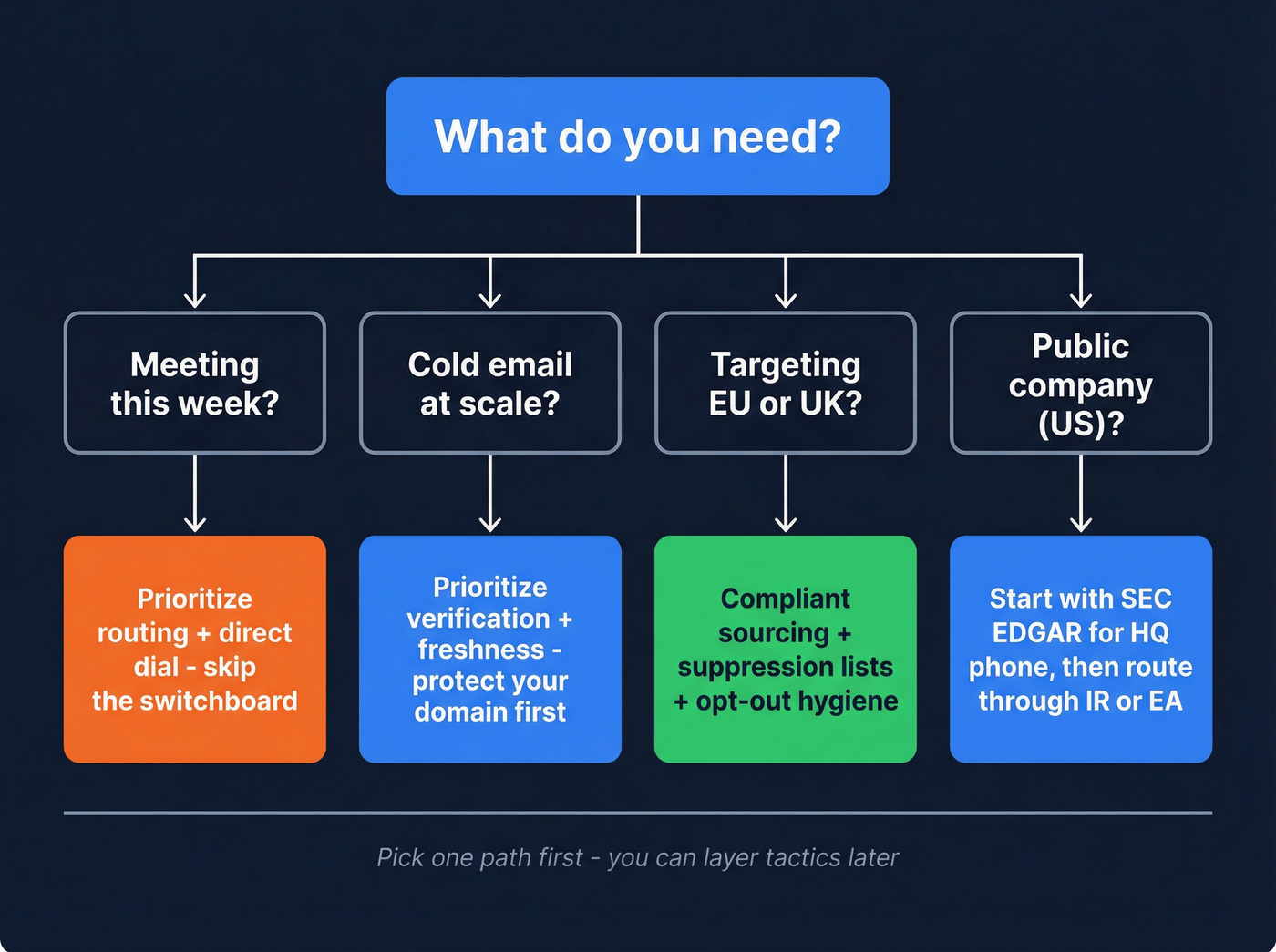
How to find executive contact information fast (decision tree by scenario)
Use this to avoid wasting an hour on the wrong tactic.
Public company (US) Use EDGAR to get official HQ phone/address, then route: CFO office, investor relations, or executive assistant.
Private company (US/Canada) Start with the company site + PDFs + press pages for patterns and routing inboxes. Then use an executive finder for the specific exec and verify before sending. (If you’re choosing tooling, start with email lookup tools.)
Nonprofit / think tank / association They often publish named staff emails/phones on press pages. Routing's usually faster than guessing the CEO's inbox.
EU/UK target Don't get cute. Use compliant sourcing, keep opt-outs clean, and avoid scraping tactics that create risk. Also expect more catch-all domains and more centralized routing. (More detail: GDPR for Sales and Marketing.)
Use this / Skip this (so you don't pick the wrong path)
Use this decision tree if...
- You've got a deadline (this week) and need the fastest path to a human.
- You're building a list for outbound and care about bounce rate more than "list size."
- You're targeting regulated industries where getting the right person matters more than getting any email.
Skip this decision tree if...
- You're doing pure inbound partnerships and already have warm intros.
- You only need a generic contact (support, billing, press) and don't need exec-level routing.
- You're trying to spray and pray. This workflow's built to protect reputation, not maximize sends.
"Exec-adjacent routing" (the move most teams skip)
If the CEO/CFO's hard to reach, route through:
- Press / Comms
- Investor Relations (IR)
- Executive team requests inboxes
- Chief of Staff / Executive Assistant (EA)

That's not "spam the press team." It's using published routing to get to the right owner without torching deliverability, and it's often the fastest way to reach the C-suite without guessing inboxes. (If you need scripts, see: How to Ask for the Right Contact Person.)
Step-by-step workflow to get exec email + phone (without burning deliverability)
I've watched teams waste months "finding emails" when their real problem was list hygiene and verification discipline. This workflow fixes that.
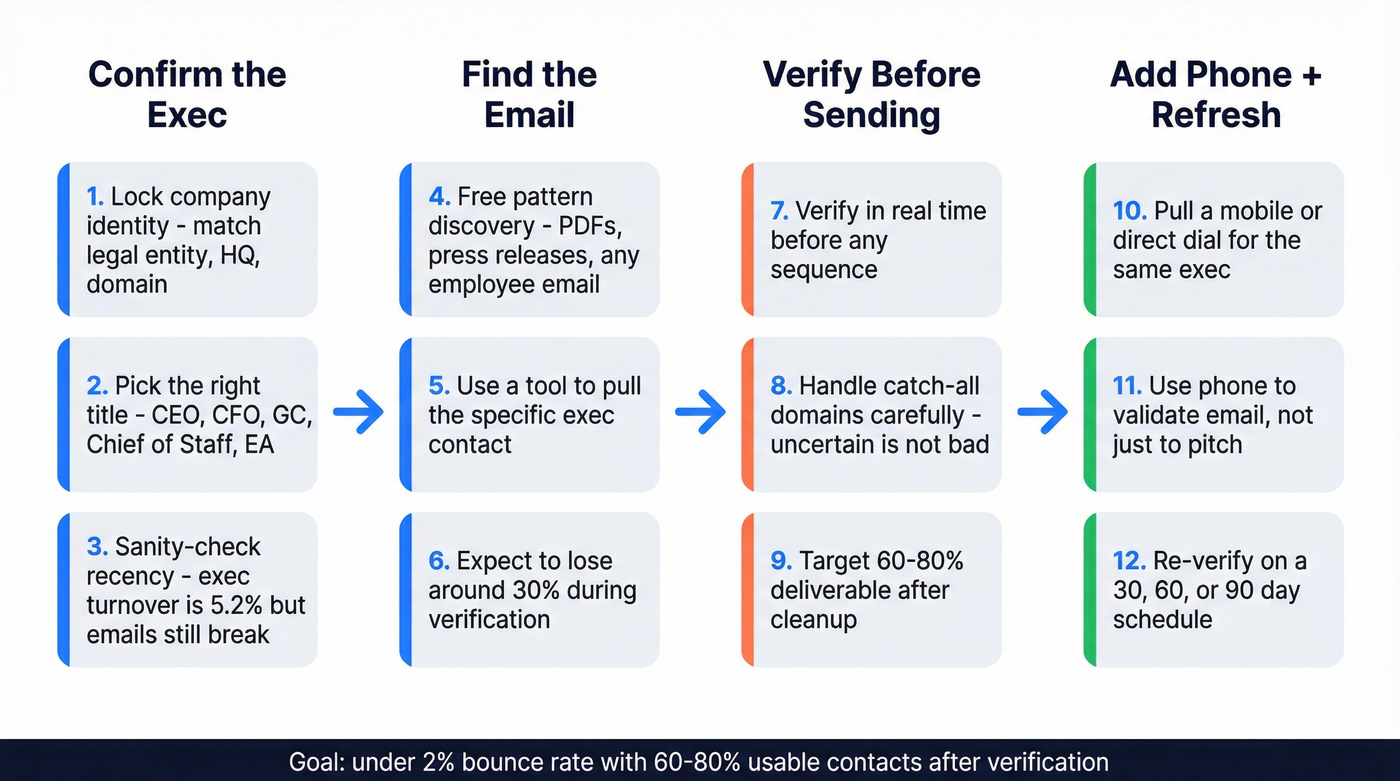
Confirm the right executive (role + company match)
Lock the company identity first. Subsidiaries and similarly named entities are where bad data starts. Match the legal entity, HQ location, and domain.
Pick the right target title. For exec outreach, "CEO" isn't always the best first touch. Shortlist:
- CEO / President
- CFO
- GC (if it's risk/compliance)
- Chief of Staff
- EA / Executive Assistant
If you sell into HR or people ops, plan for CHRO outreach to look different (more emphasis on credibility, privacy, and clear opt-outs) than a finance-led motion.
- Sanity-check recency. Exec turnover's lower than the rest of the org (Mercer puts "heads of orgs and executives" at 5.2% voluntary turnover), but emails still break from reorgs, domain changes, and alias policies. (This is why B2B contact data decay matters.)
One stale exec record can wreck a whole sequence.
Find the email (public sources -> tools)
Start with free pattern discovery. Search for any employee email on the domain to infer format (first.last, firstinitiallast, etc.). PDFs and press releases are gold. (More tactics: guess email address format.)
Use a tool to pull the specific exec contact. Tools are fast, but they're not truth. Treat the output as a hypothesis until verified, especially when you're hunting executive email addresses. (If you want a ranked list: B2B email lookup tool.)
Expect loss during verification. In real workflows, you'll typically lose around 30% of emails when you verify. That's normal. Plan for it.
Verify before you send (and what to do with catch-all domains)
- Verify in real time before any sequence. Data decays 2.1% per month, about 22.5% per year. Even if the email was good last quarter, it can be dead now. (SOP: email verification list.)
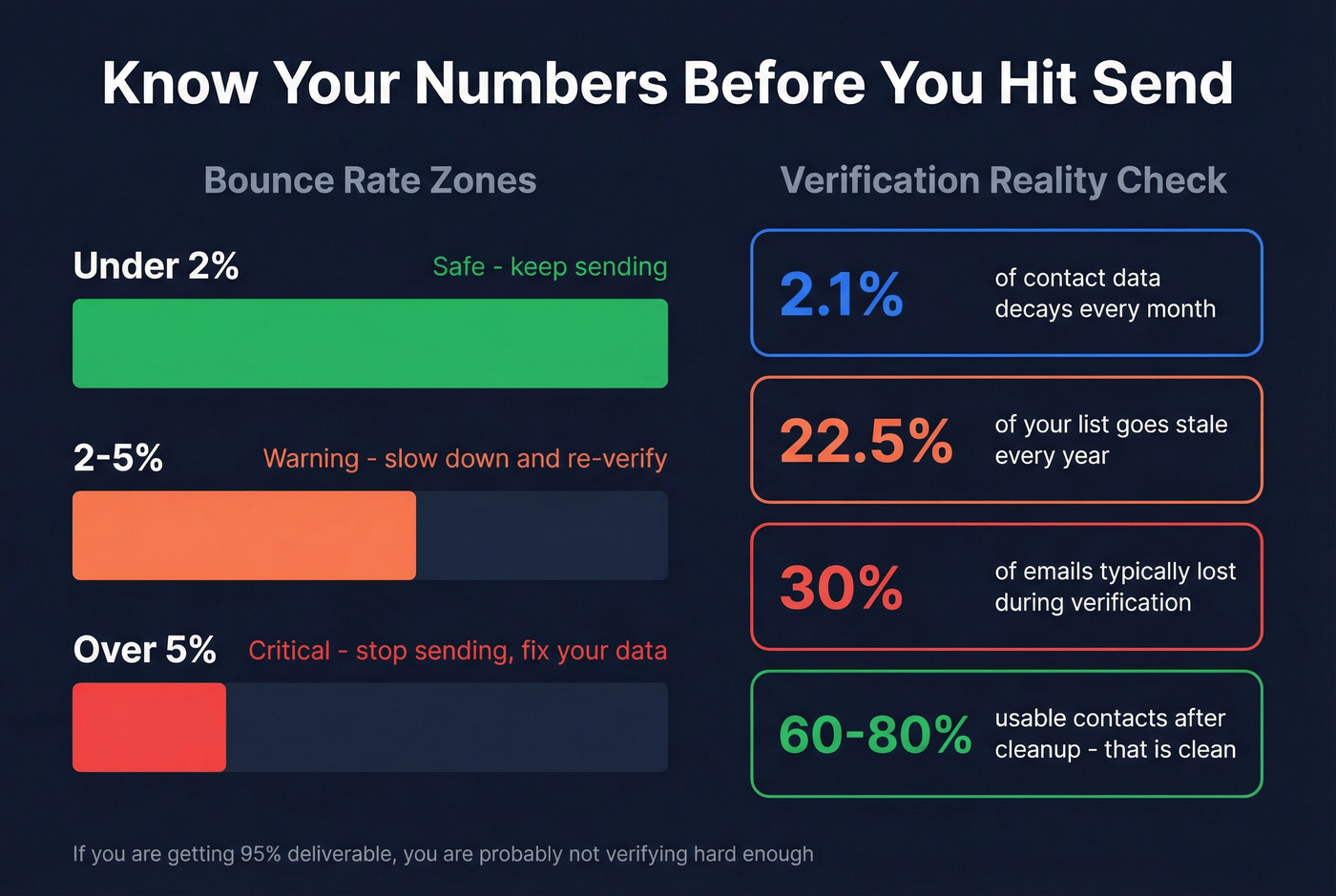
- Handle catch-all domains like a grown-up. Catch-all doesn't mean "bad," it means "uncertain." Your options:
- Send only if you've got strong corroboration (pattern + role match + recent signals)
- Route via phone/EA first
- Run a second finder to increase confidence
- Plan your "deliverable after verification" rate. After verification and cleanup, expect 60-80% of your initial list to be usable for work emails. If you're getting 95% deliverable, you're probably not verifying hard enough. (Tooling options: email verifier website.)

You just read about losing 30% of emails during verification. Prospeo's 5-step verification and 7-day data refresh cycle mean you start with cleaner exec contacts - 98% email accuracy, 125M+ verified mobiles, and catch-all handling built in.
Get the CFO's real email and direct dial in one search.
Add direct dial as the "Plan B"
Pull a mobile/direct dial for the same exec. Email's fragile. Phone's decisive. With a verified mobile, you can confirm the exec is real/current, route through an assistant faster, and salvage outreach when domains are catch-all.
Use phone to validate email, not just to pitch. A 20-second "Did I reach the right office for [Name]?" saves you from emailing the wrong person (especially with personal email mismatches).
Real talk: this one habit fixes an embarrassing amount of "we emailed the CFO" stories.
Refresh schedule (30/60/90-day rules)
- Re-verify on a schedule, not when things break.
- 30 days: high-volume outbound, fast-moving segments (startups, agencies, hiring spikes)
- 60 days: steady outbound, mid-market
- 90 days: low-volume, high-touch enterprise

If you're sending to execs quarterly off an old spreadsheet, you're basically choosing to bounce.
Free & public methods that still work in 2026 (copy/paste templates)
These aren't "growth hacks." They're boring, repeatable, and they work.
Google operators (copy/paste)
- Find any email footprint on the domain:
site:company.com ("@company.com" OR "email") - Pull PDFs where emails often appear:
site:company.com filetype:pdf ("@company.com") - Press pages and media contacts:
site:company.com (press OR newsroom OR media) ("email" OR "@company.com") - Investor relations (public companies):
site:company.com ("investor relations" OR IR) ("email" OR "@company.com")
Where to look (that isn't obvious)
- Press releases (often include comms contacts)
- Board decks / ESG reports / annual reports (PDFs with staff emails)
- Conference speaker PDFs (bios sometimes include direct contact)
- Job postings (sometimes reveal email formats via recruiter contacts)
Newsletter "inspect sender" trick
If the company's got a newsletter:
- Subscribe with a throwaway inbox
- Open the email header details
- Look for the sending domain and any reply-to patterns
Even if it's a marketing platform, you often get a real domain clue (and sometimes a human reply-to).
Identity confirmation tricks directories miss (Google Reviews + local breadcrumbs)
Most "executive email directories" fail for one reason: they guess the person, then guess the email, then call it "verified" because it doesn't bounce. That's how you end up emailing the wrong John Smith, and yes, I've seen that turn into a very awkward "please stop contacting me" reply that gets forwarded internally.
Two fast identity checks that beat that trap:
- Google Reviews / customer mentions: search
"[Exec Name]" + companyand scan reviews, testimonials, and event pages. You're looking for role confirmation ("CFO at...") and recency ("joined in 2026"). - Local filings + PDFs: state registrations, charity filings (for nonprofits), and vendor PDFs often include the company's legal name and address, which is perfect for disambiguating similarly named entities.
My opinion: if you can't confirm the exec is current, you don't have a lead. You've got a deliverability liability.
Routing paths that bypass the CEO inbox (press, IR, exec-team requests) + ethics
If you're trying to find executive contact information, routing's the cheat code because it's published, monitored, and designed to move messages.
This is also where a lot of "email and c-level executive resources" live in plain sight: press pages, IR pages, and executive requests inboxes that are meant to route serious inquiries.
Use this if...
- You need an intro fast and you're not trying to trick anyone.
- The org clearly publishes escalation paths (press, IR, executive requests).
- You're reaching out with something legitimately relevant (partnership, speaking, compliance, investor-grade request).
Skip this if...
- You're going to pretend you're media. Don't. It's unethical and it backfires.
- The page explicitly says "journalists only."
Concrete examples:
- Bipartisan Policy Center's media page includes a specific routing line for "executive team requests": a general inbox plus an escalation path.
- Novo Nordisk's media contact page is explicit: only legitimate journalist/media requests get responses. That's a hard boundary.
- SHRM's press room lists named staff with direct emails and phone numbers. Even if you're not press, it shows you where real humans are exposed.
Escalation ladder (ethical, effective, and weirdly underused)
When you need a response, don't blast five execs at once. Do a clean ladder:
- Start with the most relevant exec-adjacent owner (Chief of Staff / EA / functional VP).
- Wait 7 days (or 5 business days) with one follow-up.
- Escalate one rung (CFO -> COO -> CEO, or VP -> Chief of Staff).
- Stop after 3 rungs unless you've got a legitimate relationship reason to continue.
This is the Elliott.org-style "one exec at a time" cadence applied to B2B outreach. It works because it's respectful, readable, and it doesn't trigger internal "who is spamming us?" alarms.
Do / Don't (keep it clean)
- Do: ask for the right owner ("Who handles vendor evaluation for X?")
- Do: be transparent about being a vendor
- Don't: misrepresent your identity
- Don't: blast multiple press contacts in parallel

Public company path: SEC EDGAR (what you'll reliably get)
EDGAR won't magically hand you the CFO's email. What it will do is give you official, reliable corporate contact points you can route through.
Quick EDGAR workflow
- Go to the SEC's EDGAR search and pull a recent filing (8-K, 10-K, S-1, etc.).
- In the header, you'll reliably find:
- Principal executive office address
- Registrant telephone number
- Use that number to reach the operator, then ask for the CFO office / IR / executive assistant.
EDGAR operational details matter when you're doing this under time pressure: EDGAR accepts filings 6 a.m.-10 p.m. ET weekdays (except federal holidays). EDGAR Next compliance has been required since Sept 15, 2025, which is why entity identifiers and filing hygiene are more consistent now.
Limitations (don't expect miracles)
- Emails in filings are inconsistent and often absent.
- You're getting routing, not direct dials.
- You still need verification if you later source an email elsewhere.
Phone numbers: when email isn't enough (direct dial productivity math)
Exec outreach is one of the few places where phone math beats email optimism.
Here's why: switchboards are slow and gatekept, while direct dials compress time and increase real conversations, especially when you're trying to reach someone senior in a narrow window (earnings week, a live procurement, a crisis comms moment, you name it).
Switchboard vs direct dial (the productivity delta)
SalesIntel (citing Funnel Clarity) found:
- Time-to-dial: 80s (switchboard) vs 45s (direct dial)
- Dials-to-connect: 20 vs 12
- You're 147% more likely to have a conversation with a VP using a direct dial
- Throughput: about 3/hr reached (switchboard) vs 12/hr (direct dial)
That's not a rounding error. That's the difference between "we tried calling" and "we actually spoke to someone senior."
Tools to find executive contact information (email + direct dial) in 2026
Hot take: if your average deal size is below five figures, you probably don't need an "everything platform" to find executive contact information. You need accuracy, verification, and a phone fallback, and you need it without a procurement saga.
If you're building repeatable outbound motions, think in terms of finder + verifier + phone coverage rather than "one database to rule them all." The best stack is usually simple on purpose. (Related: B2B sales stack.)
Pricing + capability snapshot
| Tool | Best for | Verify | Direct dials | Freshness | Pricing (approx) | Fit note |
|---|---|---|---|---|---|---|
| Prospeo | Accuracy + safety | Yes | Yes | 7-day refresh | Free; from ~$39/mo | Verification-first |
| RocketReach | Quick lookups | Not a substitute for verification | Yes (higher plans) | Mixed | Free; $69-$209/mo | Verify outputs |
| Kaspr | EU prospecting | Use a verifier for outbound safety | Strong | Credit-based | Free tier available; ~€45-€99/mo | EU-heavy teams |
| Cognism | Enterprise dials | Varies by package | Strong | Managed | Not public (quote-based) | Dial-first orgs |
| Apollo | Starting dataset | Needs QA layer | Available on some plans | Large DB | Free; ~$49-$99/user/mo | Needs QA layer |
| Anymailfinder | Email recovery | N/A | No | N/A | ~$49-$249/mo | Domain required |
| Hunter.io | Patterns | Lite | No | N/A | ~$49-$199/mo | Domain research |
| Clay | Orchestration | Via steps | Via sources | Workflow-based | ~$150-$500+/mo | Setup required |
| Instantly | Sending at scale | N/A | N/A | N/A | ~$37-$97+/mo | Volume sending |
| Smartlead | Inbox rotation | N/A | N/A | N/A | ~$39-$94+/mo | Infra control |
| Lemlist | Personalization | N/A | N/A | N/A | ~$59-$99+/user/mo | Personalization |
Prospeo - best for verified exec emails + mobiles (accuracy-first) [Tier 1]
Prospeo is "The B2B data platform built for accuracy," and it's the tool I've used when deliverability's non-negotiable. You get 300M+ professional profiles, 143M+ verified emails, and 125M+ verified mobile numbers, backed by 98% email accuracy and a 7-day data refresh cycle (while many large databases refresh on a 6-week cadence).
What makes it practical for exec research is the workflow: find the contact, verify in real time (including catch-all handling), and pull a mobile when email's uncertain. The Chrome extension's a workhorse for this, especially when you're jumping between company sites and web-based CRMs or internal tools and you just want the answer without another export-import dance.
Pricing signal: free tier (75 emails + 100 extension credits/month). Paid starts around ~$39/mo. (Full breakdown: Prospeo pricing.)
RocketReach - quick lookups (but treat it like a draft, not a source of truth) [Tier 1]
Best use case: you need something in 60 seconds to keep momentum, then you verify before you send.
RocketReach is popular because it's fast. You type a name/company, you get an email/phone candidate, and your reps feel productive. The downside is staleness: it's well-reviewed, but the recurring complaints are outdated contacts and inaccurate data, and the ugliest failure mode is personal email matching (getting a deliverable Gmail that belongs to the wrong person).
Pricing: Free (5 lookups), Essentials $69/mo, Pro $119/mo, Ultimate $209/mo. (More detail: RocketReach pricing.)
Skip it if: you're going to send without verification. That's how domains get burned.

Kaspr - EU-friendly credits with clean pricing (a rare win) [Tier 1]
Kaspr's a pragmatic choice for EU-heavy prospecting where compliance expectations are tighter and you want predictable credits. It's also one of the few tools that doesn't play games with pricing.
Pricing: Free, Starter €45/mo (annual) or €59/mo monthly, Business €79/mo (annual) or €99/mo monthly.
My take: if you're building exec lists for EMEA and phone credits matter, Kaspr's an easy yes.
Cognism - enterprise direct dials + signals (powerful, pricey) [Tier 1]
Cognism wins when direct dials are the primary channel and you want signals layered in (intent, job changes, and the rest). It's not a casual tool and it's not priced like one.
Pricing: quote-based; in practice expect ~$10k-$40k/year depending on seats and modules.
Skip it if: you mainly need verified emails for a small team. You'll pay for horsepower you won't use.
Apollo - the starting dataset (where it breaks, and how to use it anyway) [Tier 2]
Apollo's the obvious starting point for SMB teams because it's cheap, broad, and familiar. But it's not the finish line. (If you use it for outreach, read: Apollo cold email.)
Where it breaks:
- You'll verify and lose around 30% of emails in real workflows.
- Mis-tagging happens, so plan on extra filtering/enrichment to avoid wasting reps' time.
How to use it well: treat Apollo as your top-of-funnel list builder, then run a verification + dedupe pass before sequences.
Pricing: free tier; typically ~$49-$99/mo per user depending on plan.
Anymailfinder - the "recover what verification removed" step [Tier 2]
Anymailfinder is what you use after verification punches holes in your list. You run the "lost" emails through it and recover a chunk, especially when you've got a clean domain and a correct name.
Pricing: typically ~$49-$249/mo depending on volume.
Best for: filling gaps, not building lists from scratch.
Hunter.io - domain patterns and lightweight finding (still useful) [Tier 2]
Hunter's still great for pattern discovery: find a few known emails on a domain, infer the format, and generate likely addresses. It's verification-lite, not an exec contact engine.
Pricing: typically ~$49-$199/mo depending on usage.
Best for: "What's the email format at this company?" in under five minutes.
Clay - when you want a repeatable enrichment machine (example workflow) [Tier 2]
Clay is the RevOps glue when you're tired of arguing about which data vendor is "right." It shines when you're combining sources, deduping, and enforcing rules.
Example workflow that actually holds up:
- Start with a company list (CSV or CRM export)
- Enrich to confirm domain + firmographics
- Pull exec contacts from one or two sources
- Verify + dedupe
- Push clean records back to CRM and your sequencer
Pricing: credit-based; expect ~$150-$500+/mo for most teams, higher for heavy enrichment.
My opinion: Clay makes disciplined teams faster and undisciplined teams slower. If you don't have a clear process, you'll build a beautiful mess.
Tier 3: sending + sequencing tools (not data, but they decide outcomes)
Instantly - best for sending at scale Instantly's a cold email sending platform that's popular for multi-inbox sending and performance tracking. Expect ~$37-$97+/mo depending on plan and volume.
Smartlead - best for inbox rotation + infra control Smartlead's built for managing lots of inboxes/domains and rotating sends without losing your mind. If you're running agency-style outbound or multiple brands, it's a strong operator tool. Expect ~$39-$94+/mo depending on plan.
Lemlist - best for personalization + multichannel sequences Lemlist is the pick when you care about personalization (images, dynamic snippets) and multichannel touches. It's less "spray volume," more "make each touch count." Expect ~$59-$99+/user/mo depending on plan.
Outreach readiness (deliverability + infrastructure benchmarks)
If you're trying to find executive contact information for cold outreach, your success rate is capped by two things: bounce rate and inbox infrastructure. Great copy can't outrun bad data.
This is the part most teams miss when they ask how to engage C-suite buyers: the "engagement" starts with getting the right identity, the right channel, and a clean send.
Deliverability checklist (exec outreach edition)
- Keep bounces under 2%. If you cross 5%, stop sending and fix the list.
- Re-verify every 30-90 days (faster if you're scaling).
- Don't send from your main domain.
- SPF/DKIM/DMARC configured before volume. (Setup guide: SPF DKIM & DMARC.)
- Segment catch-all domains into a separate, lower-volume lane.
Benchmarks you should plan around
Instantly's benchmark numbers (dataset: Jan 1-Dec 18, 2026) are a solid reality check:
- Average reply rate: 3.43%
- Top quartile: 5.5%+
- Top 10%: 10.7%+
- 58% of replies come from email #1 (follow-ups drive the other 42%)
Warmup expectations:
- 4-6 weeks warmup
- Start at 5-10/day per inbox
Infrastructure math (rule of thumb, provider limits vary):
- 3 inboxes per domain
- Max 25/day per inbox
- To send 1,000/day, you need ~14 domains
- Baseline infra cost: $200-$300/mo (domains + inboxes), before data/tools
This is why accuracy-first data matters: bad lists push you into >5% bounces, and then you're paying for new domains instead of pipeline.

This playbook says plan for 60-80% usable emails after cleanup. Prospeo users like Snyk cut bounce rates from 35% to under 5% across 50 AEs - because the data connects to real buyers, not dead inboxes. Exec emails + direct dials at $0.01/email.
Stop routing through switchboards. Reach executives directly.
If you only take one thing from this playbook: treat exec contact data like perishable inventory. Find it, verify it, add a phone fallback, and refresh it on a schedule. That's how you find executive contact information without burning your sending reputation.
FAQ
How do I find a CEO's email address if the company hides it?
Start with routing (press/IR/executive requests), infer the domain pattern from PDFs/press releases, then use a finder tool and verify before sending. If the domain's catch-all, prioritize direct dial or the executive assistant to confirm the right inbox before you send more than 1-2 emails.
What bounce rate is "too high" for cold email, and what should I do?
Under 2% is safe, 2-5% is a warning, and anything over 5% is critical. Pause sending, re-verify the list, move catch-all/unknowns into a separate lane, and don't restart volume until you're back under 2% bounces.
Is Prospeo a good option for verified executive emails and mobile numbers?
Yes. Prospeo is built for accuracy-first outbound with 98% email accuracy, 143M+ verified emails, and 125M+ verified mobile numbers, plus real-time verification and a 7-day refresh cycle. Start with the Email Finder + verification, then add Mobile Finder for a phone fallback when domains are catch-all.
What's the fastest way to get a response from an executive (without spamming)?
Use an escalation ladder: start with the Chief of Staff/EA or the most relevant functional leader, follow up once after about 7 days, then escalate one rung at a time. Stop after 3 rungs; it keeps your outreach readable, reduces internal "spam" alarms, and usually gets a reply faster than blasting multiple execs.